



Highlights
- Why Kubernetes became the default MLOps substrate - the three concrete problems it solves: GPU scheduling, elastic serving, and reproducible rollbacks
- The 2026 Kubernetes-native MLOps stack, mapped to the lifecycle: Kubeflow Pipelines, Kubeflow Trainer, KServe, Kueue, KEDA, Argo CD
- Distributed training with the new unified
TrainJobAPI, and whyPyTorchJob/TFJobare now legacy - Model serving with KServe for both predictive models and LLMs, including scale-to-zero
- GPU cost control with Kueue quotas and scale-to-zero, the line item that quietly destroys ML budgets
- Drift monitoring and GitOps so models retrain on signal and roll back on a
git revert - Working, tested manifests and code - plus an honest section on when not to reach for Kubernetes
The model hit 98% accuracy on the data scientist's GPU workstation. Then it met production.
Three users hit it at once and the single pod fell over. A node reboot wiped the in-memory model and triggered a 40-minute reload. There was no way to roll back the bad version that shipped on Friday without an engineer SSH-ing in over the weekend. Nobody could say which dataset trained the thing now answering customer requests.
The model was never the problem. The problem was that a long-lived, stateful, GPU-hungry, constantly-degrading artifact had been bolted onto infrastructure that was never designed to carry it. And here's the quietly obvious part: Kubernetes already solved most of those problems for ordinary applications years ago - scheduling, autoscaling, declarative rollbacks, isolation. MLOps on Kubernetes is largely the work of teaching that same machinery to handle models instead of microservices.
This guide is the hands-on version of that idea. We'll walk the MLOps lifecycle stage by stage and show exactly how each one maps onto Kubernetes, with manifests and code you can adapt.
Want to learn this by doing, not just reading?
The 100 Days of MLOps challenge on KodeKloud drops you into real, auto-validated environments - one hands-on lab at a time.
New to MLOps as a discipline? This guide assumes you already know what MLOps is. If not, read What is MLOps? A Complete Beginner's Guide first, this article picks up exactly where that one ends.
Why Kubernetes for MLOps?
Plenty of teams ship models without Kubernetes, and some should. So before any YAML, the honest question: what does Kubernetes actually buy an ML team? Three things, mainly.
1. It schedules scarce, expensive, heterogeneous hardware. Training and inference run on GPUs that cost more per hour than the engineers using them. Kubernetes treats nvidia.com/gpu as a first-class schedulable resource, bin-packs jobs onto nodes, and - with the right add-ons, queues work when the cluster is full instead of failing it or letting one job monopolize a node. No other layer in the stack does this as cleanly.
2. It makes every model an isolated, elastic service. A served model is just a container behind an autoscaled endpoint. Kubernetes gives each one its own resource limits, its own scaling behavior, its own rollout, and its own blast radius. Ten models on one cluster don't fight each other.
3. It makes rollouts and rollbacks declarative. A model in production is configuration: which artifact, which version, how much traffic. Once that lives in Git and syncs to the cluster, "promote v4" and "roll back to v3" become one-line changes with a full audit trail, the same GitOps discipline you already trust for application code.
Map those against the standard MLOps lifecycle and the pieces line up: pipelines become orchestrated workflows, training becomes batch Jobs, the model becomes a serving CRD, monitoring becomes metrics scraping, and retraining becomes an event that re-triggers the pipeline.
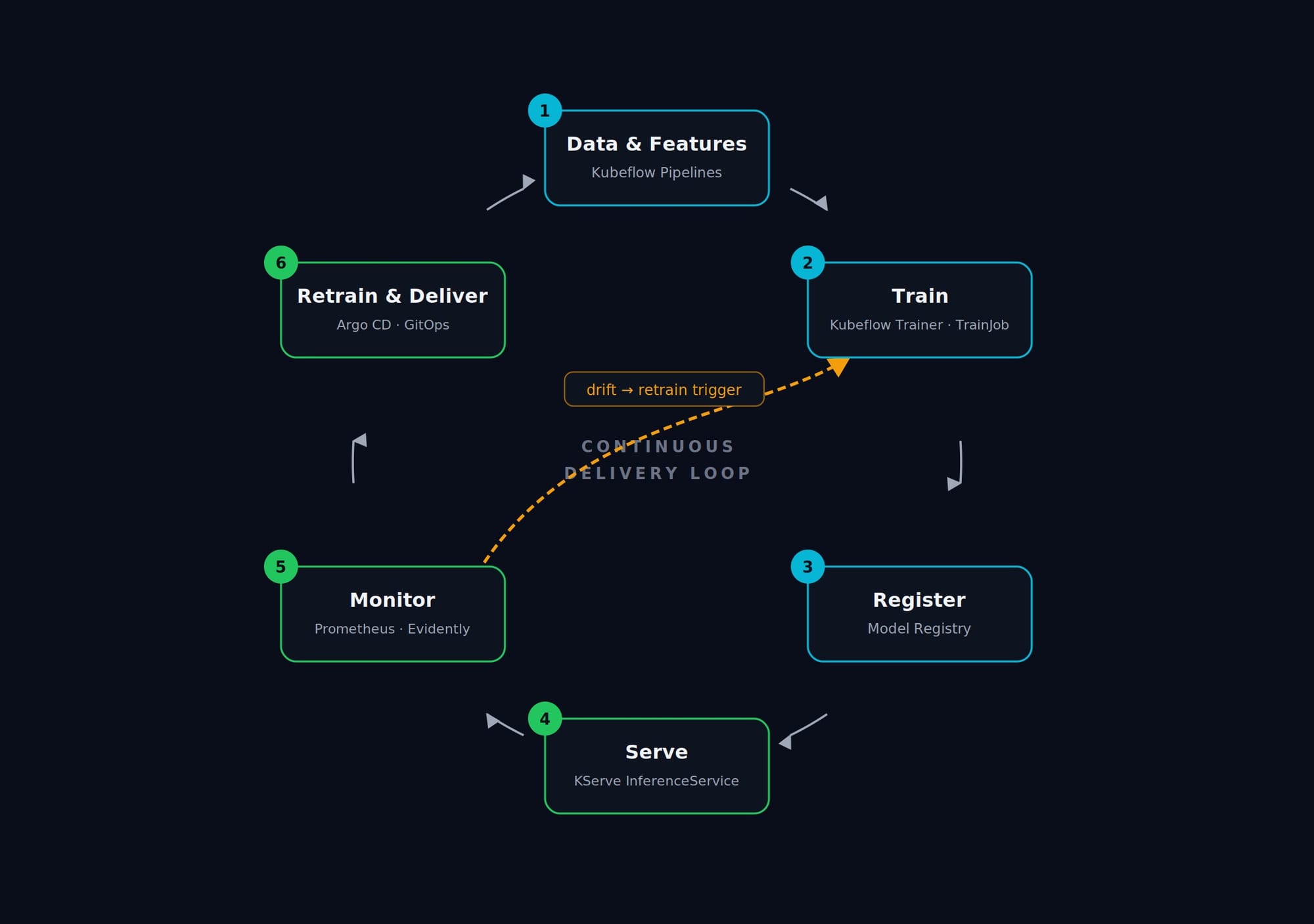
That said, Kubernetes is not free. It is an operational commitment. A solo data scientist with two models and no GPUs does not need it, and forcing Kubeflow onto that situation is how teams burn a quarter on infrastructure that serves three predictions a day. We'll come back to that trade-off at the end.
Shaky on Kubernetes fundamentals? Pods, Deployments, and Services need to be second nature before Kubeflow or KServe make sense. Brush up with Kubernetes for Beginners.
The Kubernetes-native MLOps stack
The cloud-native ML ecosystem consolidated meaningfully over the last two years. Instead of a dozen competing operators, a fairly stable set of CNCF and Kubeflow projects now covers each lifecycle stage. Here's the working stack this guide uses, keyed by purpose:
| Lifecycle stage | Kubernetes-native tool | What it gives you |
|---|---|---|
| Pipeline orchestration | Kubeflow Pipelines 2.x / Argo Workflows | DAGs of containerized steps, tracked runs |
| Distributed training | Kubeflow Trainer (TrainJob API) |
One API for PyTorch, JAX, XGBoost, DeepSpeed |
| GPU scheduling & quota | Kueue (+ Volcano) | Job queueing, gang-scheduling, fair quotas |
| Model serving | KServe | Autoscaled InferenceService for predictive + generative models |
| Autoscaling | KEDA + HPA | Event-driven scaling, including scale-to-zero |
| Monitoring | Prometheus + Grafana + Evidently | Infra metrics and data/model drift |
| Delivery | Argo CD | GitOps rollouts and instant rollback |
The single biggest shift you need to know about: under the hood, training and scheduling have standardized on Kubernetes-native batch primitives (JobSet, Kueue), and KServe has absorbed LLM serving as a first-class concern rather than leaving it to bespoke setups. If your mental model is from 2023, those two things are what changed.
Want the full tool-by-tool comparison - including the non-Kubernetes options like SageMaker and Vertex AI? See Top MLOps Tools in 2026. Here we stay focused on the Kubernetes-native path.
A note on installation: each of these ships its own operator and CRDs, and the exact install command depends on your cluster, ingress, and GPU operator setup, so we won't reproduce a brittle one-liner here, follow each project's official install guide for your version (KServe is at v0.17/v0.18, Kubeflow Trainer at v2.2, both current as of 2026). What is portable across clusters is the custom-resource layer, the manifests below, which is where we'll spend our time.
Stage 1 - Reproducible training as Kubernetes Jobs
Training in a notebook is fine for exploration and a liability in production: it depends on one machine's state, one person's kernel, and a set of pip install commands nobody wrote down. The first move in Kubernetes-based MLOps is turning training into a declarative, schedulable, reproducible Job.
This is where the most important recent change lives. Kubeflow Trainer v2 replaced the old per-framework operators - PyTorchJob, TFJob, MPIJob - with a single unified TrainJob API plus reusable runtime blueprints. If you have older manifests, they still work on the legacy release-1.9 branch, but new work should target TrainJob. (More on the migration in the FAQ.)
The pattern has two parts: a ClusterTrainingRuntime (a reusable blueprint, usually installed cluster-wide, for example torch-distributed) and a TrainJob that references it. Here's a distributed-training TrainJob:
apiVersion: trainer.kubeflow.org/v1alpha1
kind: TrainJob
metadata:
  name: fraud-model-train
  namespace: ml-prod
  labels:
    kueue.x-k8s.io/queue-name: gpu-queue   # hand scheduling to Kueue (Stage 2)
spec:
  runtimeRef:
    name: torch-distributed
    kind: ClusterTrainingRuntime
    apiGroup: trainer.kubeflow.org
  trainer:
    numNodes: 2
    resourcesPerNode:
      requests:
        nvidia.com/gpu: 2
You rarely hand-write that YAML, though. The Kubeflow SDK lets a data scientist define training as an ordinary Python function and submit it from a notebook, the SDK packages the function, builds the TrainJob, and handles every Kubernetes API call. First the training function itself (a standard PyTorch distributed-data-parallel loop; the runtime injects RANK, WORLD_SIZE, and LOCAL_RANK):
def train_func():
    import os
    import torch
    import torch.nn as nn
    import torch.distributed as dist
    from torch.nn.parallel import DistributedDataParallel as DDP

    dist.init_process_group(backend="nccl")        # gloo for CPU-only clusters
    local_rank = int(os.environ["LOCAL_RANK"])
    torch.cuda.set_device(local_rank)

    model = nn.Sequential(
        nn.Linear(4, 16), nn.ReLU(), nn.Linear(16, 3)
    ).cuda(local_rank)
    model = DDP(model, device_ids=[local_rank])

    opt = torch.optim.Adam(model.parameters(), lr=1e-3)
    loss_fn = nn.CrossEntropyLoss()

    for epoch in range(5):
        x = torch.randn(32, 4).cuda(local_rank)
        y = torch.randint(0, 3, (32,)).cuda(local_rank)
        opt.zero_grad()
        loss = loss_fn(model(x), y)
        loss.backward()
        opt.step()
        if local_rank == 0:
            print(f"epoch={epoch} loss={loss.item():.4f}")

    dist.destroy_process_group()
Then submit it, this is the entire client-side workflow:
from kubeflow.trainer import TrainerClient, CustomTrainer

client = TrainerClient()

job_id = client.train(
    runtime=client.get_runtime("torch-distributed"),
    trainer=CustomTrainer(
        func=train_func,
        num_nodes=2,
        resources_per_node={"gpu": 2},
        packages_to_install=["torch"],   # installed on every node
    ),
)

# Stream the logs back into the notebook
print("\n".join(client.get_job_logs(name=job_id)))
That is the notebook-to-cluster gap closed: the same function runs locally or across two GPU nodes, with zero direct Kubernetes interaction from the data scientist. Pair this with experiment tracking (MLflow) and a model registry, and you have a reproducible training stage.
Want a guided, hands-on build of training + tracking + orchestration? KodeKloud's course Build, Track & Orchestrate AI Models with MLflow & Kubeflow walks through containerizing a model and wiring Kubeflow Pipelines to an MLflow registry.
Stage 2 - GPU scheduling and cost control with Kueue
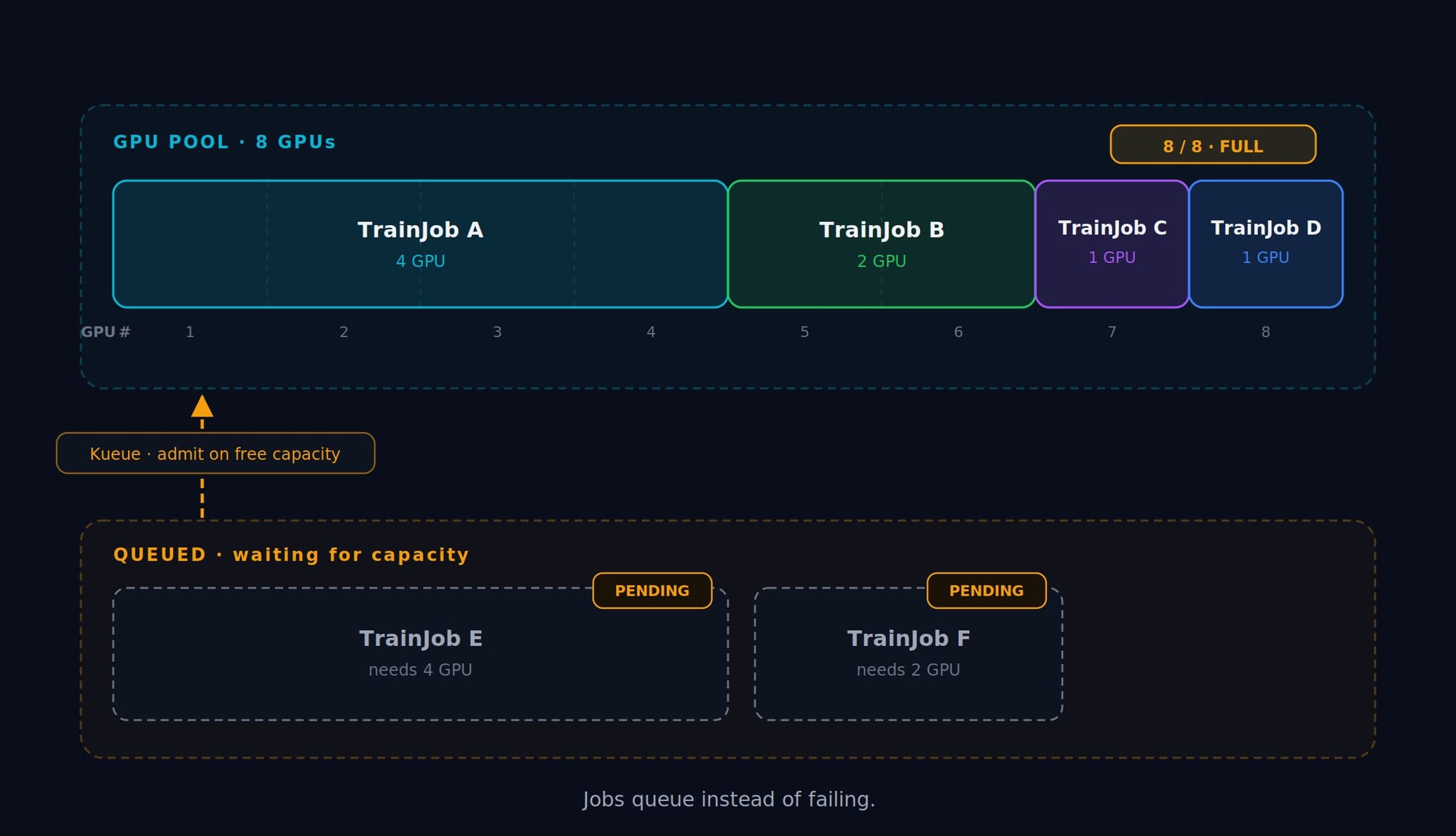
Here is the unglamorous truth about ML infrastructure budgets: the money isn't lost to training that runs, it's lost to GPUs that sit idle and to jobs that fail because the cluster was momentarily full. Plain Kubernetes scheduling is greedy and first-come, a single notebook can pin every GPU, and the next job just errors out.
Kueue fixes this by adding a queueing and quota layer on top of the scheduler. Jobs wait for capacity instead of failing, quotas are enforced per team, and distributed jobs are gang-scheduled (all pods start together or none do, so half-scheduled training can't deadlock the cluster). It plugs directly into the TrainJob from Stage 1 via that kueue.x-k8s.io/queue-name label.
You define the physical capacity once as a ClusterQueue, then expose it to a namespace through a LocalQueue:
apiVersion: kueue.x-k8s.io/v1beta1
kind: ResourceFlavor
metadata:
  name: gpu-flavor
---
apiVersion: kueue.x-k8s.io/v1beta1
kind: ClusterQueue
metadata:
  name: gpu-cluster-queue
spec:
  namespaceSelector: {}
  resourceGroups:
    - coveredResources: ["nvidia.com/gpu"]
      flavors:
        - name: gpu-flavor
          resources:
            - name: "nvidia.com/gpu"
              nominalQuota: 8        # this cluster owns 8 GPUs total
---
apiVersion: kueue.x-k8s.io/v1beta1
kind: LocalQueue
metadata:
  name: gpu-queue
  namespace: ml-prod
spec:
  clusterQueue: gpu-cluster-queue
Now any TrainJob labeled queue-name: gpu-queue is admitted only when GPUs are free, and competing teams draw from the same enforced budget. The cluster stops being a free-for-all and starts behaving like a managed resource pool.
Stage 3 - Serving models with KServe
A trained, registered model is worth nothing until something can call it. KServe turns serving into a single declarative resource: the InferenceService. You point it at a stored model artifact, and KServe stands up an autoscaled, monitored endpoint with a standard prediction protocol, no bespoke Flask app, no hand-rolled Dockerfile.
For a classic predictive model (here, scikit-learn), the entire deployment is this:
apiVersion: serving.kserve.io/v1beta1
kind: InferenceService
metadata:
  name: fraud-detector
  namespace: ml-prod
spec:
  predictor:
    minReplicas: 1
    maxReplicas: 5
    model:
      modelFormat:
        name: sklearn
      storageUri: "gs://kfserving-examples/models/sklearn/1.0/model"
      resources:
        requests:
          cpu: "100m"
          memory: "512Mi"
        limits:
          cpu: "1"
          memory: "1Gi"
Apply it and KServe handles the container, the autoscaling, and the routing. The same CRD also covers generative AI, KServe now serves LLMs through a vLLM-backed runtime and exposes an OpenAI-compatible API, which is one of the most significant changes of the last year. Swap the model format and you're serving a language model:
apiVersion: serving.kserve.io/v1beta1
kind: InferenceService
metadata:
  name: qwen-llm
  namespace: ml-prod
spec:
  predictor:
    model:
      modelFormat:
        name: huggingface
      args:
        - "--model_id"
        - "Qwen/Qwen2.5-0.5B-Instruct"
      resources:
        requests:
          cpu: "4"
          memory: 8Gi
          nvidia.com/gpu: "1"
        limits:
          cpu: "4"
          memory: 8Gi
          nvidia.com/gpu: "1"
Because the LLM endpoint is OpenAI-compatible, calling it looks like calling any chat API:
SERVICE_HOSTNAME=$(kubectl get inferenceservice qwen-llm \
  -n ml-prod -o jsonpath='{.status.url}' | cut -d/ -f3)

curl -H "Host: ${SERVICE_HOSTNAME}" \
  http://localhost:8080/openai/v1/chat/completions \
  -d '{
        "model": "qwen-llm",
        "messages": [{"role": "user", "content": "Hello, what can you do?"}],
        "max_tokens": 100
      }'
KServe also supports canary rollouts natively, set canaryTrafficPercent and a new model version takes, say, 10% of traffic while you watch its metrics before promoting it. That hook is what we'll automate with GitOps in Stage 5.
Always-on serving isn't always the right call. For spiky or low-volume models, serverless inference can be far cheaper than a standing pod. The trade-offs are worth understanding: Serverless vs Containers - When to Choose Each.
Stage 4 - Autoscaling and scale-to-zero with KEDA
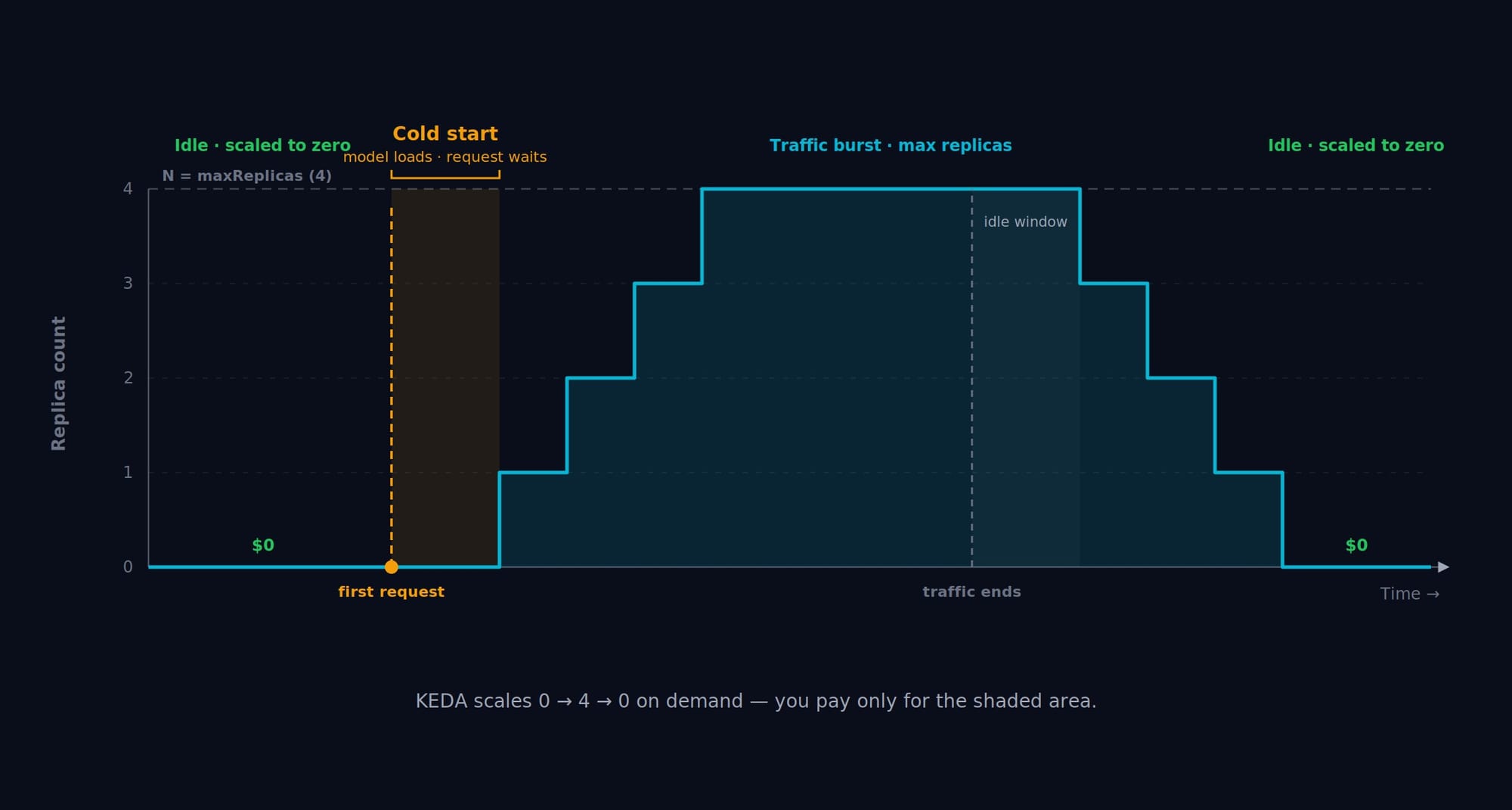
A standing GPU pod that serves ten requests a day is a budget leak. The fix is to scale serving to demand, and, for intermittent models, all the way to zero when nothing is calling them.
For steady traffic, the Horizontal Pod Autoscaler on CPU or memory is enough. For event-driven or bursty workloads, KEDA scales on real signals, queue depth, request rate, a custom Prometheus query, and uniquely supports scaling a workload down to zero replicas, then back up on the first request. For an expensive GPU model that's idle most of the day, that's the difference between paying for 24 hours and paying for the 40 minutes it's actually used.
This ScaledObject scales a KServe predictor between zero and ten replicas based on incoming request rate:
apiVersion: keda.sh/v1alpha1
kind: ScaledObject
metadata:
  name: inference-scaler
  namespace: ml-prod
spec:
  scaleTargetRef:
    name: fraud-detector-predictor
  minReplicaCount: 0        # scale to zero when idle
  maxReplicaCount: 10
  triggers:
    - type: prometheus
      metadata:
        serverAddress: http://prometheus.monitoring:9090
        metricName: http_requests_per_second
        query: sum(rate(http_requests_total{service="fraud-detector"}[1m]))
        threshold: "10"
The one cost to plan for is the cold start: a scaled-to-zero model has to load before it can answer, which is fine for batch or internal tools but not for latency-critical paths. Keep minReplicaCount: 1 for anything user-facing, and reserve scale-to-zero for the long tail of occasional models.
Stage 5 - Monitoring, drift, and GitOps delivery
Shipping a model is the start of its job, not the end. Models degrade silently as the world drifts away from their training data, so a production MLOps setup watches two distinct layers.
Infrastructure health is the layer Kubernetes already knows how to observe: latency, error rate, GPU utilization, throughput. KServe exposes Prometheus metrics, and a ServiceMonitor tells Prometheus to scrape them:
apiVersion: monitoring.coreos.com/v1
kind: ServiceMonitor
metadata:
  name: kserve-inference
  namespace: ml-prod
spec:
  selector:
    matchLabels:
      app: fraud-detector-predictor
  endpoints:
    - port: metrics
      interval: 15s
Model health is the layer that's unique to ML, and the one infra dashboards can't see: a model can be fast, healthy, and 100% available while quietly making worse and worse predictions because the input distribution shifted. Evidently compares a reference (training) distribution against live production data and flags drift. This check is small enough to run as a scheduled CronJob and wire to a retraining trigger:
import pandas as pd
from evidently import Report, Dataset, DataDefinition
from evidently.presets import DataDriftPreset

# reference = training data; current = a recent window of production data
schema = DataDefinition(numerical_columns=["amount"])
ref = Dataset.from_pandas(reference_df, data_definition=schema)
cur = Dataset.from_pandas(current_df, data_definition=schema)

result = Report(metrics=[DataDriftPreset()]).run(reference_data=ref, current_data=cur)
drift_share = result.dict()["metrics"][0]["value"]["share"]

print(f"Drifted feature share: {drift_share:.0%}")
if drift_share > 0.3:
    print("ALERT: data drift detected -> trigger retraining")
When that alert fires, it re-triggers the Stage 1 pipeline, and the feedback loop closes.
The final piece is delivery. Rather than kubectl apply-ing models by hand, you keep every InferenceService and its version in Git and let Argo CD reconcile the cluster to match. Promoting a model is a commit; rolling back a bad one is a git revert. You get an audit trail of exactly which model version was live, when, and who changed it:
apiVersion: argoproj.io/v1alpha1
kind: Application
metadata:
  name: fraud-detector
  namespace: argocd
spec:
  project: default
  source:
    repoURL: https://github.com/your-org/ml-manifests
    targetRevision: main
    path: models/fraud-detector
  destination:
    server: https://kubernetes.default.svc
    namespace: ml-prod
  syncPolicy:
    automated:
      prune: true
      selfHeal: true
Pipelines are an attack surface too - model artifacts, registries, and serving endpoints all need securing. See how teams are approaching it: The Rise of AI-Driven Container Security.
Putting it together - and knowing when to keep it simple
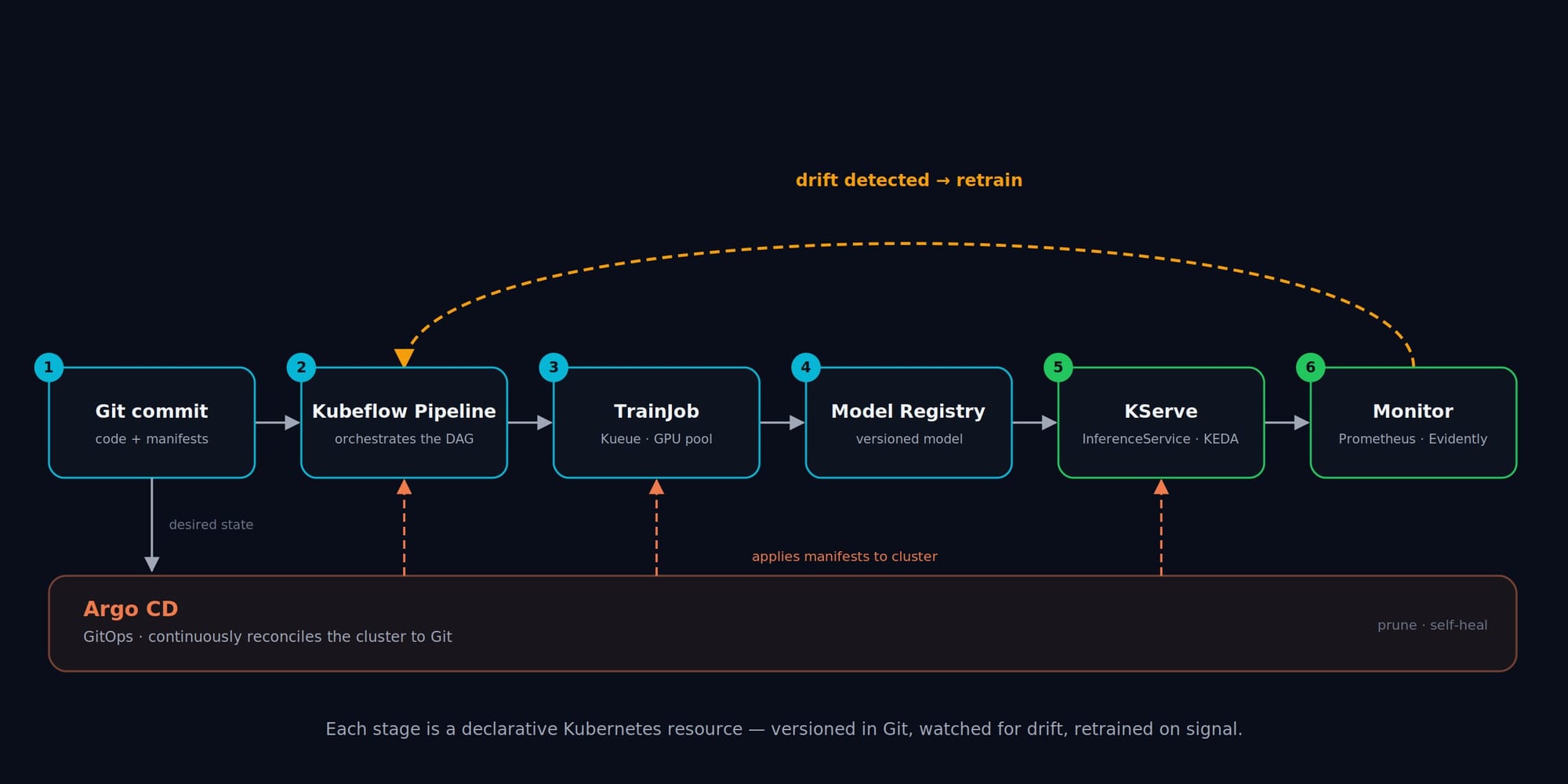
End to end, the loop now runs itself: a commit triggers a pipeline, which launches a TrainJob that Kueue schedules onto GPUs; the result is registered, and a new InferenceService is rolled out by Argo CD; KEDA scales it to demand; Prometheus and Evidently watch it; and when drift crosses a threshold, the pipeline fires again. Every stage is a declarative Kubernetes resource, versioned in Git.
But resist the urge to build all of it on day one. A pragmatic ladder:
- No models in production yet? Don't start with Kubeflow. Start with MLflow on a laptop and one containerized model.
- A few models, growing traffic, some GPUs? Adopt KServe for serving and Kueue for scheduling, the two highest-leverage pieces, before anything else.
- Many models, multiple teams, retraining on a schedule? Now the full pipeline-plus-GitOps stack earns its complexity.
The goal is never "use the most Kubernetes." It's to add each piece only when the pain it removes is real. Used that way, Kubernetes turns MLOps from a pile of fragile scripts into infrastructure you can actually reason about.
FAQ
Do I actually need Kubernetes to do MLOps?
No. For a single model with modest, predictable traffic, especially without GPUs, a managed endpoint (SageMaker, Vertex AI) or even a containerized service on a serverless platform is simpler and often cheaper. Kubernetes pays off when you have multiple models, scarce GPUs to share across teams, or a real need for portability across clouds and on-prem. The signal to adopt it is recurring pain in scheduling, scaling, or rollbacks, not a desire to have it on the résumé.
Should I run Kubeflow on Kubernetes, or just use SageMaker / Vertex AI?
It's a control-versus-overhead trade-off. Managed platforms remove the operational burden but lock you into one cloud's pricing and feature set. The Kubernetes-native stack (Kubeflow, KServe, Kueue) gives you portability, cost control, and full customization, at the price of running and upgrading that infrastructure yourself. A common 2026 pattern is hybrid: a managed platform for the heavy lifting plus open-source, Kubernetes-native components for the parts you want to keep portable.
I have old PyTorchJob and TFJob manifests - are they dead?
They're legacy, not deleted. Kubeflow Trainer v2 replaced the per-framework operators with the unified TrainJob API, which is where all new development goes. The old Training Operator V1 is still maintained on the release-1.9 branch, so existing manifests keep working, but you should plan a migration: TrainJob plus reusable ClusterTrainingRuntime blueprints replaces the separate PyTorchJob/TFJob/MPIJob CRDs with one consistent interface.
How do I stop GPUs from blowing my budget on Kubernetes?
Three levers, used together. Kueue enforces quotas and queues jobs so idle GPUs get reused instead of sitting reserved. KEDA scale-to-zero means intermittently-used models cost nothing while idle. And right-sized requests/limits plus bin-packing keep nodes densely utilized rather than half-empty. The biggest single win is usually scale-to-zero on the long tail of rarely-called models.
Ready to build it, not just read about it?
Reading manifests is one thing. Debugging a TrainJob that won't schedule, watching a KServe canary roll out, and catching real drift before users do are different skills, and they only come from doing the work.
That's what the 100 Days of MLOps challenge on KodeKloud is built for: real environments, real tools, auto-validated tasks. By the end you'll have run the full lifecycle this guide describes, with the muscle memory to prove it.
Create your free KodeKloud account →
Sources: Kubeflow Trainer v2.2 release notes and docs (March 2026); Kubeflow SDK API reference; KServe v0.15–v0.18 release notes and InferenceService docs (2025–2026); Kueue documentation (sigs.k8s.io); KEDA documentation; Evidently 0.7.x documentation; Argo CD documentation. All manifests and code snippets in this article were syntax- and schema-checked, and the runnable Python examples were executed against current library versions prior to publication.





Discussion