



Gartner's Predicts 2026 research places AI agents at the core of IT infrastructure and operations, even though only 17 percent of organizations have deployed one so far. The distance between that ambition and that reality is an engineering problem, not a model problem. An agent that operates real infrastructure is mostly plumbing: a reasoning loop, a set of tools it is allowed to call, and guardrails around the actions that change state. This tutorial walks through every piece of that plumbing by building a working Kubernetes automation agent in Go, end to end, inside a free browser playground.
Highlights
- You build a real agent loop rather than a chat wrapper.
- The agent runs in a single node Kubernetes playground with no local setup.
- Go is the native language of this problem.
- Tool calling converts language into action through a small JSON contract.
- Mutating actions sit behind a human approval gate.
- Everything runs on the Go standard library.
- One key reaches the model, with no separate provider account.
Why build an infrastructure agent in Go
The role of infrastructure and operations teams is shifting from running tasks to supervising systems that run those tasks. Gartner frames this as a move from tools that assist humans to platforms that execute complex workflows on their own, and the demand signal is strong. The same 2026 survey that reports only 17 percent of organizations have deployed an agent also finds that more than 60 percent intend to within two years, the most aggressive adoption curve of any emerging technology measured.
Kubernetes is where most of that automation will land. The CNCF Annual Survey reports that 82 percent of container users now run Kubernetes in production, which makes it the common control plane an agent can target. If you build automation that understands one infrastructure API deeply, that API should be the one running your workloads.
Go is the obvious implementation language for that automation. The Kubernetes API server, kubectl, client-go, controllers, operators, and the broader tooling ecosystem are all written in Go, and over 75 percent of CNCF projects share that choice. Three properties make Go fit this job better than the alternatives. Static compilation produces a single binary you can drop into any image or node without a runtime. Goroutines make concurrent calls to the API server cheap when an agent fans out across many resources. Strong typing on the request and response structs keeps the boundary with the model honest, so malformed tool arguments fail loudly instead of silently corrupting a command.
What you are building
The agent is a command line program with a simple control loop. You give it a request in plain language, such as asking which pods are unhealthy or telling it to scale a deployment. The program sends that request to a language model together with a description of the tools it may use. The model reasons about the request and replies with a JSON object that is either a tool to run with its arguments or a final answer. Your code runs the matching action against the cluster, captures the output, and returns it. The model then either calls another tool or finishes.
Four tools define the agent's reach in this tutorial. Three are read only and run without interruption: listing resources, describing a single resource, and reading pod logs. One mutates the cluster, scaling a deployment, and it pauses for explicit operator approval before it runs. That split between inspection and mutation is the single most important design decision in the whole system, because it bounds what an autonomous loop can do while still letting it act.
Here is the flow in one pass. A request enters through the command line. The loop calls the model with the conversation so far. If the model returns a tool action, the executor runs it, appends the result to the conversation, and loops again. If the model returns a final answer, the loop prints it and exits. A turn limit caps the loop so a confused agent cannot spin forever.
Choosing the right environment
You need two things: a single node Kubernetes cluster for the agent to operate on, and model access for the agent to reason with. A browser based playground gives you the cluster with kubectl already authenticated, and a single KodeKey supplies the model access, so a reader with a KodeKloud account needs no separate provider account, billing, or approval.
Generate a KodeKey API key from your KodeKloud account before you start. It is an account credential rather than a session token, and the place you create it is a settings page rather than a playground, so generating the key does not consume your one active playground slot. The same key reaches several models through one OpenAI compatible endpoint, which is why the agent targets that endpoint rather than a single vendor. Keep in mind that KodeKey is built for learning and prototyping, with a modest monthly request allowance, so it suits a tutorial and a handful of demo runs rather than heavy iteration or production traffic.
With the key in hand, start a single node Kubernetes playground or a local cluster created with kind or minikube. Because the agent only needs the cluster running while it works, you stay inside the one playground limit the whole time. Install Go and confirm the cluster responds:
# Install a current Go toolchain on the playground node
curl -sSL https://go.dev/dl/go1.23.4.linux-amd64.tar.gz -o go.tar.gz
sudo tar -C /usr/local -xzf go.tar.gz
export PATH=$PATH:/usr/local/go/bin
go version

# Confirm kubectl can reach the cluster
kubectl get nodes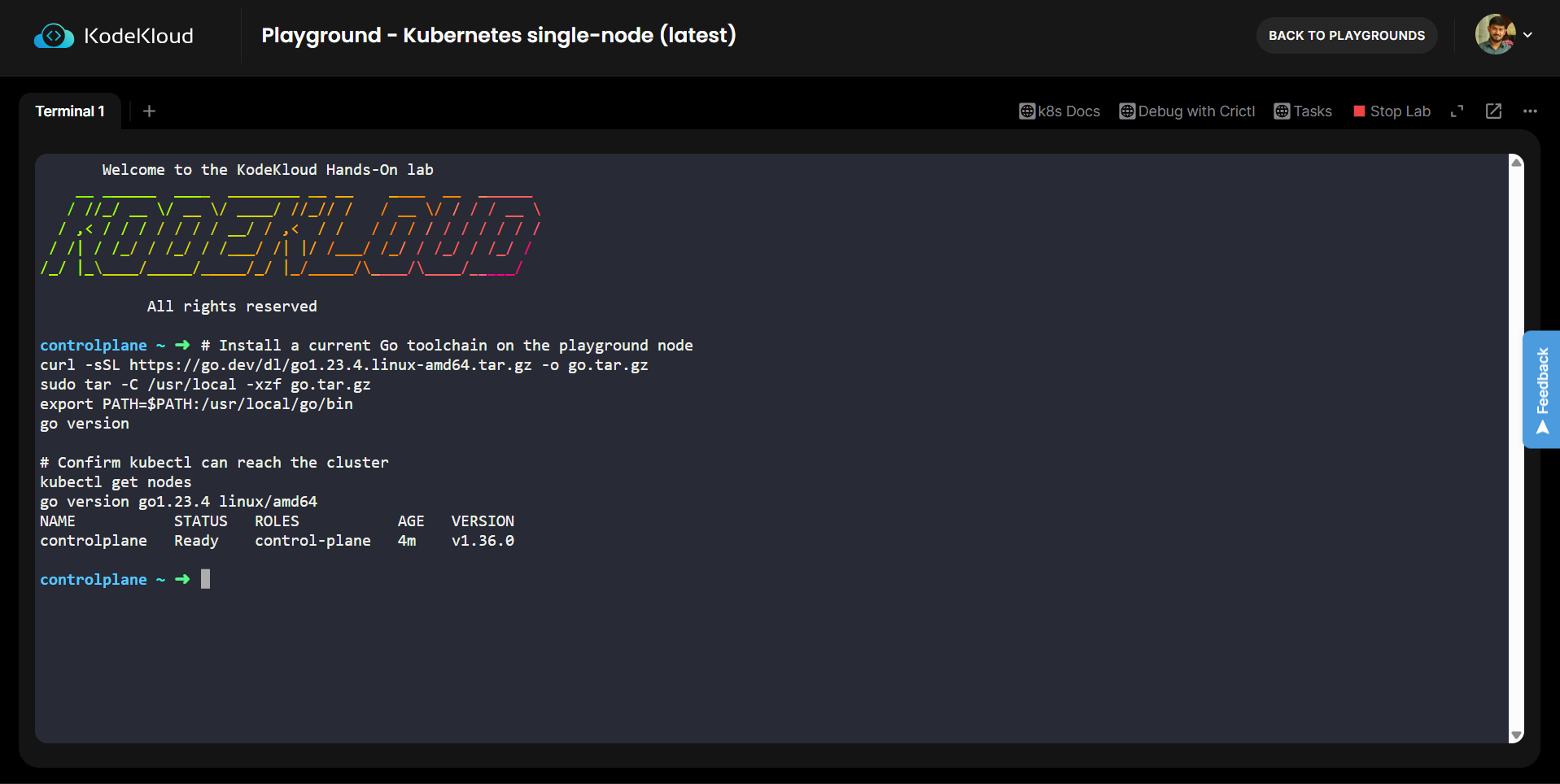
Export your KodeKey so it never touches the source:
export KODEKEY_API_KEY="your-kodekey-here"One requirement is easy to miss. The agent makes an outbound HTTPS call to the model endpoint on every turn, so the environment needs egress. Most Kubernetes playgrounds allow outbound traffic, since they already pull container images from registries. If your environment blocks egress, run the agent from a machine that has internet access and point kubectl at the remote cluster, or serve a local model through a compatible endpoint and change the base URL.
Finally, seed the cluster with something to inspect. A healthy deployment and a deliberately misconfigured one give the agent realistic material to reason about:
kubectl create deployment web --image=nginx --replicas=2
kubectl create deployment orders-db --image=postgres:16 --replicas=1
The orders-db pod will not start, because the postgres image refuses to run without a password set, so it lands in CrashLoopBackOff within a minute. That gives the agent a realistic failure to diagnose from the pod logs.
Step 1: Create the project
Make a directory, initialize a module, and create a single source file. Every code block that follows goes into that file, so by the end you have one complete main.go.
mkdir kubeagent && cd kubeagent
go mod init kubeagent
touch main.go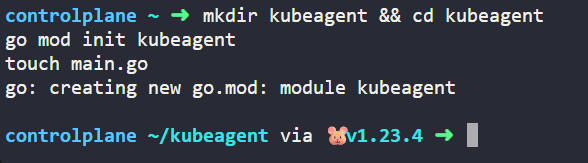
Start main.go with the package declaration, imports, and a few constants. KodeKey is OpenAI compatible, so the endpoint is a chat completions URL and the model identifier is a plain model name. Pick any model id that KodeKey lists; the one here is a current option.
package main

import (
	"bufio"
	"bytes"
	"encoding/json"
	"fmt"
	"io"
	"net/http"
	"os"
	"os/exec"
	"strings"
	"time"
)

// KodeKey is OpenAI compatible: standard chat completions, Bearer auth, and a
// plain model id. One account key reaches many models.
const (
	baseURL   = "https://api.ai.kodekloud.com/v1/chat/completions"
	model     = "claude-haiku-4-5"
	maxTokens = 1000
)
Step 2: Model the chat API in Go
The model speaks a simple chat shape: a list of messages, each with a role and some text. The request carries a model id, the messages, and a token cap, and the reply arrives under choices. One extra type, Action, models the JSON contract the agent and model agree on, where every reply is either a tool call or a final answer. Using json.RawMessage for the tool arguments lets each tool decode only the fields it needs.
// ChatMessage is one turn in an OpenAI style conversation.
type ChatMessage struct {
	Role    string `json:"role"`
	Content string `json:"content"`
}

type ChatRequest struct {
	Model     string        `json:"model"`
	Messages  []ChatMessage `json:"messages"`
	MaxTokens int           `json:"max_tokens,omitempty"`
}

type ChatResponse struct {
	Choices []struct {
		Message ChatMessage `json:"message"`
	} `json:"choices"`
	Error *struct {
		Message string `json:"message"`
	} `json:"error,omitempty"`
}

// Action is the JSON contract the model replies with on every turn: either a
// tool call or a final answer. The protocol is prompt driven, so it needs no
// native function calling and works through any OpenAI compatible endpoint.
type Action struct {
	Action  string          `json:"action"` // "tool" or "final"
	Tool    string          `json:"tool,omitempty"`
	Args    json.RawMessage `json:"args,omitempty"`
	Message string          `json:"message,omitempty"`
}
Step 3: Call the model through KodeKey
This function marshals the conversation, sets the Authorization header with your KodeKey as a bearer token, posts to the endpoint, and returns the assistant text. Surfacing the raw body on a decode failure saves real debugging time when an endpoint returns an unexpected shape, and a timeout keeps a stalled request from hanging the agent.
// callModel sends the conversation to KodeKey and returns the assistant text.
func callModel(apiKey string, messages []ChatMessage) (string, error) {
	payload, err := json.Marshal(ChatRequest{Model: model, Messages: messages, MaxTokens: maxTokens})
	if err != nil {
		return "", fmt.Errorf("marshal request: %w", err)
	}

	req, err := http.NewRequest(http.MethodPost, baseURL, bytes.NewReader(payload))
	if err != nil {
		return "", fmt.Errorf("build request: %w", err)
	}
	req.Header.Set("Authorization", "Bearer "+apiKey)
	req.Header.Set("Content-Type", "application/json")

	resp, err := (&http.Client{Timeout: 60 * time.Second}).Do(req)
	if err != nil {
		return "", fmt.Errorf("send request: %w", err)
	}
	defer resp.Body.Close()

	raw, err := io.ReadAll(resp.Body)
	if err != nil {
		return "", fmt.Errorf("read response: %w", err)
	}

	var cr ChatResponse
	if err := json.Unmarshal(raw, &cr); err != nil {
		return "", fmt.Errorf("decode response: %w (raw: %s)", err, string(raw))
	}
	if cr.Error != nil {
		return "", fmt.Errorf("api error: %s", cr.Error.Message)
	}
	if len(cr.Choices) == 0 {
		return "", fmt.Errorf("no choices returned: %s", string(raw))
	}
	return cr.Choices[0].Message.Content, nil
}
Step 4: Describe the tools and the reply contract
Without native function calling, the tool catalogue lives in the system prompt and the model replies in a fixed JSON shape. Spell out each tool, its arguments, and whether it mutates the cluster, then state the two reply forms plainly. A small parser pulls the JSON object out of the reply even when the model wraps it in prose or a code fence. Clear instructions here are the cheapest accuracy improvement available, because they steer the model toward a clean, parseable reply before any code runs.
const systemPrompt = `You are an infrastructure automation agent operating a Kubernetes cluster.

Tools you can call:
- list_resources(resource_type, namespace): list resources of a type. Read only. Use namespace "all" for every namespace.
- describe_resource(resource_type, name, namespace): detailed state of one resource. Read only.
- get_logs(pod_name, namespace, tail): recent pod log lines. Read only.
- scale_deployment(name, replicas, namespace): change a deployment replica count. This mutates the cluster.

On every turn reply with exactly ONE JSON object and nothing else.
To call a tool: {"action":"tool","tool":"<name>","args":{ ... }}
To finish:      {"action":"final","message":"<your concise answer>"}

Rules you must follow:
- To change anything you must emit a tool action. Describing a change is not performing it.
- Only state that an action succeeded after a TOOL RESULT confirms it. Never invent a result.
- Inspect with read only tools before you change anything, and keep tool output small.`

// parseAction extracts the JSON object even if the model wraps it in prose or a
// code fence, then decodes it into an Action.
func parseAction(reply string) (Action, error) {
	s := strings.TrimSpace(reply)
	if i := strings.Index(s, "{"); i >= 0 {
		if j := strings.LastIndex(s, "}"); j > i {
			s = s[i : j+1]
		}
	}
	var a Action
	err := json.Unmarshal([]byte(s), &a)
	return a, err
}
Step 5: Execute tools against the cluster
This is where intent becomes action. A helper shells out to kubectl and captures both streams, a namespace helper supplies a default, and the executor dispatches each tool call to the right command. Errors are folded into the returned text on purpose, so the model reads the failure on the next turn and adjusts rather than the program crashing. The scale path is the one that pauses: before it touches the cluster it prints what it will do and waits for the operator to type y. Anything else cancels the change and reports that decision back to the model.
// runKubectl executes kubectl with the supplied arguments and captures output.
func runKubectl(args ...string) (string, error) {
	cmd := exec.Command("kubectl", args...)
	var out, errBuf bytes.Buffer
	cmd.Stdout = &out
	cmd.Stderr = &errBuf
	if err := cmd.Run(); err != nil {
		return strings.TrimSpace(errBuf.String()), fmt.Errorf("kubectl failed: %v", err)
	}
	return strings.TrimSpace(out.String()), nil
}

func ns(value string) string {
	if value == "" {
		return "default"
	}
	return value
}

// executeTool runs one tool call against the cluster and returns text the model
// can read on the next turn.
func executeTool(a Action, reader *bufio.Reader) string {
	run := func(args ...string) string {
		out, err := runKubectl(args...)
		if err != nil {
			if out == "" {
				return "ERROR: " + err.Error()
			}
			return "ERROR: " + out
		}
		if out == "" {
			return "(no output)"
		}
		return out
	}

	switch a.Tool {

	case "list_resources":
		var in struct {
			ResourceType string `json:"resource_type"`
			Namespace    string `json:"namespace"`
		}
		json.Unmarshal(a.Args, &in)
		args := []string{"get", in.ResourceType}
		if in.Namespace == "all" {
			args = append(args, "--all-namespaces")
		} else {
			args = append(args, "-n", ns(in.Namespace))
		}
		return run(args...)

	case "describe_resource":
		var in struct {
			ResourceType string `json:"resource_type"`
			Name         string `json:"name"`
			Namespace    string `json:"namespace"`
		}
		json.Unmarshal(a.Args, &in)
		return run("describe", in.ResourceType, in.Name, "-n", ns(in.Namespace))

	case "get_logs":
		var in struct {
			PodName   string `json:"pod_name"`
			Namespace string `json:"namespace"`
			Tail      int    `json:"tail"`
		}
		json.Unmarshal(a.Args, &in)
		if in.Tail == 0 {
			in.Tail = 50
		}
		out := run("logs", in.PodName, "-n", ns(in.Namespace), fmt.Sprintf("--tail=%d", in.Tail))
		if strings.HasPrefix(out, "ERROR") {
			// A crashing pod often keeps logs only under the previous container.
			out = run("logs", in.PodName, "-n", ns(in.Namespace), "--previous", fmt.Sprintf("--tail=%d", in.Tail))
		}
		return out

	case "scale_deployment":
		var in struct {
			Name      string `json:"name"`
			Replicas  int    `json:"replicas"`
			Namespace string `json:"namespace"`
		}
		json.Unmarshal(a.Args, &in)
		fmt.Printf("\n[approval needed] scale deployment %q to %d replicas in namespace %q. Proceed? (y/n): ",
			in.Name, in.Replicas, ns(in.Namespace))
		answer, _ := reader.ReadString('\n')
		if strings.TrimSpace(strings.ToLower(answer)) != "y" {
			return "Operator denied the scale operation. No change was made."
		}
		return run("scale", "deployment", in.Name,
			fmt.Sprintf("--replicas=%d", in.Replicas), "-n", ns(in.Namespace))

	default:
		return "unknown tool: " + a.Tool
	}
}
Step 6: Build the agent loop
The loop ties everything together. It seeds the conversation with the system prompt and the request, then on each turn calls the model, records the reply, and parses it. A tool action runs the tool and appends the result as the next user message. A final action prints the answer and stops. When a reply is not valid JSON, the loop nudges the model back to the contract and tries again. The turn cap is a safety valve, not a feature.
func main() {
	apiKey := os.Getenv("KODEKEY_API_KEY")
	if apiKey == "" {
		fmt.Println("set KODEKEY_API_KEY before running the agent")
		os.Exit(1)
	}
	if len(os.Args) < 2 {
		fmt.Println("usage: agent \"your request in plain language\"")
		os.Exit(1)
	}

	goal := strings.Join(os.Args[1:], " ")
	reader := bufio.NewReader(os.Stdin)

	messages := []ChatMessage{
		{Role: "system", Content: systemPrompt},
		{Role: "user", Content: goal},
	}

	for turn := 0; turn < 12; turn++ {
		reply, err := callModel(apiKey, messages)
		if err != nil {
			fmt.Println("error:", err)
			os.Exit(1)
		}
		messages = append(messages, ChatMessage{Role: "assistant", Content: reply})

		action, err := parseAction(reply)
		if err != nil {
			// Nudge the model back to the JSON contract and try again.
			messages = append(messages, ChatMessage{
				Role:    "user",
				Content: "That was not valid JSON. Reply with exactly one JSON object as instructed.",
			})
			continue
		}

		if action.Action == "final" {
			fmt.Println("\n" + action.Message)
			return
		}

		fmt.Printf("-> calling %s %s\n", action.Tool, string(action.Args))
		result := executeTool(action, reader)
		messages = append(messages, ChatMessage{Role: "user", Content: "TOOL RESULT:\n" + result})
	}

	fmt.Println("\nreached the turn limit without a final answer")
}
Step 7: Build and run the agent
Compile the binary and point it at the cluster you seeded earlier.
go build -o agent .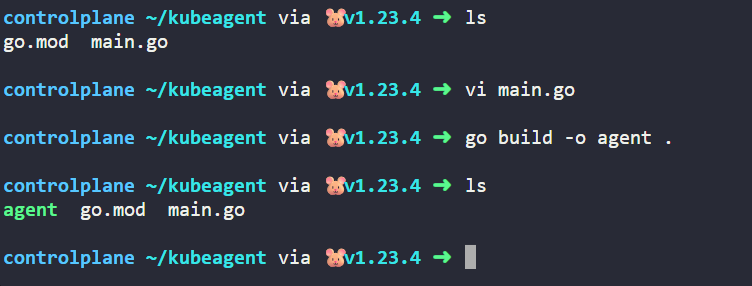
Start with a read only request. The agent should list pods, notice the unhealthy one, inspect it, read its logs, and explain the failure without any approval prompt:
./agent "list the pods in the default namespace and tell me which ones are unhealthy and why"A typical run prints each tool call as it happens, then a plain language diagnosis:
-> calling list_resources {"resource_type":"pods"}
-> calling describe_resource {"resource_type":"pod","name":"orders-db-5f8c9b7d4-2xk9p","namespace":"default"}
-> calling get_logs {"pod_name":"orders-db-5f8c9b7d4-2xk9p","tail":20}

The web pods are healthy. The orders-db pod is in CrashLoopBackOff. Its logs show
postgres refusing to start because the POSTGRES_PASSWORD environment variable is
not set. Fix it by setting that variable on the deployment.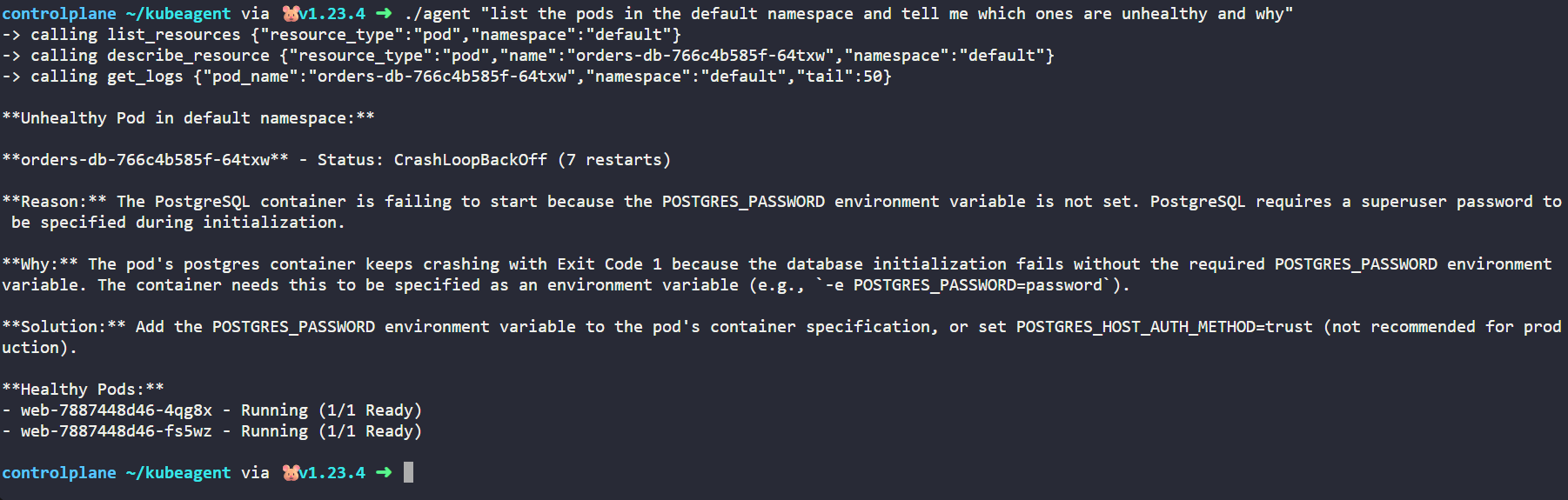
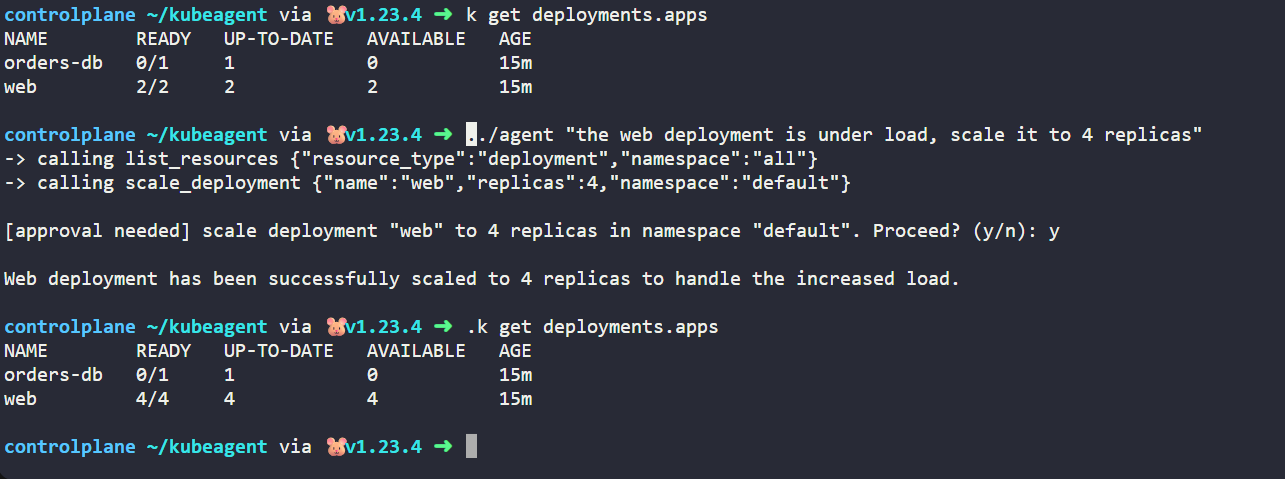
Now try a mutating request. The agent reasons that scaling is required, calls the tool, and waits for you:
./agent "the web deployment is under load, scale it to 4 replicas"-> calling scale_deployment {"name":"web","replicas":4}
[approval needed] scale deployment "web" to 4 replicas in namespace "default". Proceed? (y/n): y
Scaled the web deployment to 4 replicas. The rollout is progressing.Type n instead and the agent reports that the change was declined and stops. You now have an agent that inspects freely and acts only with consent, which is exactly the behavior an operations team can trust. Each agent run spends one model request per tool call, so keep the KodeKey request allowance in mind while you experiment.
Hardening this for production
The playground version is honest about what it is, and a few changes turn it into something you could run for a team.
Move off KodeKey for production traffic. KodeKey is built for learning and carries low request limits, so anything beyond experimentation belongs on a direct provider endpoint or your own gateway. Because the agent speaks the OpenAI compatible protocol, that switch is a change of base URL, model id, and key, with no change to the loop or the tools.
Replace the shell with a client. Shelling out to kubectl is perfect for learning and for environments where kubectl is guaranteed present, but production code should use client-go for typed access to the API server. Typed clients give you structured errors, retries, watches, and in cluster configuration through a mounted ServiceAccount, which removes the dependency on an external binary.
Bind least privilege. Give the agent its own ServiceAccount with an RBAC Role that grants only the verbs it needs, such as get and list on pods and the ability to scale a named set of deployments. Scoping the account to a single namespace caps the blast radius no matter what the model decides to call.
Add a policy layer in front of mutations. The human approval gate is a strong first control, but admission policies enforced by OPA Gatekeeper or Kyverno give you rules that hold even when no human is watching, such as refusing to scale past a ceiling or to touch a protected namespace.
Record everything. Every tool call, its arguments, the approval decision, and the result should land in an audit log. Without that trail you cannot answer the question every incident review asks, which is what the agent did and when. This same observability is what separates an experiment from a system, and it is one reason Gartner expects undisciplined deployments to fail.
Control the model interaction itself. Cap turns, set a token budget, validate tool arguments before execution, and consider a cheaper model for routine inspection with a stronger one reserved for harder reasoning. The tiered approach keeps cost predictable as usage grows.
Build your own or reach for a framework
You do not have to hand write an agent loop, so it helps to know when this approach earns its keep.
| Approach | Best when | Trade off |
|---|---|---|
| Hand written Go loop | You want full control, a single binary, native client-go access, and tight guardrails | You own the loop, retries, and tool plumbing yourself |
| Agent framework | You want abstractions, memory, and connectors out of the box and your stack favors that ecosystem | More dependencies and less visibility into how decisions are made |
| Orchestration platform | You run many agents across teams and need lifecycle, governance, and rollback at scale | Heavier operational footprint and a longer path to a first result |
For infrastructure work specifically, the hand written Go path is attractive because the language already owns the cluster tooling, the binary deploys anywhere a container does, and you can see and constrain every action. As your needs grow, you can adopt a platform for orchestration without throwing away the tools and guardrails you built here.
Conclusion
An infrastructure agent is not magic. It is a loop that calls a model, a catalogue of tools described well enough for the model to choose among them, an executor that runs those tools against a real API, and guardrails that decide what may happen without a human. You built all four in Go, ran them against a live Kubernetes cluster in a browser using a single key for model access, and kept mutating actions behind explicit approval.
From here, extend the agent along the same pattern. Add a tool that applies manifests, but gate it behind a policy check. Move from kubectl to client-go and bind a least privilege ServiceAccount. Add structured audit logging, then point the agent at a multi cluster setup once a single cluster feels solid. Each addition is another tool and another guardrail, never a rewrite, which is the quiet advantage of building the loop yourself.
FAQs
Q1: What do I need to know before building an AI agent for infrastructure automation in Go?
You need three foundations. The first is basic Go: structs, functions, error handling, and the standard library packages for HTTP and JSON, all of which this tutorial uses directly. The second is working knowledge of Kubernetes and kubectl, since the agent operates a cluster and you need to read its output to trust its actions. The third is access to a model, and with a KodeKloud account you can generate a single KodeKey that reaches several models, so you do not need to open a separate provider account or set up billing to follow along. You do not need machine learning experience, because the model is a service you call rather than something you train. If you want to firm up the Kubernetes side first, the Certified Kubernetes Administrator (CKA) course covers the cluster fundamentals this agent depends on, and the Kubernetes learning path sequences that material from the basics upward.
Q2: Where can I run this agent without setting up my own cluster or buying API credits?
A browser based Kubernetes playground gives you a working API server with kubectl already authenticated, and a single KodeKey supplies model access without a separate provider account. Generate the key from your KodeKey keyspace, which is an account page rather than a playground, so it does not use up your one active playground slot. Then start the Kubernetes single node playground, install Go with the tarball commands shown above, export the key as KODEKEY_API_KEY, seed a healthy deployment and a misconfigured one, and build the binary. KodeKey is meant for learning, so its monthly request allowance is modest and each agent run spends one request per tool call, which is plenty for a few demo runs but not for heavy iteration. Confirm the playground allows outbound HTTPS, since the agent calls the model endpoint on every turn.
Q3: Should I build my own agent in Go or use an existing agent framework?
It depends on what you value most. Build your own in Go when you want a single self contained binary, native access to client-go, and tight control over exactly which actions the agent can take and how it gets approved. That control matters a great deal for infrastructure, where an unconstrained action can take down a workload. Reach for a framework when you want memory, connectors, and orchestration primitives provided for you and your team already works in that ecosystem, accepting more dependencies and less visibility into how decisions are made in return. For most infrastructure automation, the hand written Go approach starts simpler and stays auditable, and you can graduate to a platform later without discarding the tools and guardrails you wrote.
Q4: How do I stop the agent from doing something destructive?
Use layered controls rather than trusting the model alone. The first layer is the split between read only and mutating tools, so inspection runs freely while anything that changes state is treated differently. The second is the human approval gate, which pauses every mutation for an operator to confirm. The third is Kubernetes RBAC: give the agent a dedicated ServiceAccount scoped to a single namespace with only the verbs it needs, so even a wrong decision cannot reach beyond that boundary. The fourth is an admission policy enforced by OPA Gatekeeper or Kyverno that rejects dangerous changes regardless of what the agent requests. Securing autonomous workloads in a cluster is exactly the territory the Certified Kubernetes Security Specialist (CKS) course covers, including RBAC, admission control, and policy enforcement.
Q5: Do I have to use one specific model provider for the agent?
No. The agent talks to an OpenAI compatible endpoint, and a single KodeKey reaches several models, including Claude, GPT, and Gemini variants, so you can change the model id without touching the rest of the code. Moving to production is the same kind of change: point the base URL at a direct provider or your own gateway, set the production key, and pick a model, while the loop, the tools, and the approval gate stay identical. Treat the model as a swappable component behind one function rather than something baked into the agent. You can also run a local model by pointing the base URL at a compatible server, which keeps the request off the public internet entirely.
Q6: How do I move from shelling out to kubectl toward production grade cluster access?
Replace os/exec calls with the official Kubernetes client library, client-go. Instead of building command strings, you create a typed clientset and call methods such as listing pods or updating a deployment's replica count, which return structured Go objects and errors you can handle precisely. Running inside the cluster, client-go reads credentials from the mounted ServiceAccount automatically through in cluster configuration, so you remove the dependency on an external binary and gain retries, watches, and informers. The migration is incremental, since you can convert one tool at a time while the rest continue to shell out. The Certified Kubernetes Application Developer (CKAD) course and the broader DevOps learning path both build the API fluency that makes working with client-go straightforward


Discussion