



Forward proxy or reverse proxy? One question tells them apart: whose side is it on. Everything else follows from the answer.
Highlights
- What a reverse proxy is comes down to one question, since a forward proxy represents the client while a reverse proxy represents the servers behind it.
- A reverse proxy gives you one public entry point in front of many private backends, which is why your application servers can sit on a network with no route to the internet.
- TLS termination at the proxy means certificates live in one place rather than on every application server, which turns renewal from a fleet wide chore into a single job.
- The forwarded header problem catches almost everyone once, because without configuration every request in your application logs appears to come from the proxy itself.
- Trusting forwarded headers blindly is a real security bug, since a client can send its own and claim any address it likes unless a trusted proxy overwrites them.
- Load balancer, API gateway, ingress controller, and CDN are all reverse proxies with different emphases, which is why the terminology feels like alphabet soup.
- Buffering, timeouts, and the WebSocket upgrade are the three configuration details that cause most first week problems.
Spin up a second application server and everyone suddenly has an opinion. You need a load balancer. No, a reverse proxy. Actually nginx does both. Just put a CDN in front of it. It sounds like five different products competing for one slot in your architecture, and picking wrong feels expensive and permanent. It is not, and there is a single question that separates all of them.
A forward proxy works for the client. A reverse proxy works for the servers. Both sit in the middle of a conversation, which is exactly why the names confuse people, and the side they represent is the entire distinction. Once that lands, the rest of this guide is detail: what a reverse proxy actually does to a request, why teams put one in front of nearly everything, the header problem that makes your logs useless until you fix it, and how it relates to the load balancers and gateways it keeps getting confused with.
What a reverse proxy is
In one sentence, a reverse proxy is a server that sits in front of one or more backend servers, accepts requests from clients on their behalf, forwards each request to an appropriate backend, and returns the response to the client, so that the client only ever communicates with the proxy and never learns anything about the servers behind it.
The phrase on their behalf carries the meaning. The proxy represents the servers, answers for them, and speaks in their name. From the client's point of view, the proxy is the application.
Forward and reverse, settled in one table
This distinction is worth nailing down before anything else, because almost every later confusion traces back to it.
That first row is the whole thing. A corporate proxy that blocks certain sites is representing the employees on that network, which makes it forward. Nginx sitting in front of your API is representing your API, which makes it reverse.
Did you know
The word reverse is a genuinely unhelpful name for this, and it is worth knowing that so the confusion feels less like your fault. Nothing about the traffic runs backwards. The technology was named forward proxy first, back when the common use was employees reaching the internet through a shared gateway, and when the same middleman pattern appeared on the server side the industry called it the reverse of that arrangement. If it had been named a server proxy or a service front door, an entire category of interview questions would not exist.
The architecture at a glance
Before walking through what happens inside, it helps to see the shape of the whole arrangement.
Everything on the left of the diagram below reaches a single public address. Everything on the right lives on a private network with no inbound route from the internet, which is the security benefit people most often overlook. The proxy is the only component that exists in both worlds, and it is doing six distinct jobs at once rather than simply passing traffic along.
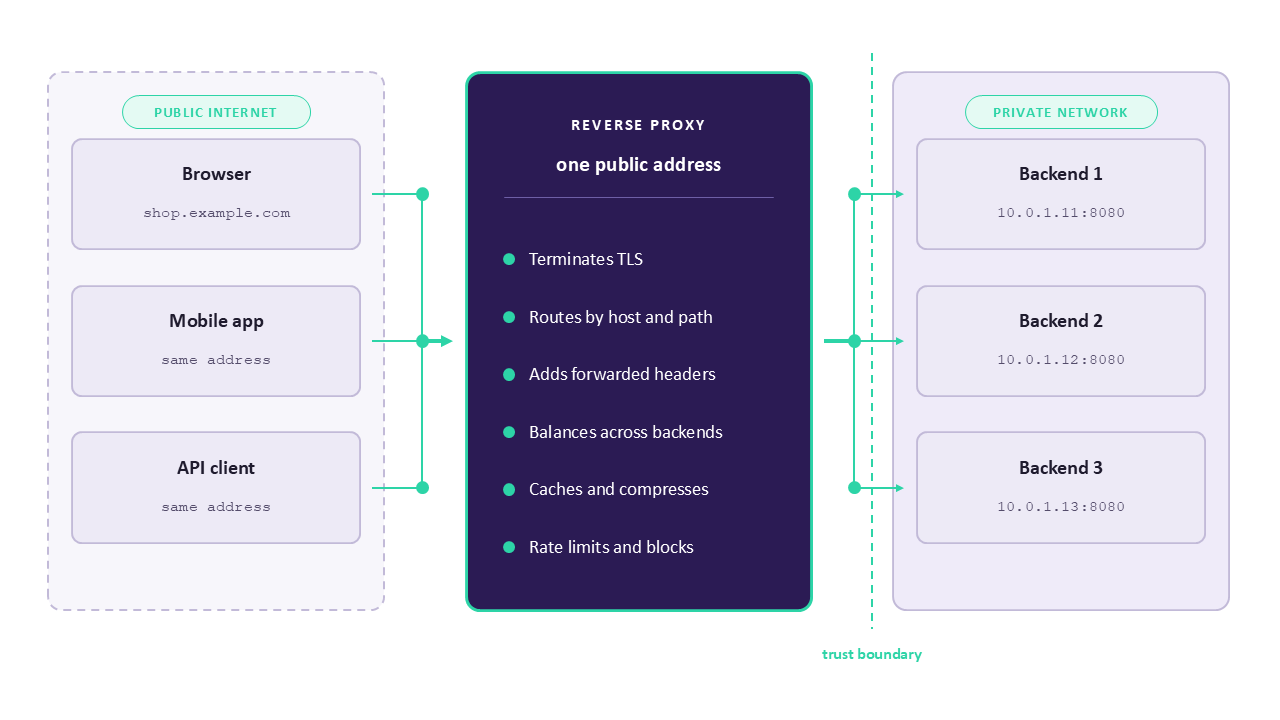
Notice the dotted line marking the trust boundary. Requests crossing it from the left are untrusted, arriving from anyone on the internet, while requests crossing it from the proxy are trusted because your configuration produced them. That distinction is what makes the forwarded headers described later either reliable or dangerous, depending entirely on whether your backends accept them from anywhere or only from the proxy.
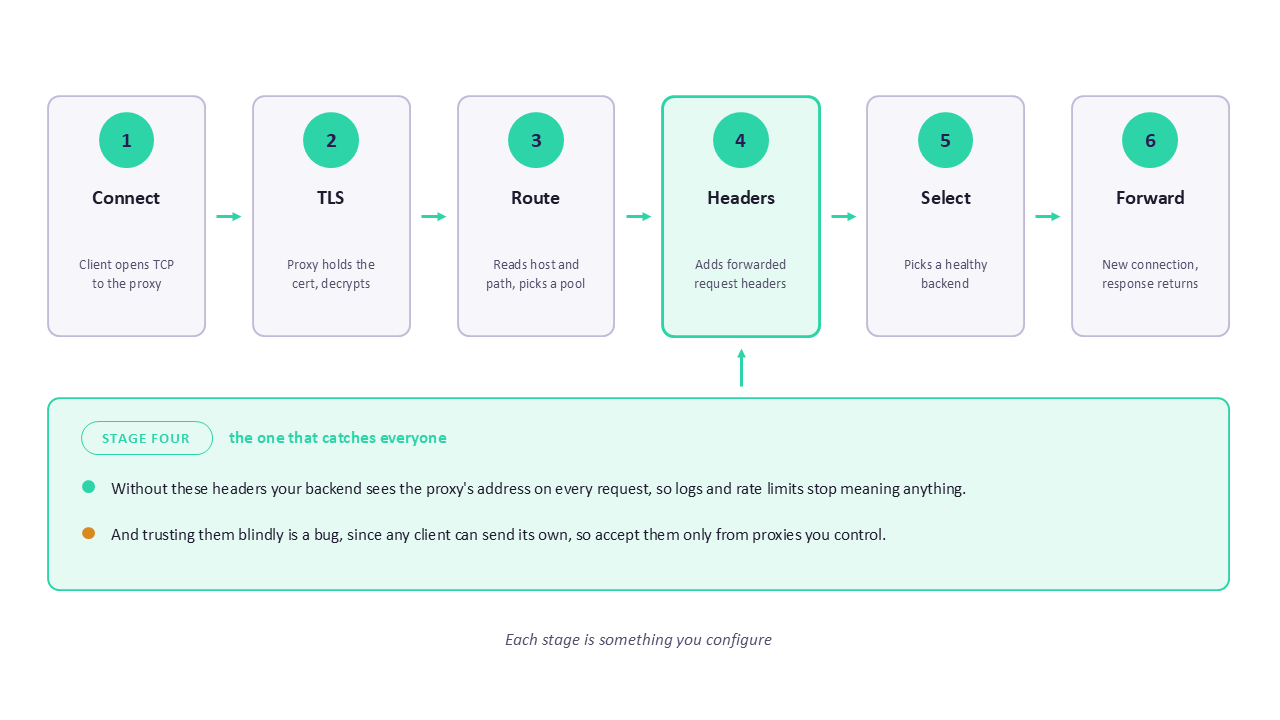
The second view breaks one request into the stages it passes through, which is the sequence the rest of this section explains in prose.
What one request actually goes through
Here is what happens between a browser typing a request and your application receiving it, with a reverse proxy in the path. Every stage is something you can configure, and knowing the sequence makes configuration files readable.
Stage one is the connection. The client resolves your domain name, gets the proxy's address, and opens a TCP connection to it. Your application servers are never involved because their addresses were never published.
Stage two is TLS. The proxy holds the certificate and performs the handshake, decrypting the request. This is called TLS termination, and from here the traffic inside your network may travel as plain HTTP or be re encrypted, depending on how much you trust the network between the proxy and the backends.
Stage three is routing. The proxy now reads the decrypted HTTP request, meaning it can see the hostname, the path, the method, and every header. It uses those to decide which backend group should handle it, which is how one address serves many services.
Stage four is header manipulation. Before forwarding, the proxy adds headers describing the original request, because the backend is about to receive a connection from the proxy rather than from the client and would otherwise know nothing about who actually asked. This is the stage that causes the most confusion, and it gets its own section.
Stage five is backend selection. If several servers can handle the request, the proxy picks one according to a load balancing algorithm, skipping any it currently considers unhealthy.
Stage six is the forward and the response. The proxy makes its own connection to the chosen backend, sends the request, receives the response, and may buffer it, compress it, cache it, or rewrite headers before passing it back down the original connection to the client.
That sequence explains a surprising amount. Your application sees a request from the proxy because stage six opened a new connection. Your certificate lives in one place because stage two happens once. One domain can serve five services because stage three reads the path.
Why teams put one in front of everything
Each of these is a real reason, and most teams start with one and discover the others.
A single entry point. One public address, one certificate, one firewall rule. Backends live on a private network with no inbound route from the internet, which removes an entire category of exposure. This alone justifies the setup for many teams.
TLS termination. Certificates and their renewal live on the proxy rather than on every application server. When a certificate expires, you fix it in one place, and application developers never handle key material.
Load balancing. Spread requests across several identical backends, and stop sending traffic to one that fails a health check. Adding capacity becomes a configuration change rather than a DNS change with all the caching problems that brings.
Path and host based routing. One hostname can serve many services, with requests to a checkout path going to one backend group and requests to a search path going to another. This is how a single domain fronts a microservice architecture.
Caching and compression. Responses that do not change often can be served by the proxy without touching a backend at all, and compression can happen once at the edge rather than in every application.
A place to put cross cutting concerns. Rate limiting, IP allow lists, request size limits, and basic authentication all belong somewhere central, and a proxy is a natural home that does not require changing application code.
In the wild
A common first deployment is a single application server with nginx in front of it, and people occasionally ask why bother with a proxy when there is only one backend to talk to. The answer usually arrives about three months later, on the day the team needs to deploy a new version without downtime, add a second service on the same domain, renew a certificate without touching the application, or block a badly behaved client. Each of those is trivial with a proxy already in place and awkward without one. Putting it in early costs an afternoon, and retrofitting it later means changing DNS, certificates, and firewall rules at the same time.
The forwarded header problem
This is the section that saves you an afternoon, because nearly everyone hits it once and it looks like a bug in the application.
Your backend no longer receives a connection from the client. It receives one from the proxy, so every request appears to come from the proxy's address. Your application logs fill with the same IP over and over, rate limiting by client address suddenly limits everyone at once, and any geographic or security logic based on the source address stops working.
The fix is a set of headers the proxy adds describing the original request.
location / {
    proxy_pass http://checkout_backend;

    proxy_set_header Host              $host;
    proxy_set_header X-Real-IP         $remote_addr;
    proxy_set_header X-Forwarded-For   $proxy_add_x_forwarded_for;
    proxy_set_header X-Forwarded-Proto $scheme;
    proxy_set_header X-Forwarded-Host  $host;
}
Each of those lines answers a question the backend cannot otherwise answer. The Host header preserves the domain the client actually requested, which matters because applications generate absolute URLs and issue redirects based on it. X-Real-IP carries the address of whoever connected to the proxy. X-Forwarded-For carries the chain of addresses, appending rather than replacing so that a request passing through a CDN and then your proxy arrives with both recorded. X-Forwarded-Proto tells the backend whether the original request used HTTPS, which is what stops an application behind a TLS terminating proxy from redirecting users into a loop because it thinks the connection is insecure. X-Forwarded-Host preserves the original hostname separately, which helps when the proxy rewrites Host for backend routing.
Your application then needs to be told to trust these headers, which is usually a framework setting with a name like trusted proxies or proxy fix. Until you set it, the framework correctly ignores the headers and keeps reporting the proxy's address.
Watch out
Trusting forwarded headers unconditionally is a genuine security bug rather than a style preference. Any client can send its own X-Forwarded-For header claiming to be any address it likes, so an application that reads the first value it finds can be told anything, which defeats IP allow lists, rate limits, and audit logs in one move. The rule is that these headers are trustworthy only when a proxy you control has overwritten or appended to them, and only when the request could not have reached the backend without passing through that proxy. Configure your framework with the specific addresses of your own proxies, and make sure backends refuse connections that do not come from them.
A configuration that works
Here is a complete nginx server block with the pieces a real deployment needs, described afterwards rather than in comments.
upstream checkout_backend {
    least_conn;
    server 10.0.1.11:8080 max_fails=3 fail_timeout=30s;
    server 10.0.1.12:8080 max_fails=3 fail_timeout=30s;
    server 10.0.1.13:8080 backup;
    keepalive 32;
}

server {
    listen 443 ssl;
    http2 on;
    server_name shop.example.com;

    ssl_certificate     /etc/ssl/certs/shop.crt;
    ssl_certificate_key /etc/ssl/private/shop.key;
    ssl_protocols       TLSv1.2 TLSv1.3;

    client_max_body_size 20m;

    location / {
        proxy_pass http://checkout_backend;

        proxy_set_header Host              $host;
        proxy_set_header X-Real-IP         $remote_addr;
        proxy_set_header X-Forwarded-For   $proxy_add_x_forwarded_for;
        proxy_set_header X-Forwarded-Proto $scheme;

        proxy_http_version 1.1;
        proxy_set_header Connection "";

        proxy_connect_timeout 5s;
        proxy_send_timeout    60s;
        proxy_read_timeout    60s;

        proxy_next_upstream error timeout http_502 http_503;
    }

    location /events {
        proxy_pass http://checkout_backend;
        proxy_http_version 1.1;
        proxy_set_header Upgrade    $http_upgrade;
        proxy_set_header Connection "upgrade";
        proxy_read_timeout 3600s;
        proxy_buffering off;
    }
}
The upstream block defines the pool of backends and how traffic is spread across it. Choosing least_conn sends each request to the server currently handling the fewest connections, which suits applications where request durations vary. The max_fails and fail_timeout settings define passive health checking, so a backend that fails three times is taken out of rotation for thirty seconds and then tried again. Marking the third server as a backup means it receives no traffic at all unless the others are unavailable. The keepalive directive maintains persistent connections to the backends, which removes the cost of a new TCP handshake on every single request and is one of the easiest performance wins available.
In the server block, client_max_body_size matters more than its obscurity suggests, because nginx defaults to one megabyte and file uploads larger than that fail with a confusing error that developers usually blame on the application.
Inside the main location, setting proxy_http_version to 1.1 and clearing the Connection header is what actually enables those keepalive connections, since the default of HTTP 1.0 closes the connection after each request regardless of the upstream setting. The three timeouts control how long the proxy waits to connect, to send, and to receive, and a short connect timeout with longer send and read timeouts is a sensible default because failing to connect should be detected quickly while a slow response may be legitimate. The proxy_next_upstream line tells nginx to retry a different backend when one returns an error or times out, which turns a single failing server into a slightly slower request rather than a user visible failure.
The second location handles WebSocket and streaming traffic, and it exists because those connections need different treatment. Passing the Upgrade and Connection headers is what allows the protocol switch to happen, without which WebSocket connections fail immediately. The long read timeout accommodates connections that stay open with no traffic for minutes at a time, and turning off buffering means events reach the client as they are produced rather than being held until nginx decides it has enough to send.
Quick tip
Buffering is the setting that produces the most puzzled bug reports. By default nginx reads the whole response from the backend before sending anything to the client, which is efficient for normal pages and completely wrong for server sent events, streaming APIs, and long running downloads, where it looks to the user as though nothing is happening until everything happens at once. If a streaming endpoint works when tested directly against the backend and appears frozen through the proxy, buffering is almost certainly the reason.
Learn Nginx properly rather than by copying
Most people learn reverse proxies by pasting a configuration block and adjusting it until traffic flows, which works right up until something breaks in a way the block does not cover. The Nginx for Beginners course on KodeKloud takes you from fundamentals through configuring nginx as a web server, reverse proxy, load balancer, and security gateway with hands on labs, which is exactly the ground this guide surveys.
Choosing how traffic is spread
When more than one backend can serve a request, the proxy needs a rule for choosing. The differences matter more than people expect.
The IP hash row deserves a caution. Session affinity, often called sticky sessions, solves the problem of an application storing session data in local memory, and it does so by giving up even distribution and making a backend failure lose those sessions. It is a reasonable stopgap and a poor destination. If you find yourself needing stickiness everywhere and permanently, that is usually a signal to move session state into a shared store such as Redis rather than to tune the proxy harder.
Health checks and what happens when a backend dies
A proxy that keeps sending traffic to a dead server is worse than no proxy, so health checking is what makes load balancing actually reliable.
Passive health checks, which is what the configuration above uses, observe real traffic and mark a backend unavailable after a number of failures. They cost nothing extra and only notice a problem after some real users have hit it.
Active health checks poll a dedicated endpoint on each backend at an interval, independently of user traffic. They detect problems before users do and require a health endpoint that means something.
That last point is where most of the value lives. A health endpoint returning 200 because the web framework started is nearly useless, since a process can be running while its database connection pool is exhausted. A useful health endpoint checks the dependencies the service actually needs and fails when they are broken. It is also worth separating readiness, meaning ready to receive traffic, from liveness, meaning still functioning, because a service that needs a moment to warm up should be temporarily out of rotation rather than restarted.
In the wild
A team once spent a morning on an incident where the proxy kept routing to a backend that was returning errors for every request. The health endpoint was a static route returning the string ok, so nginx considered the server perfectly healthy while every real request failed against a database it could no longer reach. Health checks are only as good as the thing they check, and the useful question when writing one is what would have to be true for this instance to serve a real request correctly.
The terminology, sorted out
Here is the alphabet soup, resolved. All of these are reverse proxies. They differ in emphasis and in where they sit.
Two observations make this practical. Products overlap heavily, since nginx can be a reverse proxy, a load balancer, and an ingress controller depending on configuration, so arguing about labels is less useful than asking what job this layer owns. And the progression is usually the same, in that teams start with a reverse proxy in front of one server, gain load balancing when they add a second, adopt an ingress controller when they move to Kubernetes, and add an API gateway only when governance genuinely demands it.
Reverse proxies in Kubernetes
If you run Kubernetes you are already running a reverse proxy, whether or not anyone described it that way.
An Ingress resource is a set of routing rules, and an ingress controller is the component that reads those rules and configures an actual proxy to implement them. Many controllers are nginx underneath, which is why the concepts transfer directly and why annotations on an Ingress often map to nginx directives you would recognise.
apiVersion: networking.k8s.io/v1
kind: Ingress
metadata:
  name: shop
  annotations:
    nginx.ingress.kubernetes.io/proxy-body-size: "20m"
    nginx.ingress.kubernetes.io/proxy-read-timeout: "60"
spec:
  ingressClassName: nginx
  tls:
    - hosts:
        - shop.example.com
      secretName: shop-tls
  rules:
    - host: shop.example.com
      http:
        paths:
          - path: /checkout
            pathType: Prefix
            backend:
              service:
                name: checkout
                port:
                  number: 80
          - path: /search
            pathType: Prefix
            backend:
              service:
                name: search
                port:
                  number: 80
That manifest is the same architecture as the nginx configuration earlier, expressed declaratively. The tls section points at a Secret holding the certificate, so termination happens at the ingress controller exactly as it did at nginx. The two path rules do host and path based routing, sending checkout traffic to one Service and search traffic to another. The annotations set the body size limit and read timeout, which are the same settings discussed above and the same two that catch people out, appearing here as annotations because the Ingress resource itself has no field for them.
A newer API called Gateway API is gradually replacing Ingress, offering a cleaner separation between the platform team owning the gateway and application teams owning their routes. The concepts are identical, so nothing in this guide becomes wrong, and the resource names change.
Practise this on a real cluster
Reverse proxy behaviour becomes obvious the moment you break it deliberately and watch what happens to a request. The Certified Kubernetes Administrator (CKA) course on KodeKloud covers Services, Ingress, and cluster networking through hands on labs, and the KodeKloud playgrounds give you clusters and Linux machines where you can configure nginx, misconfigure it, and see exactly which header went missing.
Caching, which is harder than it looks
Caching at the proxy is the feature people are most excited about and most often configure badly, because the hard part is not storing responses, it is knowing which ones are safe to store and for how long.
A proxy cache decides what to store using a cache key, which by default is built from the request method, the host, and the URL. Anything not in that key is invisible to the cache, and that is the source of nearly every caching bug. If your application returns different content for logged in users at the same URL, and the cache key does not include anything identifying the user, the proxy will happily serve one user's page to another.
proxy_cache_path /var/cache/nginx levels=1:2 keys_zone=static:100m
                 max_size=5g inactive=24h use_temp_path=off;

location /assets/ {
    proxy_pass http://checkout_backend;
    proxy_cache static;
    proxy_cache_valid 200 301 302 1h;
    proxy_cache_valid 404 1m;
    proxy_cache_key "$scheme$request_method$host$request_uri";
    proxy_cache_use_stale error timeout updating http_500 http_502;
    proxy_cache_lock on;
    add_header X-Cache-Status $upstream_cache_status;
}
The cache path directive defines where responses are stored, how much memory to use for keys, and how large the cache may grow before old entries are evicted. Setting proxy_cache_valid separately for successes and for 404 responses matters because caching a not found response for an hour turns a temporary deployment gap into a long outage for that path, while caching it briefly still protects the backend from repeated misses.
Setting proxy_cache_use_stale gives you the line that earns its place during an incident, because it tells nginx to serve an expired cached copy when the backend is failing or slow. Your users see slightly old content instead of an error page, which is almost always the better outcome, and it means a backend outage becomes invisible for cacheable paths.
Turning on proxy_cache_lock prevents a thundering herd, where a popular entry expires and hundreds of simultaneous requests all miss the cache and hit the backend at once. With locking, one request goes through to refresh the entry and the rest wait for it.
The final header is a debugging aid rather than a feature. Adding the cache status to the response lets you see HIT, MISS, EXPIRED, or STALE in your browser's network tab, which turns cache behaviour from guesswork into something observable.
Watch out
Never cache a response containing user specific data unless the cache key distinguishes users, and be careful that your application sets the right Cache-Control headers, because the proxy will respect them and a missing header often means a default you did not intend. The classic incident here is caching an authenticated page and serving one customer's account details to another, which is a data breach caused by a performance optimisation. When in doubt, cache only paths that are unambiguously public, such as static assets, and leave anything behind authentication uncached until you have deliberately designed the key.
The security you get, and the security you must add
A reverse proxy improves your security posture for free in some ways and only if configured in others, and the distinction is worth being precise about.
What you get simply by having one. Your backends can live on a private network with no inbound route from the internet, which removes direct attack surface entirely. Your topology is hidden, so an attacker cannot learn how many servers you run or what they are. TLS is handled consistently in one place rather than depending on every application getting it right. And you gain a single point where traffic can be observed, which makes anomaly detection possible.
What you must configure deliberately. Request size limits stop a large upload from exhausting backend memory. Rate limiting protects against both abuse and accidental retry storms. Hiding version headers stops the proxy advertising exactly which release you run. Restricting allowed methods blocks request types your application never expects. And timeouts prevent slow clients from holding connections open indefinitely.
limit_req_zone $binary_remote_addr zone=api:10m rate=20r/s;

server_tokens off;

location /api/ {
    limit_req zone=api burst=40 nodelay;
    limit_except GET POST PUT DELETE { deny all; }
    client_body_timeout 10s;
    proxy_pass http://checkout_backend;
}
The rate limit zone allocates shared memory keyed on the client address and sets a sustained rate, while the burst value allows a short spike above that rate before requests are rejected, which is important because real traffic arrives unevenly and a strict limit with no burst rejects legitimate users. Turning server_tokens off removes the nginx version from response headers and error pages, which is a small but free reduction in what an attacker learns. The limit_except block rejects any method outside the listed set, and the body timeout closes connections from clients that open a request and then send data very slowly, which is the shape of a classic resource exhaustion attack.
One boundary is worth stating clearly. A reverse proxy is not a web application firewall, and the two solve different problems. The proxy controls how traffic reaches your application, while a firewall inspects request content for attack patterns such as injection attempts. Many proxies can host a firewall module, and treating basic proxy configuration as though it provided that protection is a common and mistaken assumption.
The mistakes that catch people first
Every item here has cost somebody an afternoon, and all of them are configuration rather than architecture.
Watch out
The redirect loop is the most disorienting of these because the error gives no hint about the cause. Your proxy terminates TLS and forwards plain HTTP to the backend, the backend sees an insecure connection and helpfully redirects the user to the HTTPS version, that redirect arrives at the proxy, which terminates TLS and forwards plain HTTP again, and around it goes until the browser gives up. The fix is sending X-Forwarded-Proto and configuring the application to trust it, so the backend knows the original request was already secure.
Where to start
- Find out whether you already have a reverse proxy in your path, since a cloud load balancer, CDN, or ingress controller all count and you may have several.
- Check one application's logs and confirm whether real client addresses appear, because if they do not, the forwarded headers are missing.
- Verify how your application decides which proxies to trust, and make sure it names specific addresses rather than accepting any forwarded header.
- Look at your health endpoint and ask whether it would fail if the database were unreachable, then fix it if the answer is no.
- Set the body size limit and the timeouts explicitly rather than inheriting defaults, because the defaults are arbitrary and you will meet them eventually.
- Test a streaming or WebSocket endpoint through the proxy specifically, since those are the two that behave differently and are usually tested directly against the backend.
- Put a certificate renewal reminder on the proxy, because centralising TLS means one expiry now takes down everything behind it.
Conclusion
A reverse proxy is one of the highest value pieces of infrastructure you can put in place, and it is conceptually simple once the naming stops getting in the way. It represents your servers rather than your clients. It gives you one public door in front of many private rooms. It holds your certificates, spreads your traffic, hides your topology, and gives you somewhere to put every concern that does not belong in application code.
The parts that trip people up are not architectural, they are details. Set the forwarded headers or your logs are useless. Trust those headers only from proxies you control, or your rate limiting is decorative. Raise the body size limit, set the timeouts, turn buffering off for streams, and pass the upgrade headers for WebSockets. That short list covers most of what goes wrong in the first month.
So check your own logs this week and see whether real client addresses are reaching your application. If every line shows the same address, you have just found your first configuration fix, and it takes about five minutes.
Ready to Master the Layer in Front of Everything?
Reverse proxies sit at the boundary of every system you will ever run, which makes them worth learning properly rather than by copying configuration blocks. The Nginx for Beginners course on KodeKloud covers nginx as a web server, reverse proxy, load balancer, and security gateway with hands on labs, the Certified Kubernetes Administrator (CKA) course covers the ingress side, and the KodeKloud playgrounds give you machines to configure and break freely. Start with one today.
FAQs
Q1: What is the difference between a forward proxy and a reverse proxy?
The difference is whose side the proxy is on, and every other distinction follows from that. A forward proxy represents the client, sitting at the edge of a client network and making requests to the internet on behalf of the users behind it, which is what a corporate web filter or a VPN does, and the destination server sees the proxy's address rather than the user's. A reverse proxy represents the servers, sitting in front of your application and accepting requests from clients on their behalf, so the client sees the proxy's address and learns nothing about the backends. The practical consequences are opposite: a forward proxy is configured deliberately by the client and hides the client, while a reverse proxy is invisible to the client and hides the servers. The naming is genuinely unhelpful, since nothing runs in reverse, and the term simply reflects that the server side version arrived after the client side one had already claimed the name.
Q2: Why do all my application logs show the same IP address?
Because your application is no longer receiving connections from clients, it is receiving them from the reverse proxy, so the source address it sees is the proxy's. This breaks anything based on client identity, including logging, rate limiting, geographic routing, and IP allow lists, and it is the single most common surprise when a proxy is first introduced. The fix has two halves and both are required. First, configure the proxy to add headers describing the original request, meaning X-Real-IP for the connecting address, X-Forwarded-For for the chain of addresses, X-Forwarded-Proto for the original protocol, and Host for the requested domain. Second, configure your application framework to trust those headers, which is usually a setting listing the addresses of proxies you control. That second half matters for security as well as function, because a client can send its own forwarded headers claiming any address, so an application that trusts them from any source can be told anything.
Q3: What do I need to know before setting up a reverse proxy?
Less than you might expect, and the prerequisites are ordinary networking rather than anything specialised. Understand how DNS resolves a name to an address, since that is what points clients at your proxy in the first place. Know the basics of TLS, meaning what a certificate is and what terminating it means, because that is one of the proxy's main jobs. Be comfortable reading HTTP requests, particularly headers, since routing and the forwarded header problem both live there. On the practical side, editing a configuration file, restarting a service, and reading its error log covers the mechanics entirely. Understanding firewall rules helps, because the security benefit only materialises when backends genuinely cannot be reached directly. For structured practice, the Nginx for Beginners course on KodeKloud covers configuration from fundamentals through reverse proxy and load balancer setups, and the KodeKloud playgrounds give you machines where a broken configuration costs nothing.
Q4: Is a reverse proxy the same as a load balancer?
They overlap so heavily that the question is usually about emphasis rather than category. A reverse proxy is the broader idea, meaning any server that accepts requests on behalf of backends, and load balancing is one of the things it can do. A load balancer is a reverse proxy whose primary job is spreading traffic across several backends and removing unhealthy ones from rotation. In practice the same product does both, since nginx, HAProxy, and Envoy are all described either way depending on which feature you are using, and cloud application load balancers are reverse proxies with routing capability. The distinction that actually matters is what job you need this layer to own. If you have one backend and want TLS termination, routing, and caching, you are using it as a reverse proxy. If you have several identical backends and need traffic spread and health checked, you are using it as a load balancer. Most teams start with the first and grow into the second without changing tools.
Q5: When do I need an API gateway instead of a plain reverse proxy?
When you need per consumer control rather than per request routing, which is a smaller set of situations than vendors suggest. A reverse proxy routes, terminates TLS, balances load, caches, and can apply broad rate limits, and that covers most internal systems and most single applications comfortably. An API gateway adds capabilities aimed at APIs as products: authenticating individual consumers, applying different rate limits per API key, managing versions, transforming requests, and reporting which consumer called which endpoint how often. The clearest signal that you need one is external consumers, meaning partner companies or third party developers using your API, because that is when per consumer identity, quotas, and usage analytics stop being optional. If your consumers are your own services and your own front end, an ingress controller or reverse proxy with service to service authentication usually does the job with far less complexity and cost. Many architectures run both, with a reverse proxy at the edge for TLS and a gateway behind it for API specific concerns.
Q6: Should the connection between the proxy and my backends be encrypted?
It depends on how much you trust the network in between, and the honest answer for most teams is that plain HTTP is acceptable inside a properly isolated network and increasingly is not the default advice. Terminating TLS at the proxy and forwarding plain HTTP is common because it removes cryptographic work from every backend and simplifies certificate management enormously, and it is reasonable when the proxy and backends sit in the same private subnet with no other tenants and no route from outside. The argument against it is that anyone who gains a foothold inside that network can read all your application traffic, which is exactly the assumption zero trust architectures reject. The middle path most teams take is re encrypting between proxy and backend for anything carrying sensitive data, using internal certificates that are easier to manage than public ones. In Kubernetes, a service mesh automates this by handling mutual TLS between services without application changes, which is one of the main reasons to adopt one.


Discussion