



YAML for DevOps looks simple and quietly guesses your types. Here is every place it guesses wrong, and how to stop it.
Highlights
- YAML for DevOps is worth learning properly because it is the language your Kubernetes manifests, CI pipelines, and Ansible playbooks are written in, and it fails in ways that pass code review.
- The defining behaviour is implicit typing, meaning YAML decides what a value is by how it looks rather than by what you intended, and it never warns you.
- The Norway problem is the famous case, where the country code NO becomes the boolean false, and it belongs to a whole family that includes version numbers, port ranges, and zip codes.
- Indentation carries meaning, tabs are forbidden outright, and a missing space after a colon turns a mapping into a plain string without any error.
- Block scalars give you six ways to write multi line text, and picking the wrong one is why your embedded script has a trailing newline that breaks a checksum.
- Anchors and aliases remove repetition inside a single file, and merge keys let you build a shared base that environments override.
- Validation is cheap and almost nobody does it, so a linter plus a schema check in your pipeline removes most of the errors this guide describes.
A team once shipped a configuration file containing the line country: NO, meaning Norway. The file parsed cleanly, the pipeline went green, the deployment succeeded, and every downstream service read that field as the boolean false rather than the two letter country code. Nothing was malformed. No validator complained. YAML had simply looked at the characters N and O, recognised them as one of its many spellings of false, and helpfully converted them for you.
That is the single most useful thing to understand about YAML, and it explains almost every strange behaviour you will meet. YAML is not a passive format that stores exactly what you typed. It is a parser with opinions, deciding what each unquoted value means based on what it looks like. This guide covers the syntax properly, then spends real time on the places YAML guesses wrong, because those are the errors that reach production rather than failing in your editor.
What YAML is
YAML is a human readable data serialisation format used for configuration files, which represents three kinds of data, meaning scalars, sequences, and mappings, using indentation rather than brackets to show structure, and which applies implicit typing to unquoted values so that text resembling a number, boolean, or date is converted automatically.
Two parts of that matter more than the rest. Indentation rather than brackets is why whitespace errors are so common. Implicit typing is why correct looking files produce wrong values.
Why DevOps ended up here
It is worth knowing how YAML became the default, because that history explains both its strengths and the parts that annoy you.
Configuration used to live in bespoke formats, one per tool, each with its own parser and quirks. JSON offered a standard alternative and turned out to be uncomfortable for humans, since it has no comments, demands quotes around every key, and punishes a single trailing comma with a parse failure. YAML answered exactly those complaints: comments are allowed, quotes are usually optional, and the visual structure looks like an outline.
That readability is why Kubernetes, GitHub Actions, GitLab CI, Ansible, Docker Compose, and most of the cloud native ecosystem chose it. The tradeoff you inherited is that a format optimised for looking natural to humans has to make assumptions about what humans meant, and assumptions are where the bodies are buried.
Did you know
The name is a joke that became official. YAML originally stood for Yet Another Markup Language, positioning it among the markup formats of the early 2000s. The maintainers later changed it to the recursive acronym YAML Ain't Markup Language, specifically to signal that it is about data rather than document markup. The distinction is more useful than it sounds, because thinking of YAML as data serialisation rather than as a document format is exactly the mindset that prevents most beginner mistakes.
The three building blocks
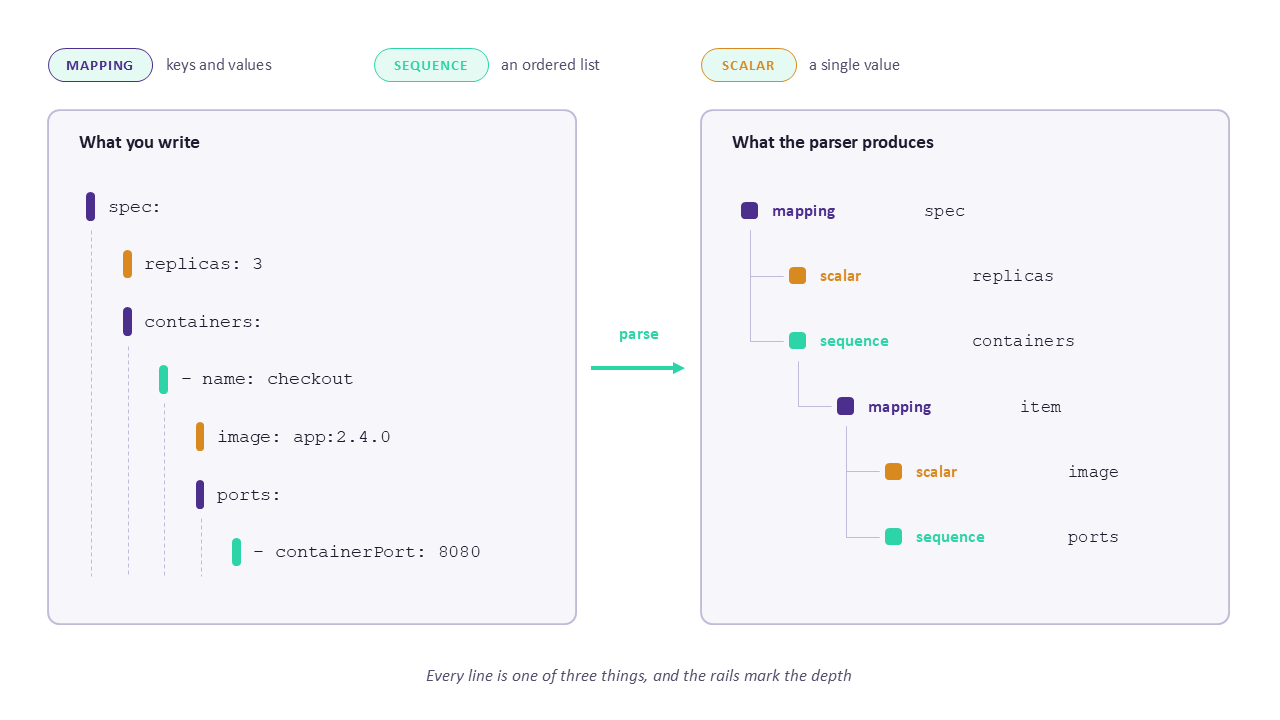
Everything in YAML is one of three things, and once you can name which one you are looking at, the syntax stops being arbitrary.
Scalars are single values, meaning strings, numbers, booleans, and nulls.
Sequences are ordered lists, written with a dash and a space before each item.
Mappings are key and value pairs, written with a colon and a space between them.
name: checkout-service
replicas: 3
enabled: true
maintainer: null

ports:
  - 8080
  - 8443

resources:
  requests:
    cpu: 500m
    memory: 256Mi
That file contains all three types nested inside each other, which is the shape of essentially every manifest you will ever edit. The top level is a mapping. The value of ports is a sequence of scalars. The value of resources is a mapping whose value is another mapping.
YAML also allows a compact flow style borrowed from JSON, which is genuinely useful for short values.
ports: [8080, 8443]
labels: { app: checkout, tier: backend }
Both forms mean exactly the same thing as the block style above. Use flow style for short lists and small maps where it improves readability, and block style for anything a person will need to edit later.
The architecture of a YAML file
Seeing the structure drawn out makes the rules above concrete, so here are two views of what is actually happening.
The first shows a manifest alongside the data structure it becomes. Every line on the left is one of the three building blocks, and the dotted rails mark the indentation levels that decide how deeply each value nests. Reading a file this way, asking which of the three things each line is, turns an intimidating wall of text into something with an obvious shape.
Below that, a second view follows your file through the parser itself, which is where the surprises come from. Your text is split into tokens, indentation is resolved into nesting, and then a stage called implicit typing inspects every unquoted value and decides what type it should be. That fourth stage is where a country code becomes a boolean and a version number loses its trailing zero, and it is covered in detail in the next section.
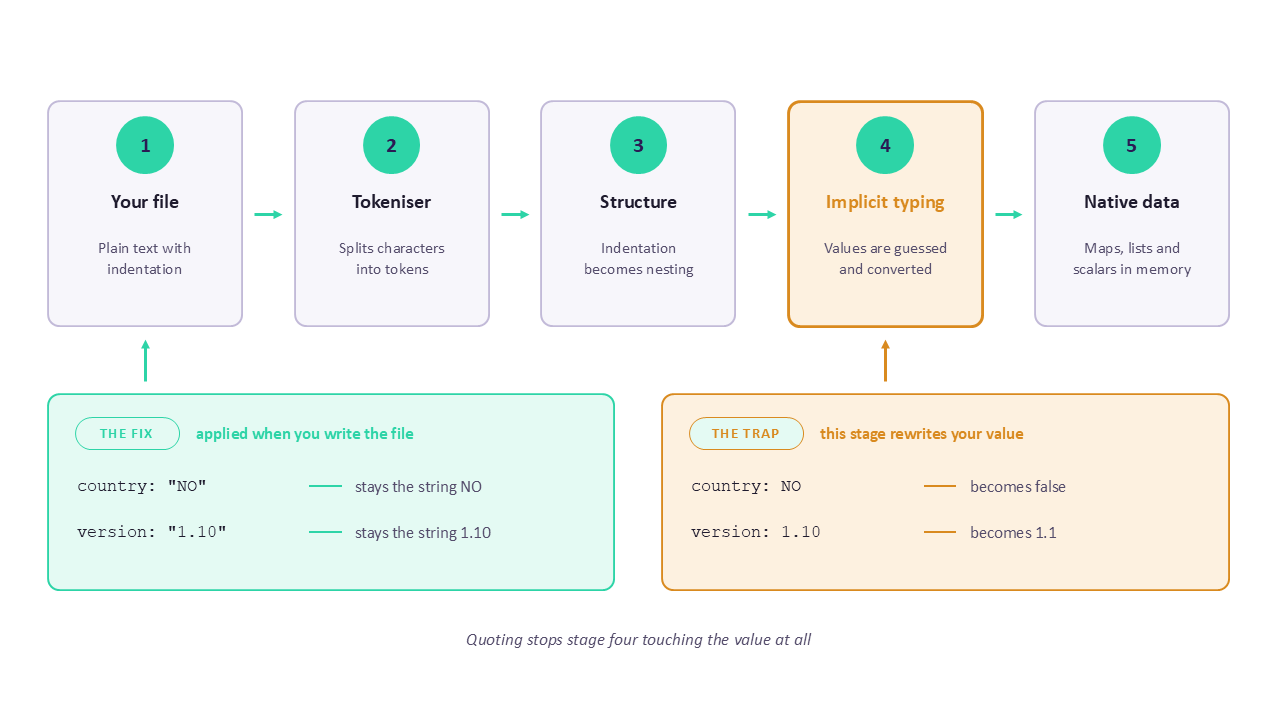
Worth noticing in that pipeline is where the fix sits. Quoting a value does not repair the damage afterwards, it prevents the implicit typing stage from touching that value at all, which is why quoting is reliable in a way that post processing never is.
Indentation, and the rules that actually bite
YAML uses indentation to show nesting, and four rules cover everything that goes wrong.
Spaces only, never tabs. The specification forbids tab characters for indentation, with no exceptions, and a tab produces a parse error. Set your editor to emit spaces when the tab key is pressed, then commit an .editorconfig file so the setting travels with the repository rather than living on one person's machine.
Be consistent. YAML does not require a specific number of spaces, it requires that siblings at the same level use the same amount. Two spaces is the near universal convention, and mixing two and four in one file is a reliable source of confusion.
A colon needs a space after it. Writing key:value without the space produces the plain string key:value rather than a mapping, and this parses successfully, which is what makes it dangerous. You get no error, just a field that is not the field you meant.
Dashes count as indentation. A sequence item's dash occupies space, so the content after it must align consistently. This is the single most common structural mistake in Kubernetes manifests, where a list of containers ends up nested one level away from where the author intended.
app:
  name: checkout
  services:
  - api
  - web

app:
  name: checkout
  services:
    - api
    - web
Both blocks above are valid and mean the same thing, which surprises people. YAML permits sequence items to sit at the same indentation as their parent key or to be indented further. Pick one style and enforce it with a linter, since the mixture is what makes files hard to scan.
Watch out
Trailing whitespace is invisible and occasionally consequential, particularly inside quoted strings and block scalars where those spaces become part of the value. A password or token with a trailing space fails authentication in a way that looks impossible to debug, because the value looks correct in every editor. Turn on whitespace visualisation in your editor, and add a linter rule that fails on trailing spaces, because the ten seconds of setup saves an afternoon at some point.
The type guessing problem in YAML for DevOps files
Here is the section worth reading twice, because these are the failures that pass review and reach production.
YAML applies implicit typing, meaning it inspects each unquoted value and converts anything that resembles a boolean, number, null, or date. It does this silently and confidently, and different parsers disagree about the rules.
Read that table slowly, because every row is a real bug pattern. The version row alone explains a category of Helm chart failures, since a chart pinned to 1.10 and a chart pinned to 1.1 become the same value after parsing, and nobody looking at the file can see why.
The fix is trivial and worth making a habit rather than a judgment call.
country: "NO"
enabled: "yes"
version: "1.10"
zip: "01234"
window: "22:30"
release: "2026-08-02"
Quoting removes ambiguity completely, because YAML never applies implicit typing to a quoted scalar. Two characters buy you a value that survives intact no matter which parser opens the file or which version of the specification that parser happens to follow.
Did you know
YAML 1.2 fixed most of this back in 2009, restricting booleans to exactly true and false in lowercase, requiring an explicit prefix for octal numbers, and dropping implicit date parsing. It also made YAML a strict superset of JSON. The problem is that the ecosystem never fully moved, because changing the rules would break existing files, so many widely used parsers still follow YAML 1.1 behaviour by default. You cannot assume which version your tool implements, which is precisely why quoting defensively beats relying on the specification.
In the wild
The GitHub Actions workflow key on: is itself one of these values, since on is a YAML 1.1 boolean. GitHub's own parser handles it correctly, and third party tools that read workflow files sometimes see a key called true instead. It is a good reminder that this is not an obscure edge case affecting hobby projects. It sits in the first three lines of millions of workflow files, and it works only because the tool that reads them was written to expect it.
Strings, and the three ways to write them
YAML gives you three ways to write a single line string, and knowing what each one does removes a lot of guesswork.
Plain, meaning unquoted. Convenient, and subject to every implicit typing rule above. Use it for values that could never be mistaken for another type, and avoid it for anything that starts with a special character.
Single quoted. Almost literal, with no escape sequences processed. A backslash stays a backslash, which makes single quotes the right choice for Windows paths and regular expressions. To include a single quote, double it.
Double quoted. Escape sequences are processed, so \n becomes a newline and \t becomes a tab. This is the only form that lets you write control characters, and it is the one to use for anything containing special characters.
plain: just some text
single: 'C:\Users\app\config'
double: "line one\nline two"
awkward: 'it''s quoted with a doubled apostrophe'
The practical guidance is simpler than the rules suggest. Use double quotes when you need escapes, single quotes when you have backslashes you want kept literally, and quotes of some kind on anything from that type coercion table.
Block scalars, for multi line text
This is where beginners lose time, because there are six combinations and the differences are invisible until something downstream breaks.
A block scalar lets you write multi line text without escaping, which matters for embedded scripts, certificates, and configuration files inside configuration files. Two characters control the behaviour.
The first character chooses whether newlines survive. A pipe means literal, so every line break in your YAML becomes a line break in the value. A greater than sign means folded, so line breaks become spaces and only blank lines create real breaks.
A second character, called the chomping indicator, controls trailing newlines. No indicator means clip, keeping exactly one trailing newline. A minus means strip, removing all of them. A plus means keep, preserving every one.
startup_script: |
  #!/usr/bin/env bash
  set -euo pipefail
  echo "starting"
  exec /app/server

description: >
  This service handles checkout requests
  and talks to the payments backend.

api_token: |-
  eyJhbGciOiJIUzI1NiIsInR5cCI6IkpXVCJ9
Each of those three uses a different form for a specific reason. The script uses a plain pipe because a shell script needs its line breaks and a single trailing newline is harmless. The description uses a folded arrow because the author wrapped a sentence across lines for readability and wants it to arrive as one line. The token uses pipe minus because a trailing newline in a credential is exactly the sort of invisible difference that makes authentication fail while the value looks perfect.
Quick tip
When something that reads a value from YAML behaves as though the value is subtly wrong, and the file looks correct, suspect a trailing newline first. Print the value with a delimiter around it, or check its length, since a length one longer than you expect is the whole story. This is the single most common cause of the puzzled hour spent comparing a certificate in YAML against the same certificate in a file, and the fix is usually changing a pipe to pipe minus.
Learn the data formats properly
YAML sits alongside JSON and JSON Path as the three formats every DevOps engineer reads daily, and learning them together makes each one clearer. The YAML and JSON Path course on KodeKloud covers both formats plus querying them, which is the natural companion to everything in this guide.
Comments deserve a brief mention because they are one of YAML's genuine advantages over JSON and they have one limitation worth knowing. A comment starts with a hash and runs to the end of the line, it can sit on its own line or after a value, and it is discarded entirely by the parser. What YAML has no concept of is a block comment, so commenting out a section means prefixing every line, which most editors will do for a selection in one keystroke.
Anchors, aliases, and merge keys
Once files get long, YAML offers a way to avoid repeating yourself, and it is underused because it looks cryptic the first time.
An anchor marks a node with a name using an ampersand. An alias reuses that node with an asterisk. A merge key, written as two less than signs and a colon, inserts the contents of a mapping into another mapping so you can override selected fields.
defaults: &defaults
  image: registry.internal/checkout
  replicas: 2
  resources:
    requests:
      cpu: 500m
      memory: 256Mi

staging:
  <<: *defaults
  replicas: 1

production:
  <<: *defaults
  replicas: 6
That file defines the shared configuration once and lets each environment override only what differs, which makes the actual differences between staging and production visible at a glance rather than buried in duplicated blocks.
Two limitations are worth knowing before you rely on this. Anchors work only within a single document, so you cannot reference an anchor defined in another file, which limits how far the technique scales across a repository. And the merge key is a YAML 1.1 feature that YAML 1.2 dropped from the core specification, so support varies by parser, and Kubernetes in particular does not process merge keys in manifests since its parser resolves them differently than people expect.
Multi document files
A single YAML file can contain several documents separated by three dashes, which is why Kubernetes manifests so often bundle a Deployment and a Service together.
apiVersion: v1
kind: ConfigMap
metadata:
  name: checkout-config
data:
  LOG_LEVEL: debug
---
apiVersion: v1
kind: Service
metadata:
  name: checkout
spec:
  selector:
    app: checkout
  ports:
    - port: 80
      targetPort: 8080
The separator is genuinely useful and it introduces one thing to watch for. Tools that load YAML must be told to expect multiple documents, so a script using a single document load function will read the first one and silently ignore everything after it. When a manifest applies half of what you expected, this is usually why.
Reading a Kubernetes manifest line by line
Everything above comes together in the file type you will edit most, so here is a real manifest with every construct identified.
apiVersion: apps/v1
kind: Deployment
metadata:
  name: checkout
  labels:
    app: checkout
    version: "1.10"
spec:
  replicas: 3
  selector:
    matchLabels:
      app: checkout
  template:
    metadata:
      labels:
        app: checkout
    spec:
      containers:
        - name: checkout
          image: registry.internal/checkout:2.4.0
          ports:
            - containerPort: 8080
          env:
            - name: LOG_LEVEL
              value: "debug"
            - name: FEATURE_NEW_CART
              value: "false"
          resources:
            requests:
              cpu: 500m
              memory: 256Mi
Walk it from the top and every line is one of the three building blocks. The whole document is a mapping, whose first four keys are apiVersion, kind, metadata, and spec. The value of metadata is another mapping, and inside it labels is a mapping too, which is why label values sit two levels in.
The quotes on the version label are doing real work rather than being decorative. Without them, 1.10 becomes the float 1.1 and your label no longer matches what you wrote. Kubernetes labels must be strings, so this one would fail validation, and in a plain configuration file it would silently succeed with the wrong value.
Under spec, the value of containers is a sequence, which you can tell from the dash. Each item in that sequence is itself a mapping, which is why name, image, and ports sit indented under the dash rather than beside it. This nesting of sequences containing mappings containing sequences is what makes manifests look intimidating, and it is only ever those three building blocks repeating.
The environment variable values are quoted for the same reason as the version. Kubernetes requires value to be a string, so an unquoted false becomes a boolean and the manifest is rejected. This is a case where the strictness helps you, because the API catches what YAML let through. In a Docker Compose file or an application config with no schema behind it, the same mistake passes silently.
Notice also that 500m and 256Mi are unquoted and safe, because neither resembles a number, a boolean, or a date. Knowing which values need quotes and which do not is entirely about recognising the patterns in the coercion table, and when in doubt the quotes cost nothing.
Quick tip
A fast way to check any manifest is to ask what type each value will become, working down the file. Most of the time the answer is obvious, and the moment you hesitate on one is exactly the moment to add quotes. Experienced engineers do this without noticing, which is why they quote version numbers and country codes reflexively while beginners assume the quoting is inconsistent styling.
Templated YAML, and why it hurts
Once you use Helm, Kustomize, or almost any CI system with variables, you stop writing YAML directly and start writing something that produces YAML. This changes the failure modes in ways worth anticipating.
The core problem is that templating engines operate on text while YAML cares about structure, so the template has no understanding of indentation levels. A variable substituted into a template can arrive with the wrong indentation, and the result is either a parse error or, worse, a valid file with the wrong nesting.
metadata:
  labels:
{{- toYaml .Values.labels | nindent 4 }}
That Helm snippet shows the standard defence. The nindent function indents the generated block by a specified number of spaces and adds a leading newline, which is how you insert a multi line value at the right depth. The leading dash in the template tag trims preceding whitespace so the output does not gain a stray blank line. Getting these wrong is behind a large share of Helm chart debugging, and the error messages point at the rendered output rather than at the template that produced it.
Three habits make templated YAML manageable.
Render before you apply, since every templating tool has a command that produces the final YAML without deploying it, and reading that output is far more useful than reading the template. For Helm this is a template command, and for Kustomize it is a build command.
Quote values that come from variables, because a variable holding the string no or a version number will be coerced exactly as a literal would, and the template gives you no hint that it happened.
Lint the rendered output rather than the template, since a linter reading a template file sees invalid YAML full of template tags and cannot help you, while the same linter reading the rendered result catches everything this guide has described.
In the wild
A recurring Helm frustration is a values file where a user writes an unquoted version, the chart renders it into an image tag, and the resulting tag is subtly wrong. Someone sets tag: 1.10 intending the 1.10 release, YAML parses it as the float 1.1, the template renders image: app:1.1, and the deployment either pulls an old version or fails to find the tag at all. The values file looks correct, the template looks correct, and the bug lives in the space between them. Rendering the chart and reading the output finds it in seconds.
Common mistakes, with the fix for each
Here is the reference table worth keeping. Every row is something that either fails confusingly or does not fail at all.
In the wild
The duplicate key row deserves emphasis because it is so quiet. Paste a block into a large manifest, accidentally define metadata twice, and most parsers keep the last occurrence and discard the first without complaint. The file is valid, the deployment applies, and half your labels have vanished. Linters can flag this and are usually not configured to, so it is worth checking that yours does before you need it to.
A debugging ladder
When a file will not parse or produces the wrong values, work down this list rather than staring at it.
Rung one is running an actual parser. Do not trust your eyes on whitespace. Feed the file to a parser and read the error, which gives you a line and a column.
Rung two is reading the line above. YAML errors frequently report the line where the parser noticed the problem, which is often one or more lines after the line that caused it, particularly with indentation mistakes.
Rung three is dumping what was actually parsed. Convert the file to JSON and read the result, since that is the fastest way to see that your string became a boolean or your list nested one level too deep.
Rung four is checking for tabs and trailing whitespace. These are invisible in most editors and cause errors that look inexplicable.
Rung five is validating against a schema. A syntactically valid file can still be a wrong Kubernetes manifest, and only a schema check catches a misspelled field name.
python3 -c 'import sys,yaml,json; print(json.dumps(yaml.safe_load(open(sys.argv[1])), indent=2))' manifest.yaml

yamllint -d relaxed manifest.yaml

grep -nP '\t' manifest.yaml

grep -nP ' +$' manifest.yaml

kubectl apply --dry-run=client -f manifest.yaml
Those five commands map onto the ladder. The first converts your YAML to JSON so you can see exactly what the parser produced, which is the single most useful debugging move available and the one beginners never think of. The second runs a linter that catches style and structural problems a parser accepts. The third and fourth find tabs and trailing spaces, which are invisible in normal viewing. The last validates a Kubernetes manifest against the real API without applying anything, catching field names and structures that are valid YAML and invalid Kubernetes.
Quick tip
Get into the habit of always using the safe loading function in whatever language you use, which in Python means yaml.safe_load rather than yaml.load. The unsafe variants can construct arbitrary objects from tagged YAML, which has been the root of real remote code execution vulnerabilities when files came from untrusted sources. Safe loading handles every structure covered in this guide, so there is no cost to the habit and a genuine risk to skipping it.
Validation in the pipeline
Almost every error in this guide is catchable automatically, and most teams do not catch them because nobody set it up. It takes an afternoon.
A YAML linter checks syntax, indentation consistency, duplicate keys, trailing whitespace, and line length. Run it on every file in the repository as a pre commit hook and in CI.
A schema validator checks that your file is a valid instance of the thing it claims to be, which for Kubernetes means tools that validate manifests against the API schema, and for CI configuration means the schema your platform publishes.
A policy checker goes further, enforcing rules your organisation cares about such as required labels, forbidden image tags, or resource limits being present.
extends: default
rules:
  line-length:
    max: 160
  indentation:
    spaces: 2
    indent-sequences: consistent
  truthy:
    allowed-values: ["true", "false"]
  key-duplicates: enable
  trailing-spaces: enable
  comments:
    min-spaces-from-content: 1
That configuration is a reasonable starting point for a team. The truthy rule is the important one, because it flags exactly the unquoted yes, no, on, and off values from the type coercion table, turning the Norway problem from an incident into a failed lint check. Setting indent-sequences to consistent enforces one sequence style throughout rather than allowing the mixture described earlier, and enabling duplicate key detection catches the silent overwrite that most default configurations let through.
Practise on real manifests
Reading about indentation is one thing, and watching a linter reject your own file for a reason you can now name is quite another. The KodeKloud playgrounds give you Kubernetes clusters and Linux machines where you can write manifests, break them deliberately, and run every validation command in this guide against files that do not matter.
YAML compared with the alternatives
Knowing when YAML is the right choice makes you better at using it, and the honest comparison is short.
The pattern is that YAML wins on human readability for nested configuration and pays for it with ambiguity, while JSON wins on precision and pays for it with verbosity. Since every valid JSON document is also valid YAML 1.2, you can always drop into JSON syntax inside a YAML file when a particular value needs to be unmistakable, which is an underused escape hatch.
Where to start
- Add a YAML linter to one repository with the configuration above, and fix whatever it finds, because the first run is always educational.
- Turn on the truthy rule specifically, since that single check would have caught the Norway problem and everything like it.
- Enable duplicate key detection and see whether any existing file has been quietly losing values.
- Configure your editor for two space indentation with visible whitespace, and commit an
.editorconfigso the setting travels. - Convert one confusing manifest to JSON and read the output, which will show you at least one value that is not the type you assumed.
- Add a schema validation step for your Kubernetes manifests or CI files, so misspelled fields fail in the pipeline rather than at apply time.
- Search your repositories for unquoted values matching the coercion table, particularly version numbers and country codes, and quote them.
Conclusion
YAML has a reputation for being fussy, and the reputation is only half earned. The whitespace rules are simple once stated, meaning spaces only, be consistent, and put a space after the colon. What genuinely catches people is the part nobody explains, which is that YAML reads your unquoted values and decides what they are, converting anything that resembles a boolean, a number, or a date without telling you.
Everything else follows from those two ideas. Quote anything ambiguous and the type traps disappear. Run a linter and the whitespace mistakes disappear. Add schema validation and the structurally valid but semantically wrong files fail in your pipeline instead of your cluster. That is genuinely the whole discipline, and it takes an afternoon to set up.
So convert one of your manifests to JSON this week and look at what the parser actually produced. There is a good chance at least one value is not the type you thought it was, and finding that yourself is worth more than any amount of reading about it.
Ready to Master the Formats DevOps Runs On?
YAML, JSON, and JSON Path are the three data formats you will read every day for the rest of your career, and learning them properly pays back immediately. The YAML and JSON Path course on KodeKloud covers all three with hands on querying practice, the DevOps Pre Requisite Course puts them alongside the Linux and networking fundamentals they sit on, and the KodeKloud playgrounds give you environments to break manifests in safely. Start with one today.
FAQs
Q1: Why does YAML turn my values into the wrong type?
Because YAML applies implicit typing, meaning it inspects every unquoted value and converts anything that looks like a boolean, number, null, or date without asking you. The most famous case is the Norway problem, where the country code NO becomes the boolean false, since YAML 1.1 recognises yes, no, on, off, y, and n as booleans in a case insensitive way. The same behaviour affects version numbers, so 1.10 becomes the float 1.1 and loses its trailing zero, values with leading zeros such as zip codes, which may be read as octal, and time like strings such as 22:30, which older parsers treat as a base sixty number. YAML 1.2 removed most of these conversions back in 2009, and the ecosystem never fully migrated because doing so would break existing files, so you cannot assume which rules your parser follows. The reliable fix is to quote any value where the string form matters, since quoted scalars are never implicitly typed, and to enable the truthy rule in your linter so these values fail a check rather than reaching production.
Q2: Can I use tabs for indentation in YAML?
No, and this is one of the few hard rules with no exceptions. The YAML specification forbids tab characters for indentation entirely, so a single tab produces a parse error rather than being interpreted as some number of spaces. This trips people up because tabs are invisible in most editors and because many other formats accept them, so a file copied from a blog post or a chat message can arrive with tabs that look identical to spaces on screen. The fix is configuration rather than discipline: set your editor to insert spaces when the tab key is pressed, use two spaces as the indent width since that is the near universal convention in DevOps tooling, and commit an .editorconfig file so the setting applies to everyone who opens the repository rather than only to whoever configured their editor. Adding a linter rule that fails on tabs closes the gap for files that arrive from elsewhere, and enabling whitespace visualisation in your editor makes the problem visible when it happens.
Q3: What do I need to know before working with YAML in a DevOps role?
Less than you might think, and the essentials are all covered by a handful of concepts. Understand the three data types, meaning scalars, sequences, and mappings, because every file you ever edit is those three nested inside each other. Know the indentation rules, particularly that tabs are forbidden, that siblings must align, and that a colon needs a space after it. Understand implicit typing well enough to recognise which values need quoting, since that single habit prevents the errors most likely to reach production. Know the difference between the literal and folded block scalars and what the chomping indicators do, because embedded scripts and credentials depend on it. Beyond that, being able to run a parser, convert YAML to JSON to inspect what was produced, and configure a linter covers the practical side entirely. For structured practice, the YAML and JSON Path course on KodeKloud covers the formats and querying them, and the DevOps Pre Requisite Course places them alongside the Linux and networking fundamentals they support.
Q4: What is the difference between the pipe and the greater than sign in YAML?
They are the two block scalar styles and they differ in what happens to your line breaks. The pipe means literal, so every newline you type is preserved in the resulting value, which is what you want for shell scripts, configuration files embedded inside a manifest, and certificates where the line structure is meaningful. The greater than sign means folded, so newlines become spaces and only a blank line produces an actual line break, which suits long prose that you have wrapped across several lines purely for readability in the editor. Each can be combined with a chomping indicator controlling trailing newlines, where no indicator keeps exactly one, a minus removes all of them, and a plus keeps every one. The minus variant matters more than it sounds, because a credential or token written with a plain pipe arrives with a trailing newline attached, which causes authentication failures that are extremely hard to diagnose since the value looks perfect in every editor. Use |- for anything where exact bytes matter.
Q5: How is YAML different from JSON, and when should I use each?
YAML optimises for humans writing and reading configuration, while JSON optimises for machines exchanging data unambiguously, and that difference explains everything else. YAML allows comments, usually lets you omit quotes, uses indentation rather than brackets, and supports features such as anchors, multiple documents in one file, and block scalars for multi line text. JSON has none of those, which makes it more verbose and considerably more predictable, since it never guesses types and every value means exactly what it says. Use YAML for configuration a person will edit, which is why Kubernetes, CI pipelines, and Ansible all chose it. Use JSON for APIs, machine generated output, and anywhere ambiguity would be costly. A useful detail is that JSON is a valid subset of YAML 1.2, so you can write a JSON style value inside a YAML file whenever you want a particular structure to be unmistakable, which is a handy escape hatch for values that keep getting misinterpreted.
Q6: How do I validate YAML before it reaches production?
Three layers, and each catches something the others miss. A linter such as yamllint checks syntax, indentation consistency, duplicate keys, trailing whitespace, and the truthy values that cause implicit typing bugs, and it should run as a pre commit hook so mistakes are caught before they become commits. A schema validator checks that the file is a valid instance of what it claims to be, which for Kubernetes means validating manifests against the API schema and catching misspelled field names that are perfectly valid YAML and completely wrong Kubernetes. A policy checker enforces your own rules, such as required labels or forbidden image tags. Alongside those, two habits help enormously: converting a file to JSON and reading the output shows you exactly what the parser produced rather than what you assumed, and running a client side dry run against your cluster validates a manifest without applying it. Setting all of this up takes an afternoon and removes the majority of the errors described in this guide permanently.


Discussion