Hi Diego,
You were supposed to make changes in Selinux configuration as well to keep the required state persistent. This is something you missed hence the answer was marked as failed for you.
Thanks
Inderpreet
Hi Diego,
You were supposed to make changes in Selinux configuration as well to keep the required state persistent. This is something you missed hence the answer was marked as failed for you.
Thanks
Inderpreet
Hi Tenny,
Seems like you had a spelling mistake while making entry in Selinux config file. The state was supposed to be set to disabled but mistakenly you entered disbaled in the config so answer was marked as failed.
Thanks
Inderpreet
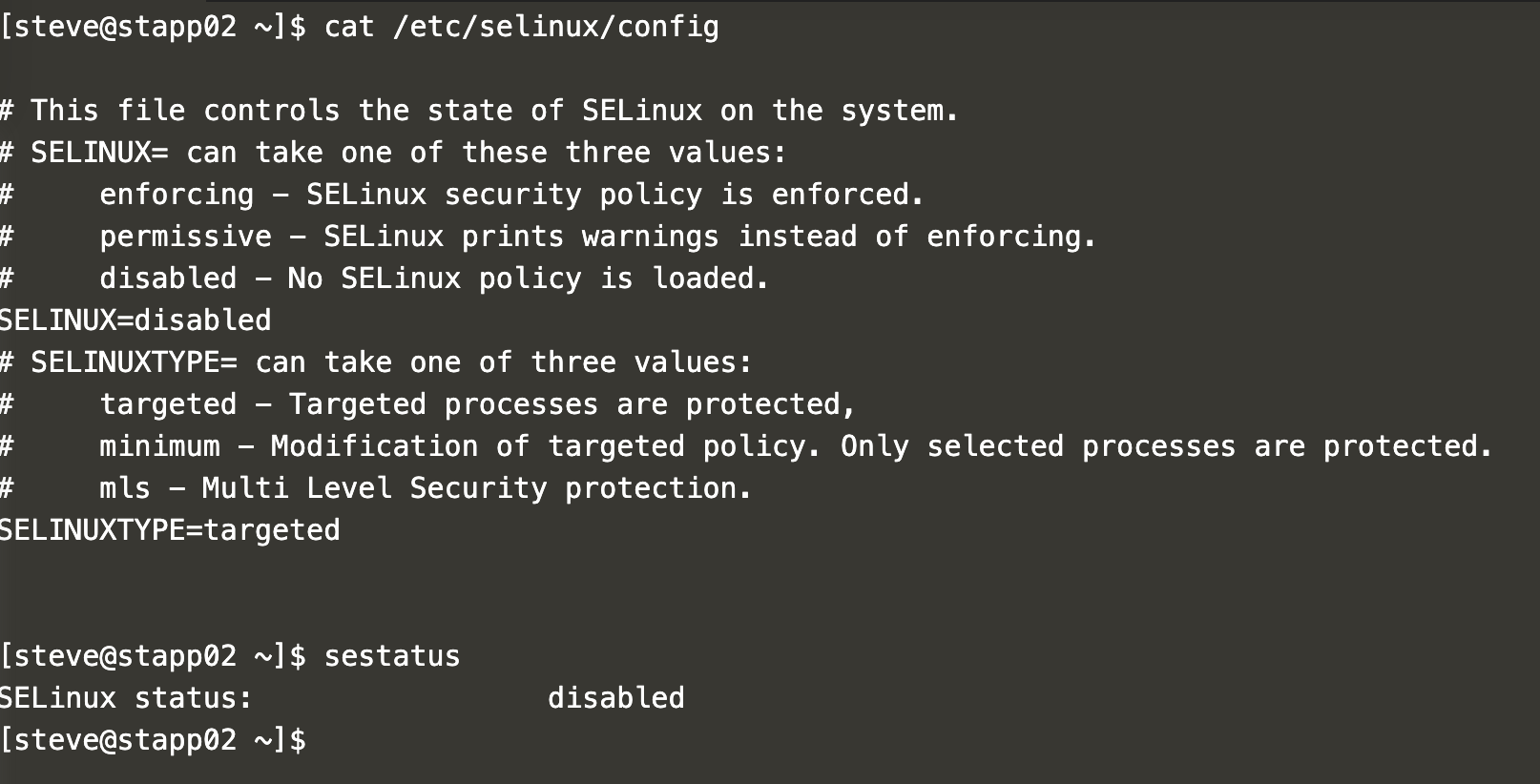
I’ve installed all the SElinux packages and updated /etc/selinux/config by settin SELINUX=disable in stapp02. But the task is mentioned failed. What’s wrong?
Hi,
We just reviewed your answer and found that you rebooted the stapp02 server after making changes however in question it is clearly mentioned not to reboot the server. Please note that in any of the questions you never need to reboot the servers.
I hope it clarifies why your task was marked as failed.
Thanks
Inderpreet
Thanks for the response.
Hello, what did I miss? Here’s what I did:
Hi @samishken
As per error displayed w.r.t your task required packages are not installed on app server 1 seems like you were asked to make the required changes on App Server 1 instead of App Server 2. Hence task was marked as failed.
Hi,
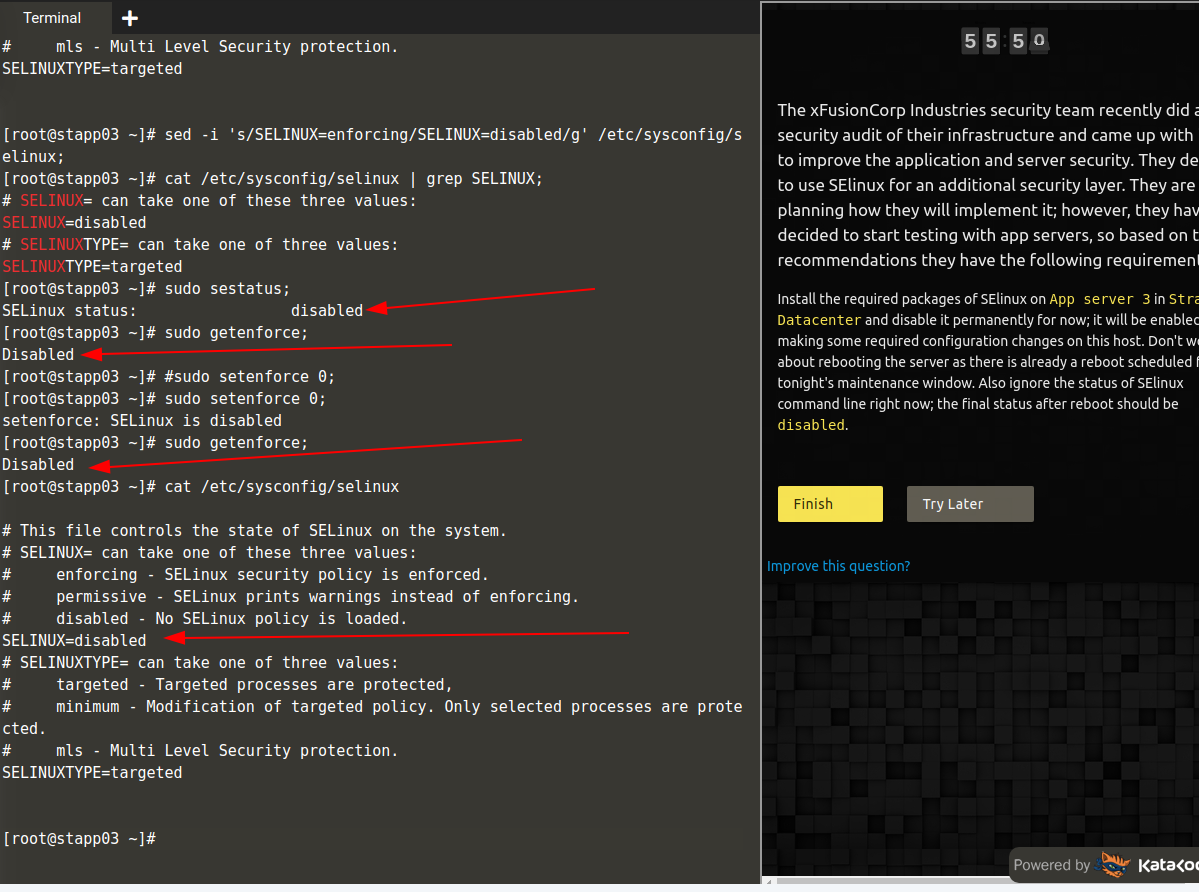
I have installed all required packages in app server 3 and also Selinux status is disabled. Let me know where I went wrong.
My task was also set to failed yet all the checks were correct:
[root@stapp02 ~]# getenforce
Disabled
[root@stapp02 ~]# cat /etc/sysconfig/selinux

# This file controls the state of SELinux on the system.
# SELINUX= can take one of these three values:
#     enforcing - SELinux security policy is enforced.
#     permissive - SELinux prints warnings instead of enforcing.
#     disabled - No SELinux policy is loaded.
SELINUX=disabled
# SELINUXTYPE= can take one of three values:
#     targeted - Targeted processes are protected,
#     minimum - Modification of targeted policy. Only selected processes are protected.
#     mls - Multi Level Security protection.
SELINUXTYPE=targeted


required state of Selinux does not match on app server 2
Update, I have a feeling i know why:
seems like sed might be destroying a symlink:
sed -i.bak ‘s/^SELINUX=enforcing/SELINUX=disabled/’ /etc/sysconfig/selinux
I would need to run some more tests. I would appreciate a second go.
/etc/sysconfig/selinux → …/selinux/config
update2 tests completed, I see exactly where i went wrong, this is a lesson on how sed interacts with symlinks - expecially with regard to backups with -i:
$ echo "Hello World" > hello
$ ln -s hello world
$ ls -la
total 0
drwxrwxrwx 1 rforth rforth 512 Apr 16 18:05 .
drwxr-xr-x 1 rforth rforth 512 Apr  8 20:08 ..
-rw-rw-rw- 1 rforth rforth  12 Apr 16 18:04 hello
lrwxrwxrwx 1 rforth rforth   5 Apr 16 18:05 world -> hello
$ cat hello
Hello World
$ cat world
Hello World
$ sed -i.bak 's/World/Richard/' world
$ ls -la
total 0
drwxrwxrwx 1 rforth rforth 512 Apr 16 18:05 .
drwxr-xr-x 1 rforth rforth 512 Apr  8 20:08 ..
-rw-rw-rw- 1 rforth rforth  12 Apr 16 18:04 hello
-rw-rw-rw- 1 rforth rforth  14 Apr 16 18:05 world
lrwxrwxrwx 1 rforth rforth   5 Apr 16 18:05 world.bak -> hello
$  cat hello
Hello World
$ cat world
Hello Richard
$
so it looks like sed -i.bak will break the symlink between /etc/sysconfig/selinux and /etc/selinux/config and create a new “file”, moving the symlink to a backup.
Thus if the exam (correctly) is checking /etc/selinux/config it would still contain the old data, whereas /etc/sysconfig/selinux is now no longer a symlink but a new independent file.
Lesson learned!
Hi,
My task was set as failed too. Below i attach recap message:
Task Status - Failed
- required ‘SElinux’ packages are not installed on App Server {{HOST_COUNT}}
The same variable {{HOST_COUNT}} was in question.
I think I installed all needed packages and disable SELinux permanently in /etc/selinux/config. To be sure everything is OK i made all needed changes on all app servers. Unfortunately veryfication failed.
Task completed successfully with below steps
ssh banner@stapp03
sudo yum update
sudo rpm -aq | grep selinux
yum install policycoreutils policycoreutils-python selinux-policy selinux-policy-targeted libselinux-utils setroubleshoot-server setools setools-console mcstrans
sudo sestatus
pwd
sudo su -
vi /etc/selinux/config
copy paste
# This file controls the state of SELinux on the system.
# SELINUX= can take one of these three values:
#     enforcing - SELinux security policy is enforced.
#     permissive - SELinux prints warnings instead of enforcing.
#     disabled - No SELinux policy is loaded.
SELINUX=disabled
# SELINUXTYPE= can take one of three values:
#     targeted - Targeted processes are protected,
#     minimum - Modification of targeted policy. Only selected processes are protected.
#     mls - Multi Level Security protection.
SELINUXTYPE=targeted
This is a technical glitch as of now it’s fixed.
I think so… But what about my points 
@Inderpreet In DNS troubleshooting task, in the task its mentioned to use Google DNS name servers but it didnt mention ipv4 or ipv6 dns name servers, i have used ipv6 name servers and however ping gave 8.8.8.8 ipv4 name server. but task is mentioned incomplete. can you make the task pending for me, i shall use ipv4 name servers and complete the task this time.
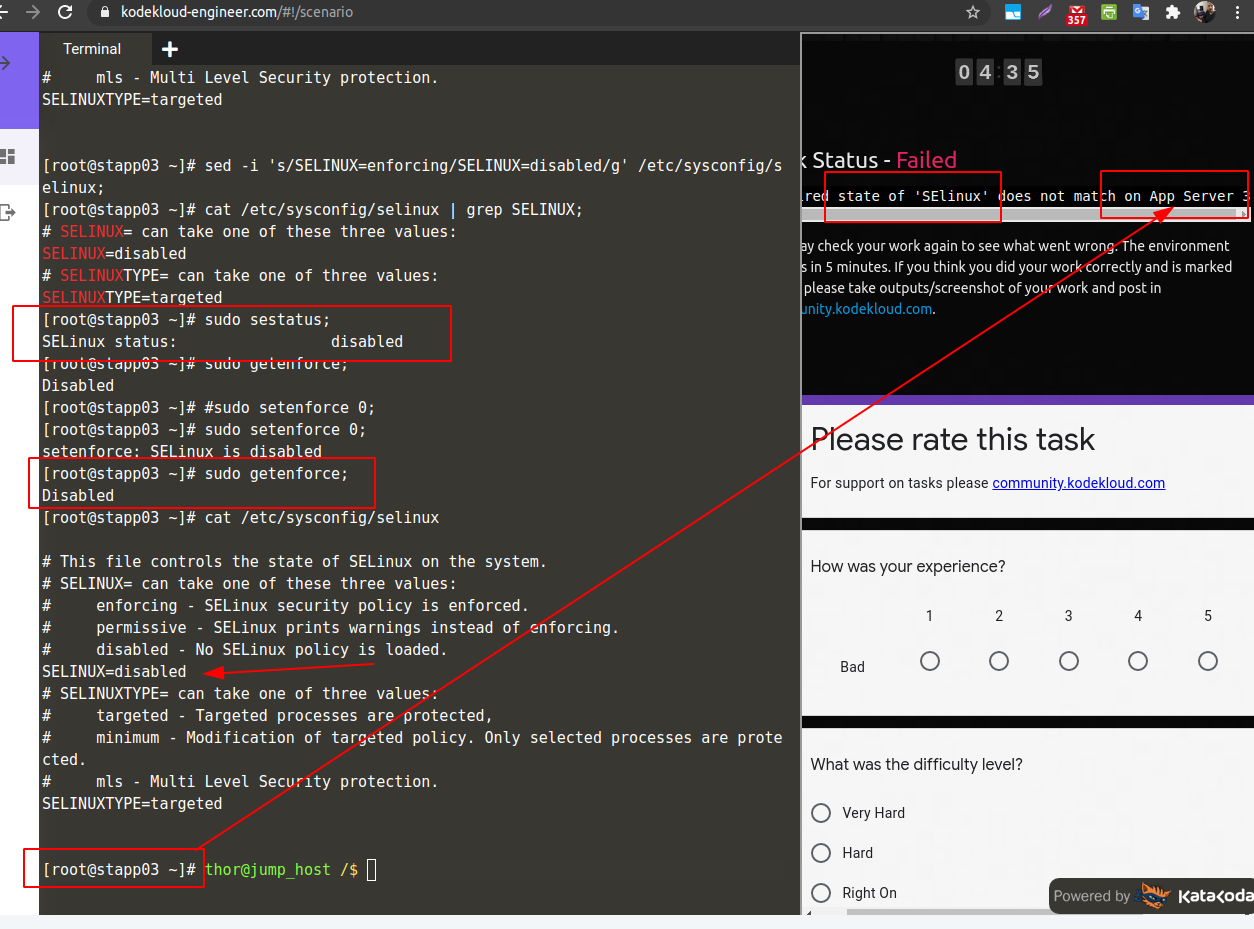
i had an issue with this lab , i went thru all the steps to put the selinux into disabled stated , they re scored me as Failed for the task, Apparently , they score me on the assumption it had should been done on App server 1 however , in the writting they mention APP server 3 ??? anyone faced this issue in the lab???
@loupon1979 Thanks for reporting this, do you mean you were asked to disable Selinux on app server 3 but you got error for app server 1 ?
about Linux run levels task: @Lakshmi @Tej-Singh-Rana @Inderpreet @akshayyw pls check the screen shots attached in thread Linux run levels failed, i am not sure why stapp01 says runlevel is not set and others stapp02 stapp03 as set. i have started changing run levels to 5 with stapp01 itself and later stapp02,stapp03. its puzzling for me any update by checking the screen shots. getting a failed task downs the tempo when you did everything right in the task. @kodekloud-support3 @Ayman
Install the required packages of SElinux on App server 3 in Stratos Datacenter and disable it permanently for now; it will be enabled after making some required configuration changes on this host. Don’t worry about rebooting the server as there is already a reboot scheduled for tonight’s maintenance window. Also ignore the status of SElinux command line right now; the final status after reboot should be disabled.