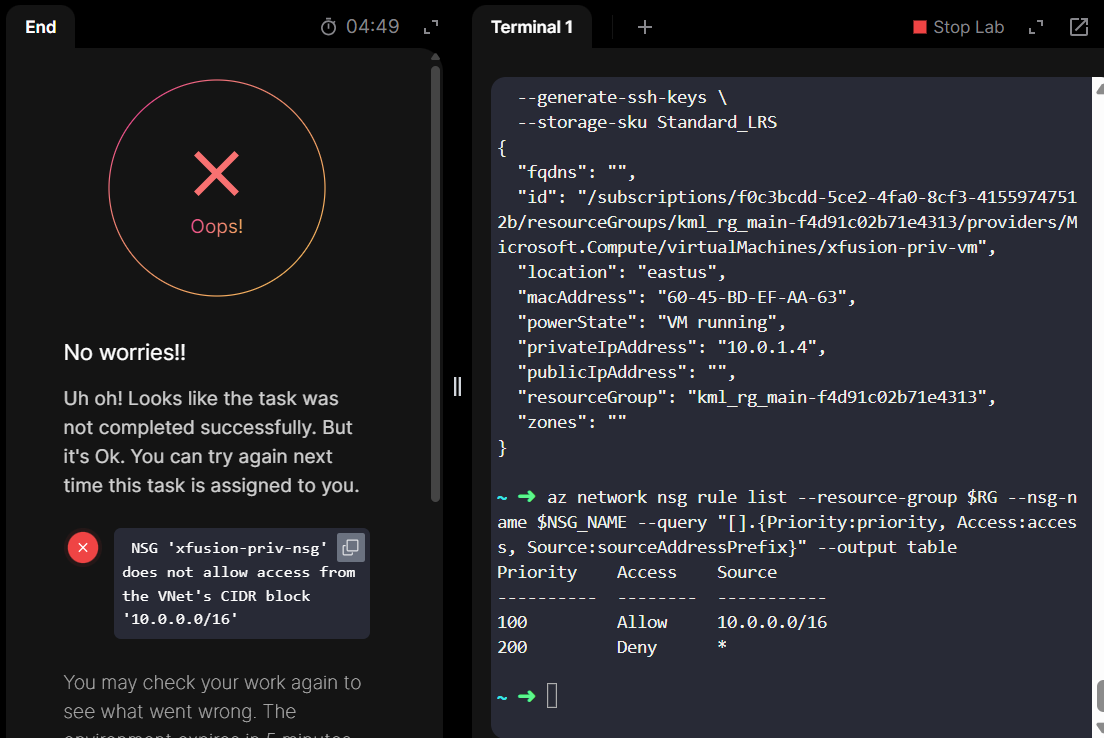
I am facing the same issue with the “Deploying Virtual Machines in a Private Virtual Network” lab task. Despite configuring the Network Security Group (NSG) exactly as requested to restrict traffic to the VNet’s CIDR block, the validation script continues to fail.
The Error:
The task fails with the following message:
NSG ‘xfusion-priv-nsg’ does not allow access from the VNet’s CIDR block ‘10.0.0.0/16’
What I have tried:
I understand the requirement is to allow access only from the VNet’s CIDR (10.0.0.0/16). To achieve this, I used the CLI to:
Create an Allow rule for 10.0.0.0/16 with Priority 100.
Create a Deny rule for * (Internet/Any) with Priority 200 to satisfy the “only” condition.
Associated the NSG with the Subnet.
I also tried the solution suggested in this GitHub repository
Found something interesting: if I allocate all resources to CentralUS, the lab works using Srikanth’s instructions. The lab says “EastUS”, but since that does not work, ignore that.
Hi,
Thanks for your effort. I tried centralus and westus just in case also tried different size Standard D2s v3 and Standard D2s v3 but still the corrector refuses and the task fails.
Not sure where you’re going wrong, TBH. Do make sure that you’re setting the correct disk type (StandardHDD) and other parameters besides the region specified in the task. I’ve done this task enough in the last week to be sure that you can get the VMs to deploy and get the grader to accept your answer.
J’ai testé récemment le déploiement de serveurs vps dans un environnement privé pour des besoins de tests internes. L’approche de gestion des NSG et des CIDR mentionnée ici me parle beaucoup. Dans mon expérience avec UNIVIRTUAL, la configuration de serveurs privés via leur interface m’a permis de mieux isoler le trafic et simplifier le déploiement.