"Validation file not found" error on App Server despite successful Jenkins pipeline builds

Lab: Jenkins Pipeline with Conditional Branch Deployment
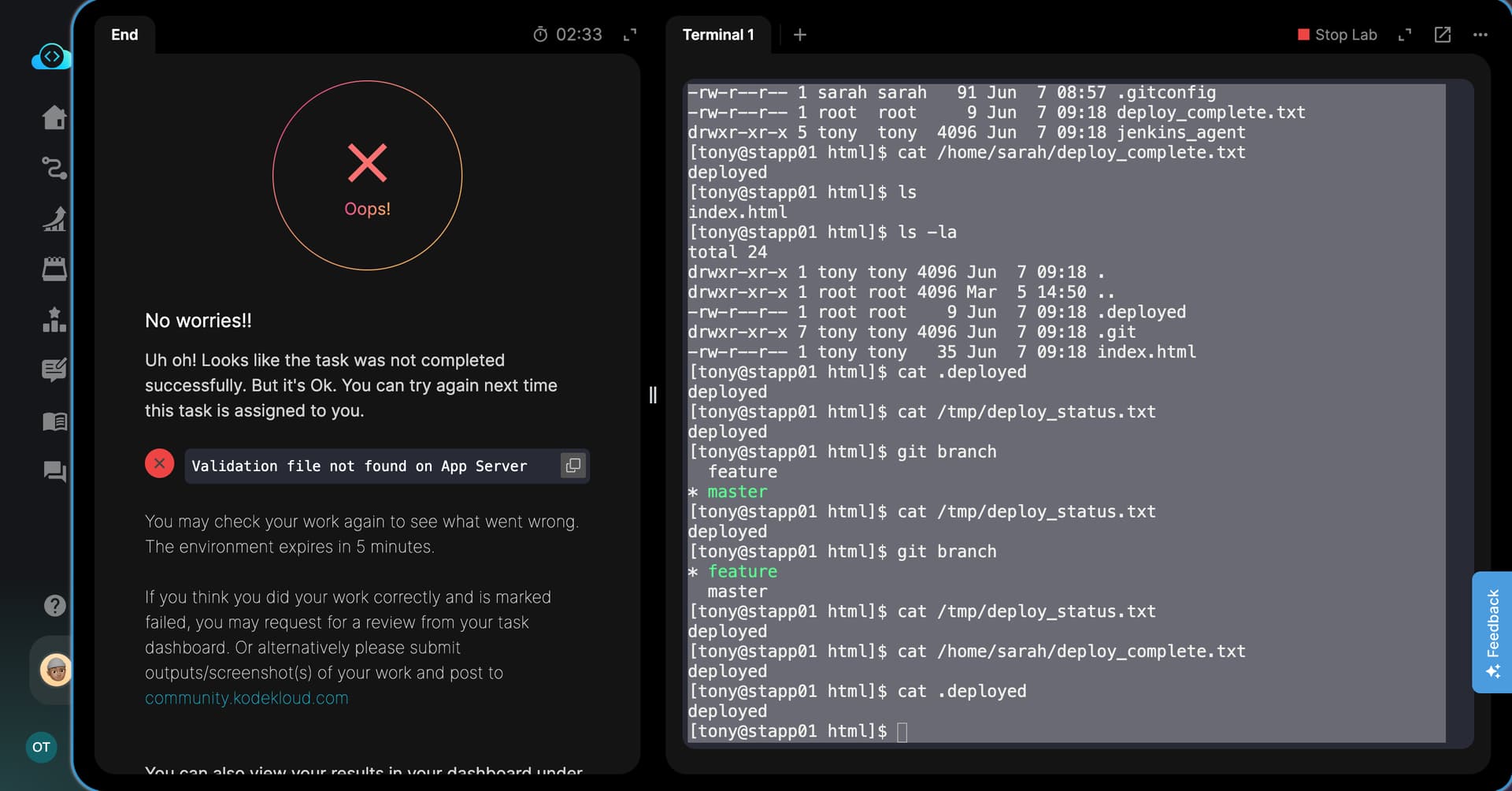
Issue: Task keeps failing with “Validation file not found on App Server” even though both master and feature branch builds are completing with SUCCESS.

What I have done:

  1. Created slave node (App Server 1) with label stapp01 and remote root /home/sarah/jenkins_agent

  2. Installed Java 17 on stapp01
    sudo yum install -y java-17-openjdk
    sudo alternatives --set java /usr/lib/jvm/java-17-openjdk-17.0.18.0.8-2.el9.x86_64/bin/java

  3. Fixed permissions
    sudo chown -R tony:tony /var/www/html
    sudo chown -R tony:tony /home/sarah/jenkins_agent
    git config --global --add safe.directory /var/www/html

  4. Created pipeline job datacenter-webapp-job with BRANCH parameter

  5. Pipeline script (simplified):

   pipeline {
       agent { label 'stapp01' }
       
       parameters {
           string(name: 'BRANCH', defaultValue: 'master')
       }
   
       stages {
           stage('Deploy') {
               steps {
                   script {
                       if (params.BRANCH == 'master') {
                           sh """
                               cd /var/www/html
                               git fetch origin
                               git checkout master
                               git pull origin master
                               sudo systemctl restart httpd
                               echo "deployed" | sudo tee /home/sarah/deploy_complete.txt
                               echo "deployed" | sudo tee /var/www/html/.deployed
                               echo "deployed" | sudo tee /tmp/deploy_status.txt
                           """
                       } else if (params.BRANCH == 'feature') {
                           sh """
                               cd /var/www/html
                               git fetch origin
                               git checkout feature
                               git pull origin feature
                               sudo systemctl restart httpd
                               echo "deployed" | sudo tee /home/sarah/deploy_complete.txt
                               echo "deployed" | sudo tee /var/www/html/.deployed
                               echo "deployed" | sudo tee /tmp/deploy_status.txt
                           """
                       }
                   }
               }
           }
       }
   }
  1. Both builds are SUCCESSFUL:
  • master branch build: SUCCESS
  • feature branch build: SUCCESS
  1. Validation files exist on App Server:
    $ ls -la /home/sarah/deploy_complete.txt
    -rw-r–r-- 1 root root 9 Jun 7 09:18 /home/sarah/deploy_complete.txt$ ls -la /var/www/html/.deployed
    -rw-r–r-- 1 root root 9 Jun 7 09:18 /var/www/html/.deployed$ ls -la /tmp/deploy_status.txt
    -rw-r–r-- 1 root root 9 Jun 7 09:18 /tmp/deploy_status.txt

  2. Apache is running and serving content:
    $ curl http://localhost:8080
    Welcome to xFusionCorp Industries!

  3. Git branches work correctly:
    $ git branch

  • feature
    master

What am I missing?

The task checker still says “Validation file not found on App Server” and marks the task as FAILED.

Is there a specific filename or location that the validator is looking for? Or is this a lab environment issue?

One problem is in (3), since you don’t need (nor do you want) to change the ownership of the “sarah” directories in this lab. You want the agent to execute as user “sarah”, and to be able to write to those directories she owns. This will also make your script simpler.

Also, the call to “systemctl restart httpd” is unneeded (and probably not what you want in any case).

Thanks sir for your correct guideline.

I successfully completed the task. :pray:

The key points were:

  1. Changing the Jenkins agent to run as user sarah instead of tony
  2. Removing sudo systemctl restart httpd (it was not needed)
  3. Removing all sudo chown commands for sarah’s directories

After making these changes, both master and feature branch builds passed and the validation file was found successfully.

Your explanation was very helpful. Thank you again!

Lab: Jenkins Pipeline with Conditional Branch Deployment

Issue: Task keeps failing with “Validation file not found on App Server” even though both master and feature branch builds are completing with SUCCESS.

What I have done:

  1. Created slave node (App Server 1) with label stapp01 and remote root /home/sarah/jenkins_agent

  2. Installed Java 17 on stapp01
    sudo yum install -y java-17-openjdk
    sudo alternatives --set java /usr/lib/jvm/java-17-openjdk-17.0.18.0.8-2.el9.x86_64/bin/java

  3. Fixed permissions
    sudo chown -R tony:tony /var/www/html
    sudo chown -R tony:tony /home/sarah/jenkins_agent
    git config --global --add safe.directory /var/www/html

  4. Created pipeline job datacenter-webapp-job with BRANCH parameter

  5. Pipeline script (simplified):

   pipeline {
       agent { label 'stapp01' }
       
       parameters {
           string(name: 'BRANCH', defaultValue: 'master')
       }
   
       stages {
           stage('Deploy') {
               steps {
                   script {
                       if (params.BRANCH == 'master') {
                           sh """
                               cd /var/www/html
                               git fetch origin
                               git checkout master
                               git pull origin master
                               sudo systemctl restart httpd
                               echo "deployed" | sudo tee /home/sarah/deploy_complete.txt
                               echo "deployed" | sudo tee /var/www/html/.deployed
                               echo "deployed" | sudo tee /tmp/deploy_status.txt
                           """
                       } else if (params.BRANCH == 'feature') {
                           sh """
                               cd /var/www/html
                               git fetch origin
                               git checkout feature
                               git pull origin feature
                               sudo systemctl restart httpd
                               echo "deployed" | sudo tee /home/sarah/deploy_complete.txt
                               echo "deployed" | sudo tee /var/www/html/.deployed
                               echo "deployed" | sudo tee /tmp/deploy_status.txt
                           """
                       }
                   }
               }
           }
       }
   }
  1. Both builds are SUCCESSFUL:
  • master branch build: SUCCESS
  • feature branch build: SUCCESS
  1. Validation files exist on App Server:
    $ ls -la /home/sarah/deploy_complete.txt
    -rw-r–r-- 1 root root 9 Jun 7 09:18 /home/sarah/deploy_complete.txt$ ls -la /var/www/html/.deployed
    -rw-r–r-- 1 root root 9 Jun 7 09:18 /var/www/html/.deployed$ ls -la /tmp/deploy_status.txt
    -rw-r–r-- 1 root root 9 Jun 7 09:18 /tmp/deploy_status.txt

  2. Apache is running and serving content:
    $ curl http://localhost:8080
    Welcome to xFusionCorp Industries!

  3. Git branches work correctly:
    $ git branch

  • feature
    master

What am I missing?

The task checker still says “Validation file not found on App Server” and marks the task as FAILED.

Is there a specific filename or location that the validator is looking for? Or is this a lab environment issue?

  • You’re still restarting httpd, which probably confuses the grader.
  • I don’t think you need to call “git fetch origin”, although it’s probably harmless.
  • I suspect that the validation files are an internal detail of the working of the grader, and isn’t something you need to manage.