followed document step by step
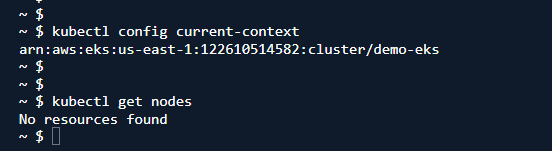
followed document step by step
I’m walking through the tutorial right now. It’s actually working for me:
vim aws-auth-cm.yaml
~ $ kubectl apply -f aws-auth-cm.yaml
configmap/aws-auth created
~ $ kubectl get nodes
NAME                            STATUS     ROLES    AGE   VERSION
ip-172-31-1-181.ec2.internal    NotReady   <none>   23s   v1.24.17-eks-59bf375
ip-172-31-8-74.ec2.internal     NotReady   <none>   18s   v1.24.17-eks-59bf375
ip-172-31-89-145.ec2.internal   NotReady   <none>   23s   v1.24.17-eks-59bf375
~ $ kubectl get nodes
NAME                            STATUS     ROLES    AGE   VERSION
ip-172-31-1-181.ec2.internal    NotReady   <none>   70s   v1.24.17-eks-59bf375
ip-172-31-8-74.ec2.internal     Ready      <none>   65s   v1.24.17-eks-59bf375
ip-172-31-89-145.ec2.internal   Ready      <none>   70s   v1.24.17-eks-59bf375
~ $ kubectl get nodes
NAME                            STATUS   ROLES    AGE   VERSION
ip-172-31-1-181.ec2.internal    Ready    <none>   75s   v1.24.17-eks-59bf375
ip-172-31-8-74.ec2.internal     Ready    <none>   70s   v1.24.17-eks-59bf375
ip-172-31-89-145.ec2.internal   Ready    <none>   75s   v1.24.17-eks-59bf375
~ $ kubectl get po -A
NAMESPACE      NAME                              READY   STATUS    RESTARTS     AGE
external-dns   external-dns-76b5567444-65pdt     1/1     Running   0            22m
kube-system    aws-node-8sgn2                    2/2     Running   0            88s
kube-system    aws-node-hvcbs                    2/2     Running   0            83s
kube-system    aws-node-phk5l                    2/2     Running   0            88s
kube-system    coredns-b8b6dd877-cxdg9           1/1     Running   0            22m
kube-system    coredns-b8b6dd877-zmzxz           1/1     Running   0            22m
kube-system    eks-node-monitoring-agent-f42q9   1/1     Running   1 (9s ago)   88s
kube-system    eks-node-monitoring-agent-g95c5   1/1     Running   0            88s
kube-system    eks-node-monitoring-agent-gh6sf   1/1     Running   0            83s
kube-system    eks-pod-identity-agent-4ljjx      1/1     Running   0            88s
kube-system    eks-pod-identity-agent-x5b48      1/1     Running   0            83s
kube-system    eks-pod-identity-agent-xfmdv      1/1     Running   0            88s
kube-system    kube-proxy-rv8t5                  1/1     Running   0            88s
kube-system    kube-proxy-w9s9b                  1/1     Running   0            83s
kube-system    kube-proxy-z7mt6                  1/1     Running   0            88s
kube-system    metrics-server-5f8959cc48-6hnhz   1/1     Running   0            25m
kube-system    metrics-server-5f8959cc48-hhxq7   1/1     Running   0            25m
~ $
If I had to guess, you may not have made the correct edit to the configmap. But in general, the totorial seems to work.