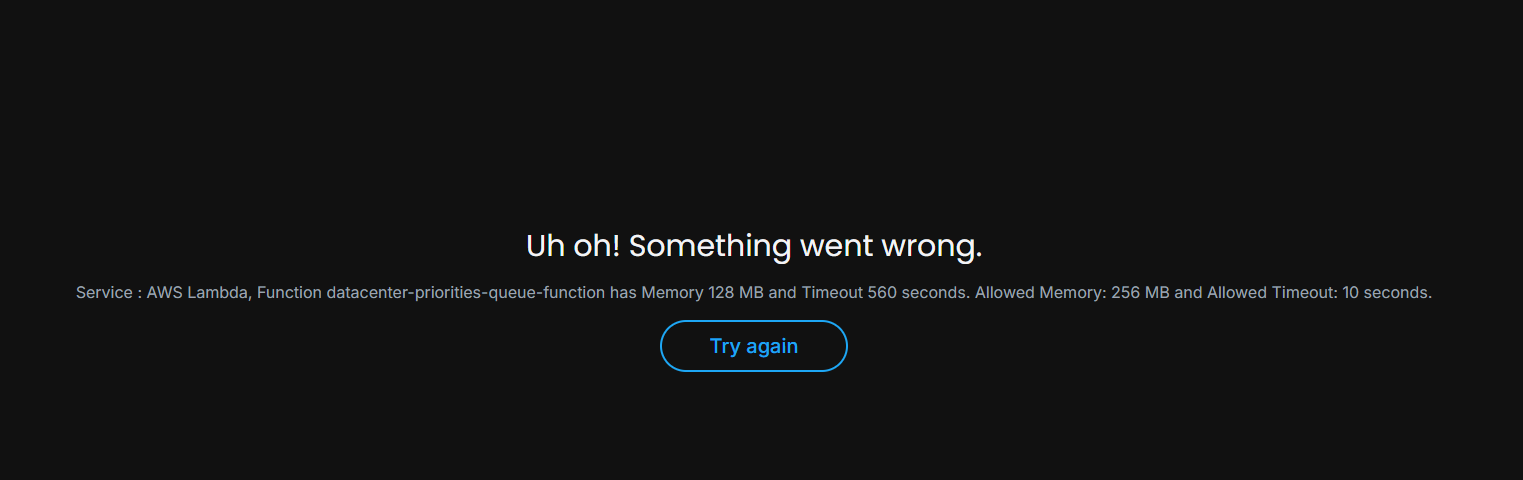
Unable to proceed with Day 48 due to error:
Service : AWS Lambda, Function “function” has Memory 128 MB and Timeout 560 seconds. Allowed Memory: 256 MB and Allowed Timeout: 10 seconds.
Unable to revise day 47 or open other lab courses. Day 47 is already closed and passed. Please advise
Issue still occurs even on incognito and other browsers.
When I open DevTools, I can also see “Failed to load resource: the server responded with a status of 401 ()” . Tried to clear cache re-login and new browser session, also tried on other devices or network, still the same.
A 401 suggests you are not logged in. Is it possible you’re in a place with a firewall that’s preventing you to get to some of our servers? Another possibility is that you’re using a browser extension (some anti-tracking extensions come to mind) which is acting as if it was a firewall.
Can you possibly reset the session? manager.labs.kodekloud.com/session?token*** shows token is already used. I don’t know if this info is related but the issue still persists and I am unable to finish the remaining active practice tasks.
I’m now on a home network and using a personal laptop, issue is still the same. I cannot finish or start any tasks, please advise. Should I raise a ticket for this?
Yes, please see the screenshot posted on the replies. It occurs on all tasks - revision or start. Unable to access the AWS CLI or the console from Day 47 to apply the solution as my browser history is already cleared.
We are also going to change these lambda questions to state what should be put for memory and timeout to prevent other people falling into the same trap.
We do have limits for infrastructure sizes to prevent abuse, but you would only see these if you have ever started a playground and read the info on limits. It’s on us to ensure that KKE challenge questions state valid values so that these thresholds are not accidentally crossed.
I don’t know if it has been done yet, since the person who was assigned to do it has probably signed off now as he’s in India. You can give it a try and if still not working I will prompt him in the morning.
@gt23 Can you send me the email address you use to log in to the platform as a DM and let me know when you have so that I may check my private messages.
Hi @Alistair_KodeKloud , tried Day 47 Revise and Day 48 Start, the issue still occurs. I have sent you my email address. Please check your chat messages, thank you for your help!