Hi Team,
I am currently participating in the 100 Days of Cloud (AWS) program and am working on Task 31.
At the moment, I am unable to deploy the RDS instance, as I am encountering the error mentioned below. I have tried multiple times but the issue persists.
Could you please look into this and help resolve it at the earliest?
Thank you for your support.
User: arn:aws:iam::787171101936:user/kk_labs_user_286671
Action: rds:DescribeGlobalClusters
On resource(s): arn:aws:rds::787171101936:global-cluster:*
Context: a service control policy explicitly denies the action
Having gone throught the task, I don’t think the rds:DescribeGlobalClusters is actually needed to finish the task – I got the database to go to Available even with this error. I think it only affects your ability to see certain details about other RDS clusters.
User: arn:aws:iam::654654579437:user/kk_labs_user_152728
Action: rds:CreateDBInstance
On resource(s): arn:aws:rds:us-east-1:654654579437:db:database-1
Context: a service control policy explicitly denies the action
please provide solution for this
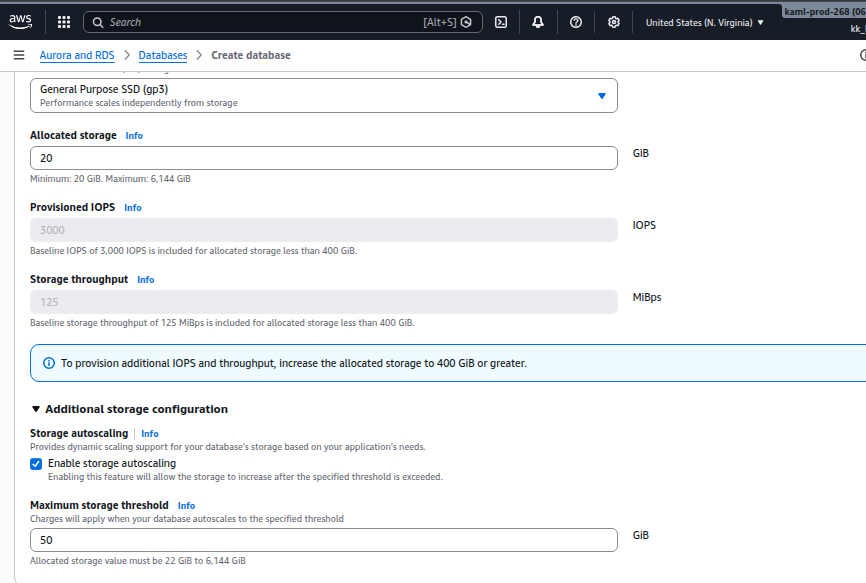
It would have helped if you had shared a screenshot of your RDS config. I tried this lab, and it worked fine at my end.
Probably, youmight have misconfigured the Storage Autoscaling. You need set the threshold value to 50GB as required in the task.
It also might be the class of service you asked for. I got the rds:CreateDBInstance error the first time I did the lab. The fix turned out to be using the “Free-tier” level of service.
When you visit the RDS console, you may see that error. It is because there is a pane there for displaying the status of global clusters.
Global clusters are not enabled for these accounts hence the message.
We have no labs that require use of global clusters, therefore…
That message can be ignored