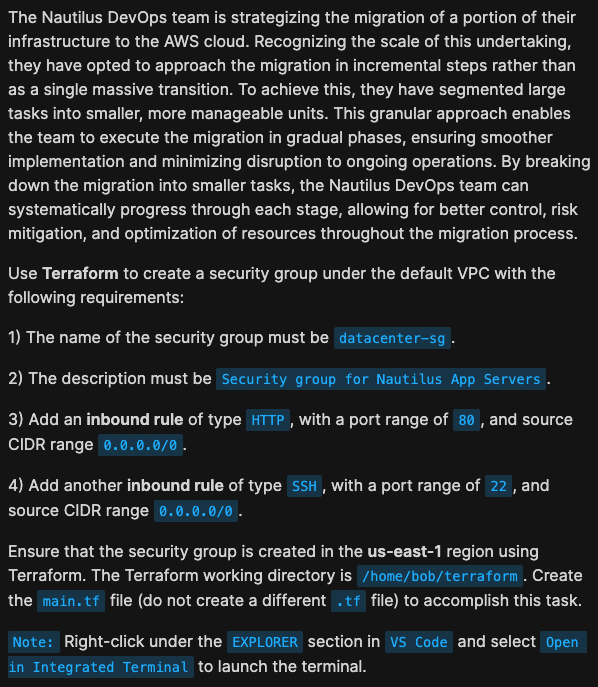
Hi,
I am not sure what I am missing, but I am getting the 'datacenter-sg' doesn't exist. error. Any help on this would be awesome.
Below is the terraform code.
data "aws_vpc" "default" {
  default = true
}

module "security_group" {
  source = "terraform-aws-modules/security-group/aws"

  name        = "datacenter-sg"
  description = "Security group for Nautilus App Servers"
  vpc_id      = data.aws_vpc.default.id

  ingress_rules = {
    http = {
      from_port   = 80
      ip_protocol = "tcp"
      cidr_ipv4   = "0.0.0.0/0"
      description = "HTTP from all"
    }
    ssh = {
      from_port   = 22
      ip_protocol = "tcp"
      cidr_ipv4   = "0.0.0.0/0"
      description = "SSH from all"
    }
  }

  tags = {
    Name = "datacenter-sg"
  }
}
Output of → aws ec2 describe-security-groups
{
    "SecurityGroups": [
        {
            "GroupId": "sg-025395ba7df7d3213",
            "IpPermissionsEgress": [
                {
                    "IpProtocol": "-1",
                    "UserIdGroupPairs": [],
                    "IpRanges": [
                        {
                            "CidrIp": "0.0.0.0/0"
                        }
                    ],
                    "Ipv6Ranges": [],
                    "PrefixListIds": []
                }
            ],
            "Tags": [],
            "VpcId": "vpc-df89c6174675daae9",
            "SecurityGroupArn": "arn:aws:ec2:us-east-1:000000000000:security-group/sg-025395ba7df7d3213",
            "OwnerId": "000000000000",
            "GroupName": "default",
            "Description": "default VPC security group",
            "IpPermissions": []
        },
        {
            "GroupId": "sg-aacdcc3f098e40c2f",
            "IpPermissionsEgress": [],
            "Tags": [
                {
                    "Key": "Name",
                    "Value": "datacenter-sg"
                }
            ],
            "VpcId": "vpc-df89c6174675daae9",
            "SecurityGroupArn": "arn:aws:ec2:us-east-1:000000000000:security-group/sg-aacdcc3f098e40c2f",
            "OwnerId": "000000000000",
            "GroupName": "datacenter-sg-9104789fd12fe3a9b925a47ad1",
            "Description": "Security group for Nautilus App Servers",
            "IpPermissions": [
                {
                    "IpProtocol": "tcp",
                    "FromPort": 80,
                    "ToPort": 80,
                    "UserIdGroupPairs": [],
                    "IpRanges": [
                        {
                            "Description": "HTTP from all",
                            "CidrIp": "0.0.0.0/0"
                        }
                    ],
                    "Ipv6Ranges": [],
                    "PrefixListIds": []
                },
                {
                    "IpProtocol": "tcp",
                    "FromPort": 22,
                    "ToPort": 22,
                    "UserIdGroupPairs": [],
                    "IpRanges": [
                        {
                            "Description": "SSH from all",
                            "CidrIp": "0.0.0.0/0"
                        }
                    ],
                    "Ipv6Ranges": [],
                    "PrefixListIds": []
                }
            ]
        }
    ]
}