Hi All,
I had an error and it says “xfusion_kp is not Rsa” Below is my code and output. Could any one will help me with it?
resource “tls_private_key” “xfusion_kp” {
Terraform will perform the following actions:
resource “local_file” “xfusion_kp_file” {
content = (sensitive value)
content_base64sha256 = (known after apply)
content_base64sha512 = (known after apply)
content_md5 = (known after apply)
content_sha1 = (known after apply)
content_sha256 = (known after apply)
content_sha512 = (known after apply)
directory_permission = “0777”
file_permission = “0400”
filename = “/home/bob/xfusion.pem”
id = (known after apply)
resource “tls_private_key” “xfusion_kp” {
algorithm = “RSA”
ecdsa_curve = “P224”
id = (known after apply)
private_key_openssh = (sensitive value)
private_key_pem = (sensitive value)
private_key_pem_pkcs8 = (sensitive value)
public_key_fingerprint_md5 = (known after apply)
public_key_fingerprint_sha256 = (known after apply)
public_key_openssh = (known after apply)
public_key_pem = (known after apply)
rsa_bits = 4096
Hi @floatingarya
The resource block appears to be in good order." and try this again.
It would have helped if you had shared the code in a code block:
resource “tls_private_key” “xfusion_kp” {
algorithm = “RSA”
rsa_bits = 4096
}
resource “local_file” “xfusion_kp_file” {
content = tls_private_key.xfusion_kp.private_key_pem
filename = “/home/bob/xfusion-kp.pem”
file_permission = “0400”
}
Hi @floatingarya ,
Could you please share the task name? I checked both Terraform level 1 and level 2 but couldn’t find any task called “Create a new key pair.”
Hi guys! How it’s going?
resource "tls_private_key" "datacenter_kp" {
  algorithm = "RSA"
  rsa_bits  = 2048
}

resource "local_file" "private_key" {
  filename        = "/home/bob/datacenter-kp.pem"
  content         = tls_private_key.datacenter_kp.private_key_pem
  file_permission = "0600"
}
After finish the exercise, I saw that message
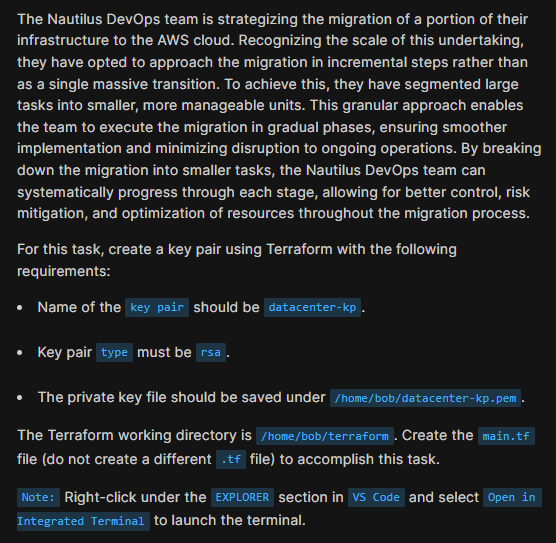
'datacenter-kp' doesn't exist or or its type is not 'rsa'.
Someone have a clue?
Thanks!
Could I please see the wording of the question? The terraform works to create a file /home/bob/datacenter-kp.pem. It sounds like the grader script does NOT expect that file name. So the question may clarify why that is.
Hi Rob.
I can’t upload other screeshot, to show you pwd, and the datacenter-kp.pem.
Thank you
I don’t have any way to check what the grader is doing, unfortunately. The problem also says the script file should be /home/bob/terraform/main.tf. If that’s the case, I have no idea what else they’re checking. But your file is syntactically correct and runs – that I’ve verified.
Thank you, @rob_kodekloud .
i am having the same issue with this task.
Esther
October 18, 2025, 5:07pm
#11
After creating the tls_private_key, you’ll have to create the key_pair with the aws_key_pair resource and set the public key to the public_key_openssh generated by the tls_private_key resource.
1 Like
As suggested by @Esther , this works. Thanks.
resource "tls_private_key" "ssh_key" {
  algorithm = "RSA"
  rsa_bits  = 4096
}

resource "aws_key_pair" "kp" {
  key_name   = "datacenter-kp"
  public_key = tls_private_key.ssh_key.public_key_openssh
}

resource "local_sensitive_file" "pem" {
  content  = tls_private_key.ssh_key.private_key_pem
  filename = "/home/bob/datacenter-kp.pem"
}