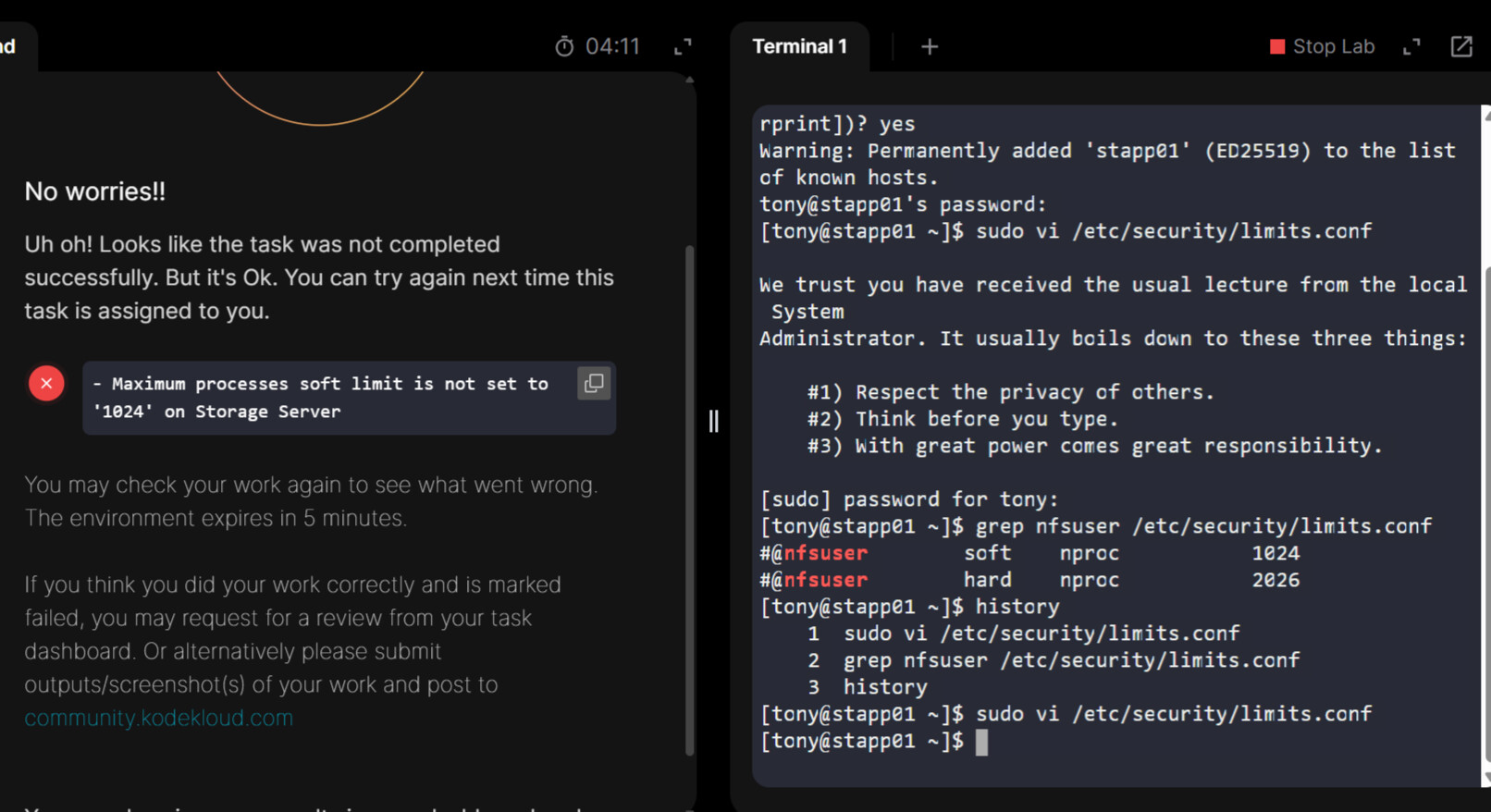
When i was working with the task, In the question it’s showing that i need to work on application server1, but when i have done changes in the script with soft and hard limit, and checking the task it’s showing error that the soft limit need to be setup on storage server. If i was trying to login with the storage server it’s showing the below error.
(thor@jump-host ~$ ssh natasha@ststor01
ssh: Could not resolve hostname ststor01: Name or service not known)
Task i was working with:-
In the Stratos Datacenter , our application server 1 is encountering performance degradation due to excessive processes held by the nfsuser user. To mitigate this issue, we need to enforce limitations on its maximum processer.
Could anyone please help me with this error.
Thanks.
My sense is that this probably really did need to happen on app server 1, and not on the storage server. In fact, this might explain your error – the way that our KKE labs are set up, if a server is not needed for a task, it won’t be accessible in the task. You need to do
ssh tony@stapp01
You’ll need to add entries to /etc/security/limits.conf on that server.
Previously i have worked with the same step of updating the entries on /etc/security/limits.conf file on tony’s app server. I will work once again with this and will update.
Thanks for the response Rob.
Hai rob_kodekloud,
Can you please help me with this. I have attached the SS for your reference.
Facing the same issue after working on tony@stapp01.
Below mentioned are the steps i have followed
- Logged into tony@stapp01 server.
- Used "sudo vi /etc/security/limits.conf and then added the soft link and hard link limit at the end.
- Confirmed the edited lines using grep command and it shows the lines added.
- Once after clicking for the check, It shows the error.
In this error also it is only mentioning soft link is not set on storage server
Does that say
#@nfsuser
If it does, then there one issue. # marks the entire line as a comment, so it will be ignored.
Secondly, the result says
Maximum processes soft limit is not set to ‘1024’ on Storage Server
Your screenshot shows you have done it on app server 1.
Today i was able to clear the task.
Firstly thanks for timely suggestions team.
In my task itself it is showing that i need to work on app server 1, so if i am trying to logged into storage server i was unable to login as Rob mentioned in previous chat about the KKE setup.
And i had a small doubt, as you mentioned # marks the line as a comment and ignored. If that is the cause for error it has show soft and hard limit as a error, as i have mentioned # for both the limits. But in my situation it’s showing only for soft limit. Is there any particular trigger point for the error, Just for better understanding.
Thanks.
Had you put this file on the correct server, neither limit would have been set since both are commented.
I assume the grader here gives up at the first error it encounters.
Yes, i copied the file to the mentioned server itself. And i was able to complete my task.