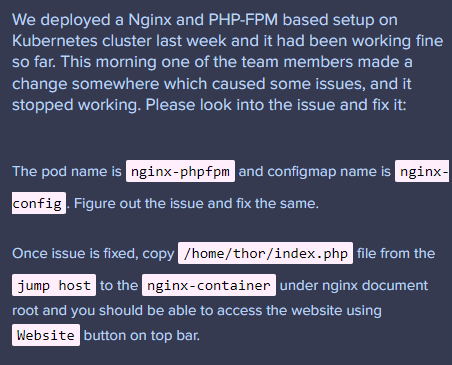
We need additional information about your issue what did you try to do? Also, please provide us the level and the curriculum for the task
Thank
Hi @sudhakar.raya
Finally, found the task. 
To finalize this task check the root path on configmap and the mounted path on nginx-container shared-file
Good luck
Hello @mmkmou ,
Thank you for your inputs. I did verified root path on configmap and the mounted path on nginx-container shared-file and could find no difference. Not sure what am I missing here.
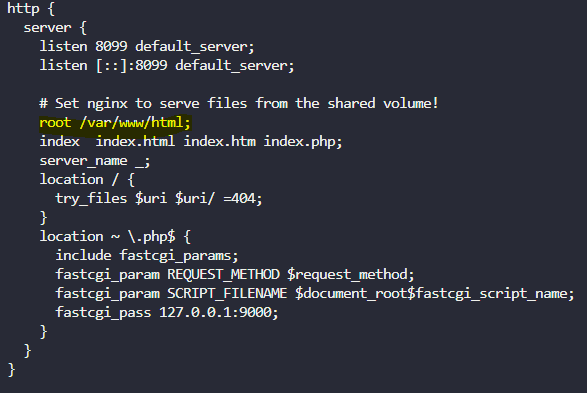
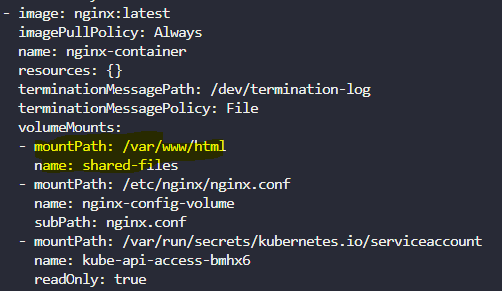
So after making sure that shared files were hosting on same path for both containers is it working?
Hello i can see the paths /var/www/html are same in config map and the nginx container. But still the page is not accessible. What else is needed please help
I was able to fix the Nginx + PHP-FPM issue on Kubernetes. Here’s what worked:
Make sure the volume mount path in your pod matches the root path in the Nginx ConfigMap. For example, if the ConfigMap has:
root /var/www/html;
Then the Nginx container should mount the shared volume at /var/www/html.
Once that’s correct and the pod is running, copy your PHP file into the container like this:
kubectl cp /home/thor/index.php nginx-phpfpm:/var/www/html/index.php -c nginx-container
After that, the website should load the index.php file correctly.