https://learn.kodekloud.com/user/courses/helm-for-beginners/module/b90a4aa4-31b5-43d3-a7aa-383d48c50db0/lesson/ef6d5919-cd28-4d13-8298-1f3f1961f07e
Lab: Writing a helm chart
Create a helm chart at /root/webapp-nginx for this application by converting the deployment and service definition files into templates.
Create a chart first and then move the definition files into the templates directory.
- The deployment and service objects should be named in the format
RELEASE-NAME-nginx.
- Set
apiVersion for the chart to v2.
- Name the chart
webapp-nginx.
- Set version number to
0.1.1.
- Set
appVersion to 1.16.0.
- Values file has a variable
image set by default so make changes for an image nginx:1.16.0.
- Value of
image variable to be used in deployment as the image name for the container.
In solution
The values.yaml file should be look like as follows:
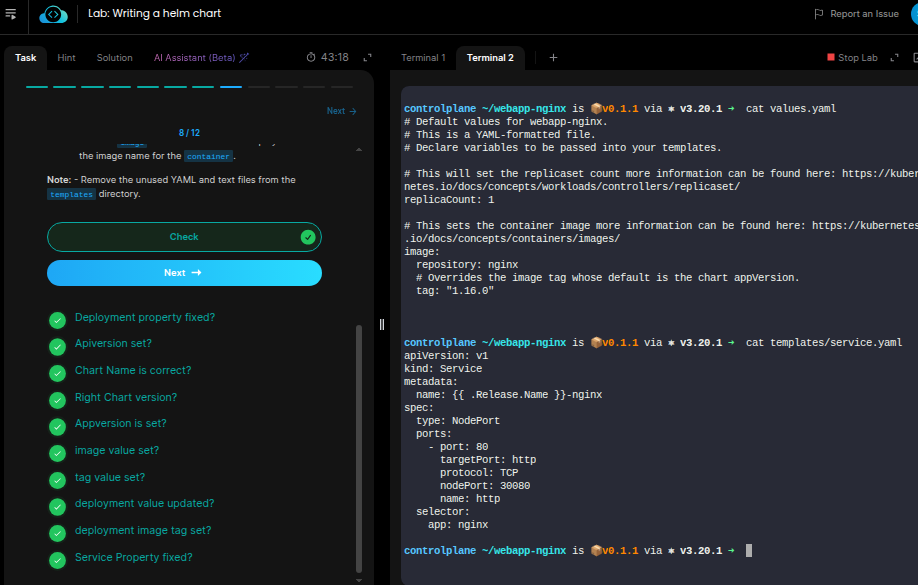
replicaCount: 1

image:
  repository: nginx
  tag: 1.16.0

service:
  type: ClusterIP
  port: 80
Why service type will cluster ip when given service is NODEPORT
controlplane ~/webapp-nginx/templates ➜ cat /root/webapp/service.yaml
apiVersion: v1
kind: Service
metadata:
name: nginx
spec:
type: NodePort
ports:
- port: 80
targetPort: http
protocol: TCP
nodePort: 30080
name: http
selector:
app: nginx
Yup!
That’s a bug in the solution for the Service type; there is no requirement for updating the Service type.
I’ll inform the team to fix this.
However, if we carry out the task as defined in the requirements, the task results in a pass.
I am a bit confused , As i am not getting confidence on helm 
that is other topic, Comming to my concern
The deployment name can be modified in deployment.yaml file as:
name: {{ .Release.Name }}-nginx
The container section in the deployment.yaml can be modified as:
   containers:
      - name: {{ .Values.image.repository }}
        image: {{ .Values.image.repository }}:{{ .Values.image.tag }}
The service name in the service.yaml should be modified as:
name: {{ .Release.Name }}-nginx
My concern is why imagePullPolicy in deployment no need the change?
plus why service name need to be name: {{ .Release.Name }}-nginx
Let me share my solution
controlplane ~/webapp-nginx is 📦 v0.1.1 via ⎈ v3.20.1 ➜  cat templates/deployment.yaml
apiVersion: apps/v1
kind: Deployment
metadata:
  name: {{.Release.Name}}-nginx
spec:
  selector:
    matchLabels:
      app: {{.Release.Name}}
  template:
    metadata:
      labels:
        app: {{.Release.Name}}
    spec:
      containers:
        - name: {{.Values.image.repository}}
          image: {{.Values.image.repository}}:{{.Values.image.tag}}
          imagePullPolicy: {{.Values.image.pullPolicy}}
          ports:
            - name: http
              containerPort: 80
              protocol: TCP
controlplane ~/webapp-nginx is 📦 v0.1.1 via ⎈ v3.20.1 ➜  cat templates/service.yaml
apiVersion: v1
kind: Service
metadata:
  name: {{.Release.Name}}
spec:
  type: NodePort
  ports:
    - port: 80
      targetPort: http
      protocol: TCP
      name: http
  selector:
    app: {{.Release.Name}}
https://learn.kodekloud.com/user/courses/helm-for-beginners/module/b90a4aa4-31b5-43d3-a7aa-383d48c50db0/lesson/ef6d5919-cd28-4d13-8298-1f3f1961f07e
Lab: Writing a helm chart
Create a helm chart at /root/webapp-nginx for this application by converting the deployment and service definition files into templates.
Create a chart first and then move the definition files into the templates directory.
- The deployment and service objects should be named in the format
RELEASE-NAME-nginx.
- Set
apiVersion for the chart to v2.
- Name the chart
webapp-nginx.
- Set version number to
0.1.1.
- Set
appVersion to 1.16.0.
- Values file has a variable
image set by default so make changes for an image nginx:1.16.0.
- Value of
image variable to be used in deployment as the image name for the container.
In solution
The values.yaml file should be look like as follows:
replicaCount: 1

image:
  repository: nginx
  tag: 1.16.0

service:
  type: ClusterIP
  port: 80
Why service type will cluster ip when given service is NODEPORT
controlplane ~/webapp-nginx/templates ➜ cat /root/webapp/service.yaml
apiVersion: v1
kind: Service
metadata:
name: nginx
spec:
type: NodePort
ports:
- port: 80
targetPort: http
protocol: TCP
nodePort: 30080
name: http
selector:
app: nginx
Because labels, imagePullPolicy, and selectors on Deployment and Service are not the tasks in question.
You can templatize them as in your yaml manifests; there’s nothing wrong with it. But that’s not part of the requirement for this lab.
I am a bit confused , As i am not getting confidence on helm
that is other topic, Comming to my concern
The deployment name can be modified in deployment.yaml file as:
name: {{ .Release.Name }}-nginx
The container section in the deployment.yaml can be modified as:
   containers:
      - name: {{ .Values.image.repository }}
        image: {{ .Values.image.repository }}:{{ .Values.image.tag }}
The service name in the service.yaml should be modified as:
name: {{ .Release.Name }}-nginx
My concern is why imagePullPolicy in deployment no need the change?
plus why service name need to be name: {{ .Release.Name }}-nginx
Let me share my solution
controlplane ~/webapp-nginx is  v0.1.1 via ⎈ v3.20.1 ➜ cat templates/deployment.yaml
apiVersion: apps/v1
kind: Deployment
metadata:
name: {{.Release.Name}}-nginx
spec:
selector:
matchLabels:
app: {{.Release.Name}}
template:
metadata:
labels:
app: {{.Release.Name}}
spec:
containers:
- name: {{.Values.image.repository}}
image: {{.Values.image.repsitory}}:{{.Values.image.tag}}
imagePullPolicy: {{.Values.image.pullPolicy}}
ports:
- name: http
containerPort: 80
protocol: TCP
controlplane ~/webapp-nginx is v0.1.1 via ⎈ v3.20.1 ➜ cat templates/service.yaml
apiVersion: v1
kind: Service
metadata:
name: {{.Release.Name}}
spec:
type: NodePort
ports:
- port: 80
targetPort: http
protocol: TCP
name: http
selector:
app: {{.Release.Name}}