@Inderpreet
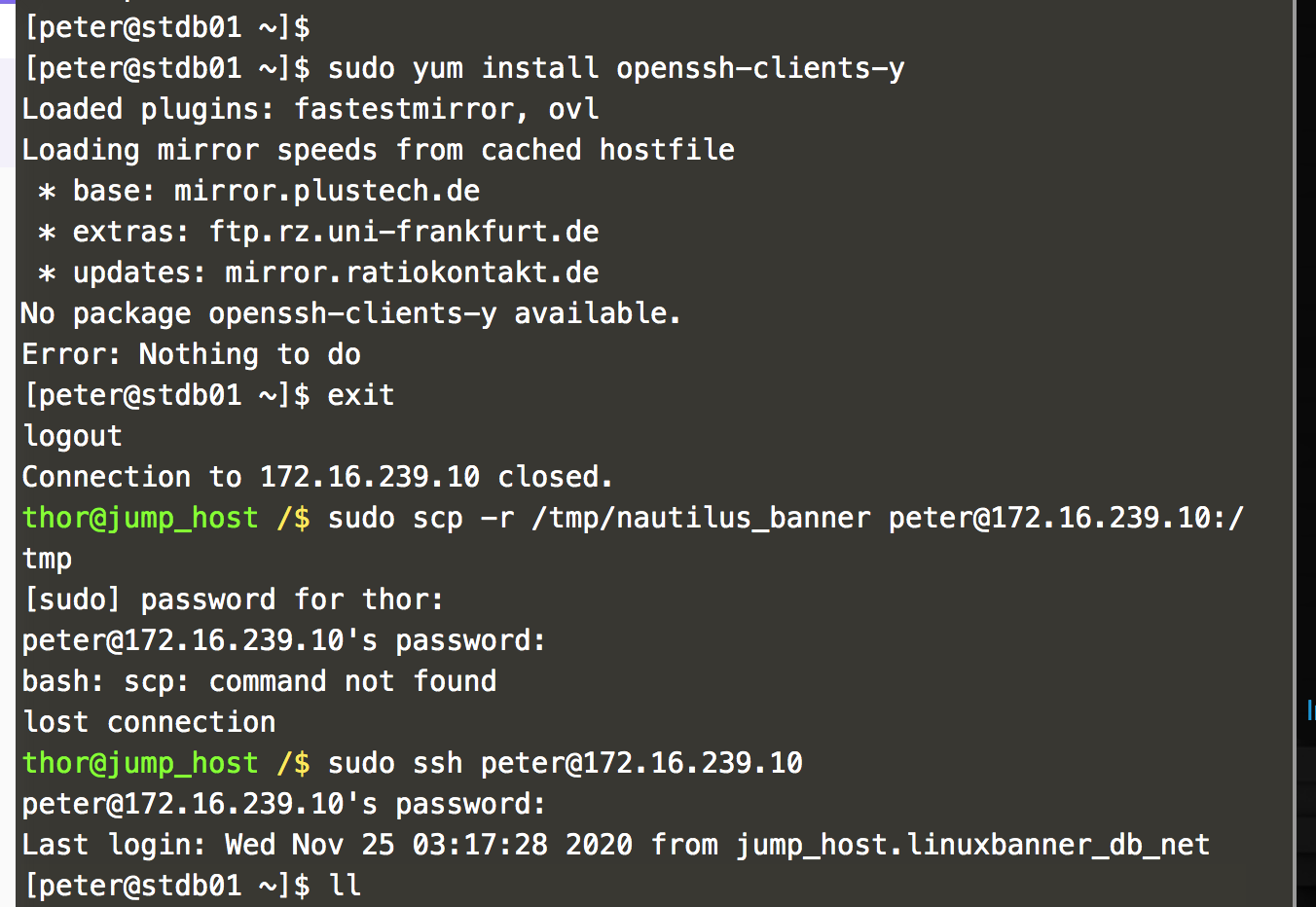
While attempting the above mentioned task, I am facing issues while doing scp to DB server from the jump_start server. I have attached the screenshoot for your reference.
Could you please check and advise.
I have performed the following steps.
sudo scp -r /root/nautilus_banner tony@172.16.238.10]:/tmp
sudo scp -r /root/nautilus_banner steve@172.16.238.11(:/tmp
sudo scp -r /tmp/nautilus_banner banner@172.16.238.12:/tmp
sudo scp -r /tmp/nautilus_banner peter@172.16.239.10:/tmp
Hello, @bhusan.binay
Please give some space between openssh-clients and -y.
$ sudo yum install openssh-clients -y
If you already know the password and user identity. You don’t require to use “sudo” beginning of the ssh command.
$ ssh peter@172.16.239.10

$ scp -r /tmp/nautilus_banner banner@172.16.238.12:/tmp
Both should be work without use of sudo.
We use sudo, only for internal core services which normal user cannot access.
Thanks @Tej-Singh-Rana (Tej) for pointing the mistake. I was able to complete the task now.