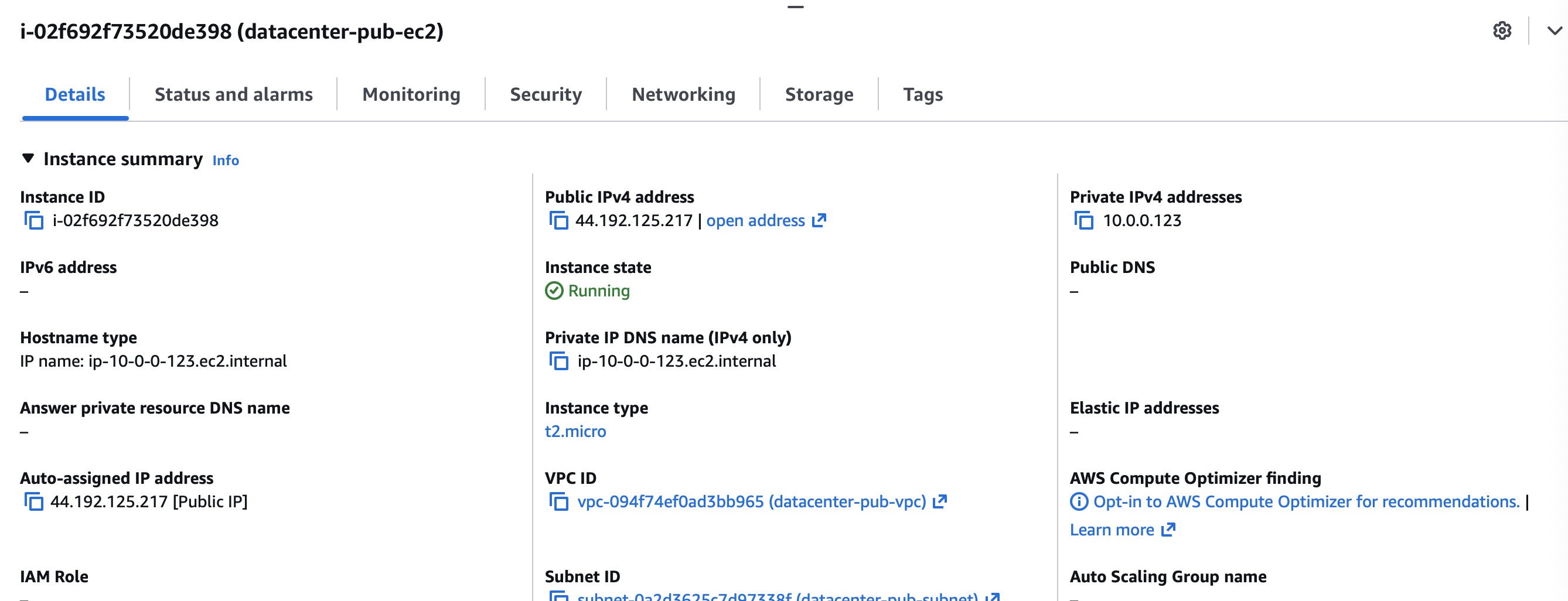
I am able to login but kodekloud engineer says " SSH port 22 is not accessible for instance datacenter-pub-ec2”
Output from my terminal confirming I am able to ssh
ssh -i datacenterkeypair.cer ec2-user@44.192.125.217
The authenticity of host '44.192.125.217 (44.192.125.217)' can't be established.
ED25519 key fingerprint is SHA256:H3mqoTDp0Sp/kpcmF/V2nQL4G6TgzgL1aF5TDAeHHHU.
This key is not known by any other names.
Are you sure you want to continue connecting (yes/no/[fingerprint])? yes
Warning: Permanently added '44.192.125.217' (ED25519) to the list of known hosts.
   ,     #_
   ~\_  ####_        Amazon Linux 2023
  ~~  \_#####\
  ~~     \###|
  ~~       \#/ ___   https://aws.amazon.com/linux/amazon-linux-2023
   ~~       V~' '->
    ~~~         /
      ~~._.   _/
         _/ _/
       _/m/'
[ec2-user@ip-10-0-0-123 ~]$
Instance details
Which lab is this? If it’s a KodeKloud Engineer lab, I’d need the name of the lab, and possibly the “day” of 100 Days. If it’s a regular lab, then a link to the lab would be very helpful.
Hi @pari0477
Does the question ask to create a key pair with a specific name (like datacenterkeypair.cer as you have)?
If it has not, then how does the grader know what you called it in order to test your solution?
For any question involving setting up password-less SSH, unless it asks for a specific name for the key pair, you must accept the default name id_rsa
If it did ask for that specific name (or any other name), then please as Rob asks, provide the Level and task name of the KKE task so we may look.
Not sure how to answer how the grader knows what to test.
From my perspective, I did everything that was asked and confirmed that it is working. Hope the below helps you better with the context you are looking for.
The Nautilus DevOps Team has received a request from the Networking Team to set up a new public VPC to support a set of public-facing services. This VPC will host various resources that need to be accessible over the internet. As part of this setup, you need to ensure the VPC has public subnets with automatic IP assignment for resources. Additionally, a new EC2 instance will be launched within this VPC to host public applications that require SSH access. This setup will enable the Networking Team to deploy and manage public-facing applications.
Create a public VPC named xfusion-pub-vpc, and a subnet named xfusion-pub-subnet under the same, make sure public IP is being auto assigned to resources under this subnet. Further, create an EC2 instance named xfusion-pub-ec2 under this VPC with instance type t2.micro. Make sure SSH port 22 is open for this instance and accessible over the internet.
Use below given AWS Credentials: (You can run the showcreds command on aws-client host to retrieve these credentials)
Console URL https://700974443545.signin.aws.amazon.com/console?region=us-east-1
Username kk_labs_user_xxxxxxx
Password xxxxxxxxxxxxx
Start Time Sun Jan 04 22:41:02 UTC 2026
End Time Sun Jan 04 23:41:02 UTC 2026
Notes:
Create the resources only in us-east-1 region.
To display or hide the terminal of the AWS client machine, you can use the expand toggle button as shown below:
Day 27: Configuring a Public VPC with an EC2 Instance for Internet Access
This is the lab and yes it is part of the 100 days of cloud
One point – PLEASE DO NOT COPY AWS OR OTHER CLOUD CREDENTIALS TO POSTS – they’d end up indexed by Google, which would be VERY BAD. I’ve edited your post to remove the sensiive parts. I’ll give it a look now that I’ve done that.
I don’t mind redoing the lab, but the miss in a long list of completions hurts my ego 
This one’s fairly involved. This guy suggests this solution, which worked for me.
Rob, my solution worked. There was no issue inthe solution. I meant to highlight the issue with the verification script.