Impact of Assigning a Second IP on eth0: SSH Connection Issue from Jump Host to app03 and app04 futher clarify

Below is the question

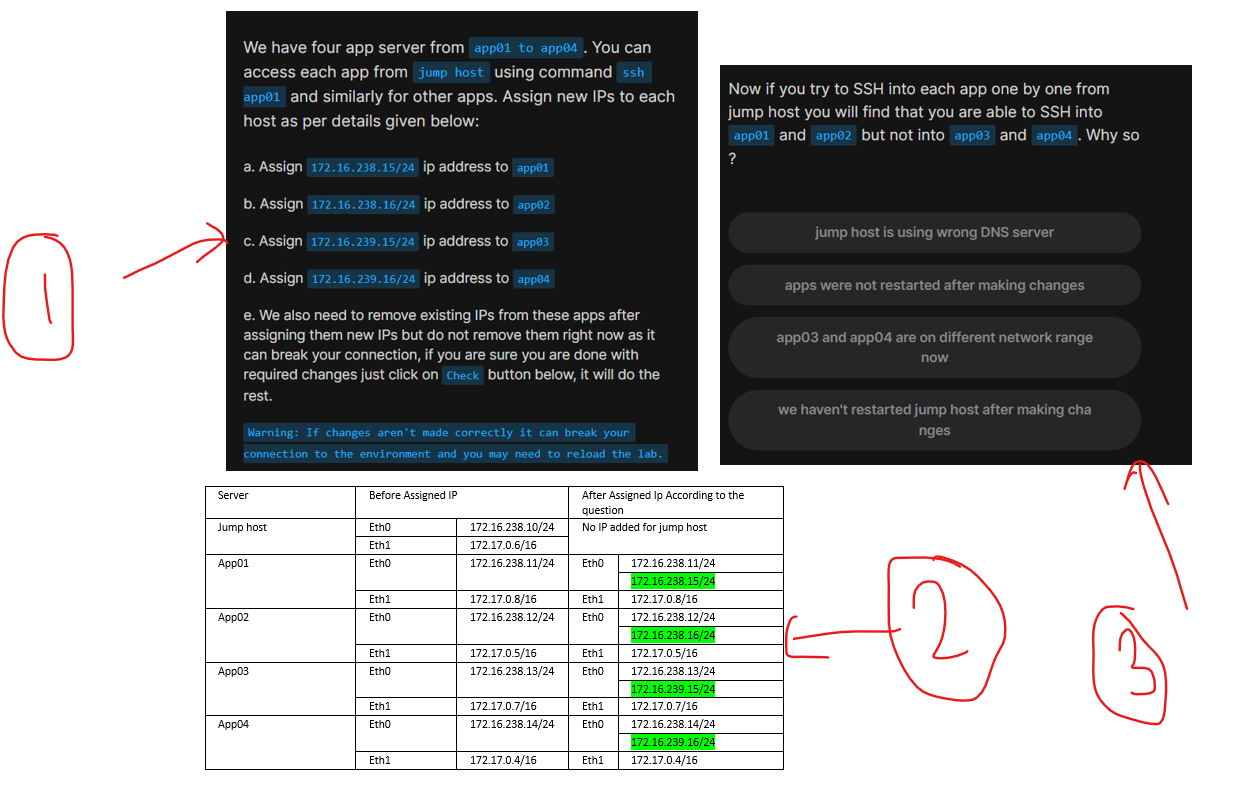
Image 01

after that i followed the steps and i completed the question successfully, below table show how ips are assigned to each app

image 02

my question based on this below question

image 03

I observed that SSH from the jump host to app03 and app04 stopped working. My concern is that previously, app03 had the IP address 172.16.238.13/24. After assigning a new IP (172.16.239.15/24) to eth0, both IPs are still available on the interface.

Why did the existing connection from the jump host stop after adding 172.16.239.15/24? Did this new IP become the primary IP for eth0 on app03? Or did the jump host get confused due to the presence of two IP addresses? I need to understand the exact reason why the connection from the jump host was interrupted

as a new member i can not add many images, so i combined all and created one image
Hello, @Mithila-Navishka

When a server has multiple IPs on the same interface, one of them becomes the primary source IP for outgoing connections.

You can check this by running:

ip addr show

The first inet entry on the interface is typically the primary IP used for outgoing traffic.

In your case, after adding 172.16.239.15/24 to app03, the system may have started using it as the preferred source IP.

Why the SSH Connection Broke

  1. The Jump Host (172.16.238.10) is in a Different Network

    • The jump host expects SSH responses from 172.16.238.x/24 (since it originally connected to 172.16.238.13).
    • However, app03 might now be replying from 172.16.239.15/24 instead.
  2. No Route Exists for the New IP on the Jump Host

    • If the jump host has no route for 172.16.239.0/24, it won’t know how to reach app03 at its new IP.
    • The response packets might get dropped or ignored.

Conclusion

The SSH connection was likely interrupted because:

  • The primary source IP on app03 changed to 172.16.239.15.
  • The jump host had no route to reach this new network.

You can fix this by adding a route on the jump host and/or forcing app03 to prefer its old IP.

1 Like