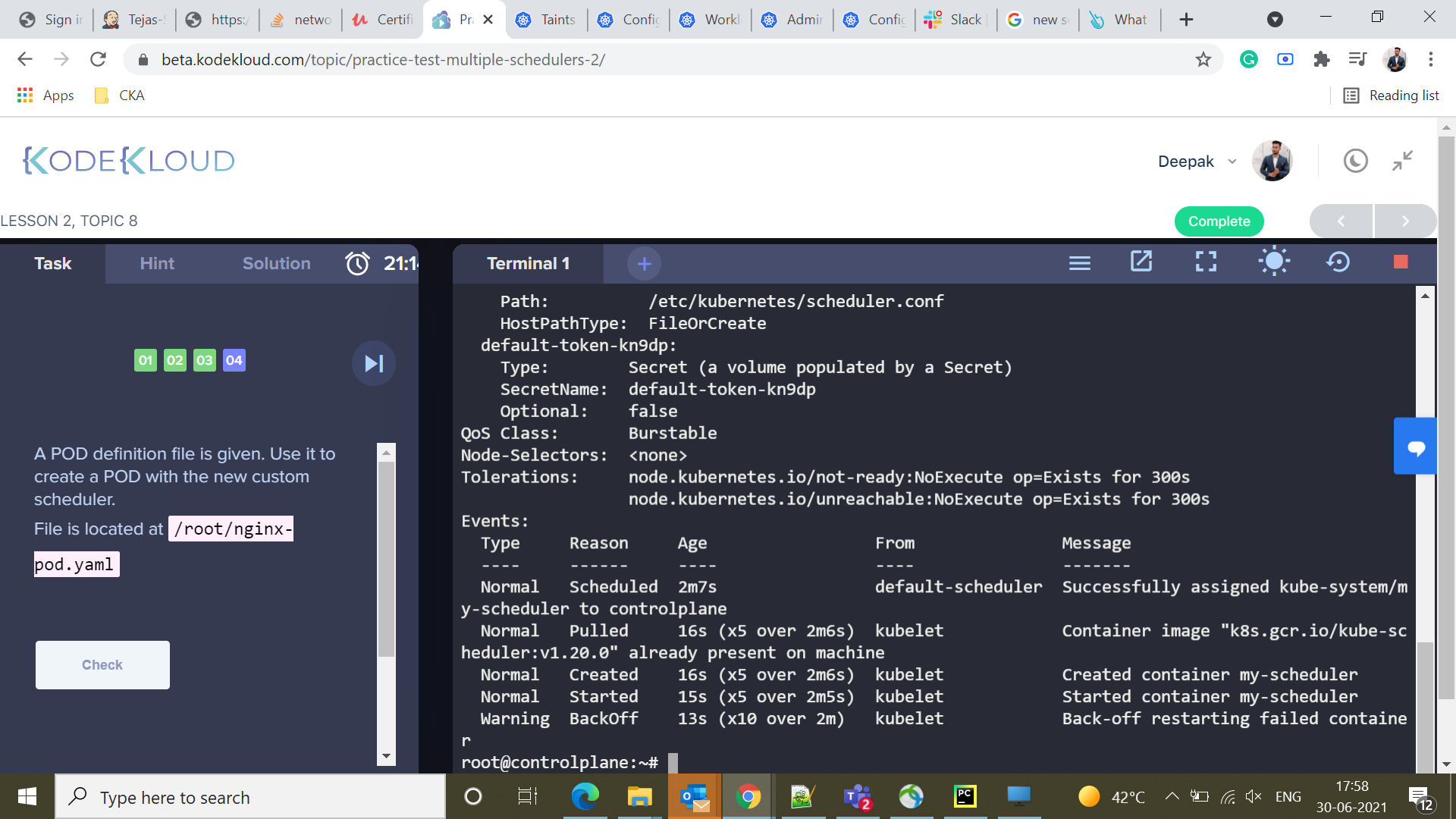
Deepak Mourya:
Hi, In Multiple Scheduler lab, I have changes the --leader-elect and add scheduler-name in the yaml. but after a minute my-scheduler will be in CrashLoopBackOff stage. Is there anything missing from my side ?
containers:
Basavraj Nilkanthe:
@Deepak Mourya is there any error message?
Basavraj Nilkanthe:
I hope you have kept name different for custom scheduler?
Deepak Mourya:
yes, i changed it to my-scheduler
Basavraj Nilkanthe:
could you please confirm lab details, I would like to test from my machine
Basavraj Nilkanthe:
@Deepak Mourya
Basavraj Nilkanthe:
root@controlplane:/tmp# kubectl -n kube-system logs my-scheduler-controlplane
I0630 12:38:23.478312       1 serving.go:331] Generated self-signed cert in-memory
failed to create listener: failed to listen on 127.0.0.1:10259: listen tcp 127.0.0.1:10259: bind: address already in use
Basavraj Nilkanthe:
I am also facing same issue but I can see error message, its binding port issue
Basavraj Nilkanthe:
we have to get it tested with different port
Basavraj Nilkanthe:
default-scheduler has picked this port
Basavraj Nilkanthe:
root@controlplane:/tmp# netstat -tulpn
Active Internet connections (only servers)
Proto Recv-Q Send-Q Local Address           Foreign Address         State       PID/Program name
tcp        0      0 127.0.0.1:10248         0.0.0.0:*               LISTEN      4764/kubelet
tcp        0      0 127.0.0.1:10249         0.0.0.0:*               LISTEN      5892/kube-proxy
tcp        0      0 127.0.0.1:2379          0.0.0.0:*               LISTEN      4064/etcd
tcp        0      0 10.14.156.9:2379        0.0.0.0:*               LISTEN      4064/etcd
tcp        0      0 10.14.156.9:2380        0.0.0.0:*               LISTEN      4064/etcd
tcp        0      0 127.0.0.1:2381          0.0.0.0:*               LISTEN      4064/etcd
tcp        0      0 0.0.0.0:8080            0.0.0.0:*               LISTEN      767/ttyd
tcp        0      0 127.0.0.1:10257         0.0.0.0:*               LISTEN      3941/kube-controlle
tcp        0      0 127.0.0.1:10259         0.0.0.0:*               LISTEN      3744/kube-scheduler
tcp        0      0 127.0.0.11:34835        0.0.0.0:*               LISTEN      -
tcp        0      0 127.0.0.1:34165         0.0.0.0:*               LISTEN      4764/kubelet
tcp        0      0 127.0.0.53:53           0.0.0.0:*               LISTEN      535/systemd-resolve
tcp        0      0 0.0.0.0:22              0.0.0.0:*               LISTEN      782/sshd
tcp6       0      0 :::10250                :::*                    LISTEN      4764/kubelet
tcp6       0      0 :::6443                 :::*                    LISTEN      3662/kube-apiserver
tcp6       0      0 :::10256                :::*                    LISTEN      5892/kube-proxy
tcp6       0      0 :::22                   :::*                    LISTEN      782/sshd
tcp6       0      0 :::8888                 :::*                    LISTEN      5223/kubectl
udp        0      0 127.0.0.11:55024        0.0.0.0:*                           -
udp        0      0 127.0.0.53:53           0.0.0.0:*                           535/systemd-resolve
udp        0      0 0.0.0.0:8472            0.0.0.0:*                           -
Basavraj Nilkanthe:
we can try with 10282 port
Basavraj Nilkanthe:
which is free
Deepak Mourya:
ok let me try
Deepak Mourya:
i have taken 10260 still not working
Deepak Mourya:
containers:
- command:
- kube-scheduler
- –authentication-kubeconfig=/etc/kubernetes/scheduler.conf
- –authorization-kubeconfig=/etc/kubernetes/scheduler.conf
- –bind-address=127.0.0.1
- –kubeconfig=/etc/kubernetes/scheduler.conf
- –leader-elect=false
- –scheduler-name=my-scheduler
- –port=10260
image: http://k8s.gcr.io/kube-scheduler:v1.20.0|k8s.gcr.io/kube-scheduler:v1.20.0
imagePullPolicy: IfNotPresent
livenessProbe:
failureThreshold: 8
httpGet:
host: 127.0.0.1
path: /healthz
port: 10260
Basavraj Nilkanthe:
error message
Deepak Mourya:
Warning Failed 28s (x3 over 47s) kubelet Error: failed to start container “my-scheduler”: Error response from daemon: OCI runtime create failed: container_linux.go:367: starting container process caused: exec: “my-scheduler”: executable file not found in $PATH: unknown
Warning BackOff 11s (x6 over 43s) kubelet Back-off restarting failed container
Basavraj Nilkanthe:
kubectl -n kube-system logs pod-name