I have been doing my challenge in K8s Level2 “11. Fix issue with LAMP Environment in Kubernetes”. I’m facing some error below. Coud you help me resolve this task.
" One of the DevOps team members was trying to insta
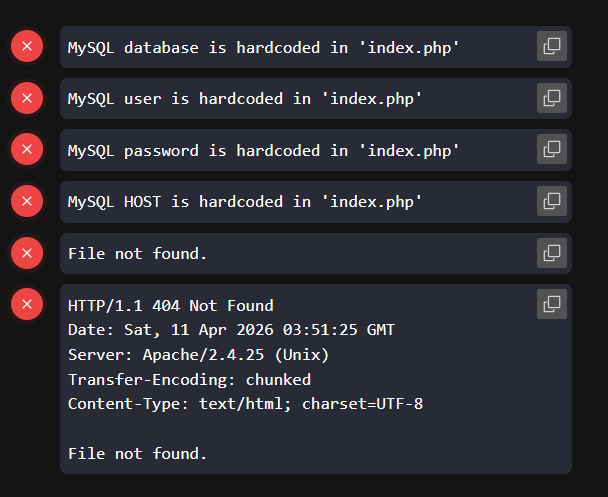
ll a WordPress website on a LAMP stack, which is deployed on a Kubernetes cluster. It was working well, and we could see the installation page a few hours ago. However, something seems to have gone wrong with the stack after the website went down. Please look into the issue and fix it:
FYI, the deployment name is lamp-wp and it is using a service named lamp-service. Apache is using the default HTTP port, and the NodePort is 30008. From the application logs, it has been identified that the application is facing some issues connecting to the database, in addition to other problems. Additionally, there are some environment variables associated with the pods, such as MYSQL_ROOT_PASSWORD, MYSQL_DATABASE, MYSQL_USER, MYSQL_PASSWORD, and MYSQL_HOST
Also, do not attempt to delete or modify any other existing components, such as deployment names, service names, types, labels, secrets and so on."
You need to exec into the PHP container and update the inv vars in /app/index.php within the container and restart the PHP service.
I think you also need to update the Service for the appropriate port as well.
This is Deployment file:
apiVersion: apps/v1
kind: Deployment
metadata:
labels:
app: lamp
name: lamp-wp
namespace: default
spec:
replicas: 1
revisionHistoryLimit: 10
selector:
matchLabels:
app: lamp
tier: frontend
strategy:
type: Recreate
template:
metadata:
annotations:
kubectl.kubernetes.io/restartedAt: “2026-04-12T03:24:47Z”
labels:
app: lamp
tier: frontend
spec:
containers:
- env:
- name: MYSQL_ROOT_PASSWORD
valueFrom:
secretKeyRef:
key: password
name: mysql-root-pass
- name: MYSQL_DATABASE
valueFrom:
secretKeyRef:
key: database
name: mysql-db-url
- name: MYSQL_USER
valueFrom:
secretKeyRef:
key: username
name: mysql-user-pass
- name: MYSQL_PASSWORD
valueFrom:
secretKeyRef:
key: password
name: mysql-user-pass
- name: MYSQL_HOST
valueFrom:
secretKeyRef:
key: host
name: mysql-host
image: webdevops/php-apache:alpine-3-php7
imagePullPolicy: IfNotPresent
name: httpd-php-container
ports:
- containerPort: 80
name: httpd
protocol: TCP
resources: {}
terminationMessagePath: /dev/termination-log
terminationMessagePolicy: File
volumeMounts:
- mountPath: /opt/docker/etc/php/php.ini
name: php-config-volume
subPath: php.ini
- env:
- name: MYSQL_ROOT_PASSWORD
valueFrom:
secretKeyRef:
key: password
name: mysql-root-pass
- name: MYSQL_DATABASE
valueFrom:
secretKeyRef:
key: database
name: mysql-db-url
- name: MYSQL_USER
valueFrom:
secretKeyRef:
key: username
name: mysql-user-pass
- name: MYSQL_PASSWORD
valueFrom:
secretKeyRef:
key: password
name: mysql-user-pass
- name: MYSQL_HOST
valueFrom:
secretKeyRef:
key: host
name: mysql-host
image: mysql:5.6
imagePullPolicy: IfNotPresent
name: mysql-container
ports:
- containerPort: 3306
name: mysql
protocol: TCP
resources: {}
terminationMessagePath: /dev/termination-log
terminationMessagePolicy: File
dnsPolicy: ClusterFirst
restartPolicy: Always
schedulerName: default-scheduler
securityContext: {}
terminationGracePeriodSeconds: 30
volumes:
- configMap:
defaultMode: 420
name: php-config
name: php-config-volume
– Service file
apiVersion: v1
kind: Service
metadata:
labels:
app: lamp
name: lamp-service
namespace: default
spec:
clusterIP: 10.43.201.117
clusterIPs:
- 10.43.201.117
externalTrafficPolicy: Cluster
internalTrafficPolicy: Cluster
ipFamilies:
- IPv4
ipFamilyPolicy: SingleStack
ports:
- nodePort: 30008
port: 80
protocol: TCP
targetPort: 80
selector:
app: lamp
tier: frontend
sessionAffinity: None
type: NodePort
status:
loadBalancer: {}
Pasting the YAML removes all the indentation, making it hard to read and comprehend.
As I mentioned, you need to exec into the PHP container, and update the env vars aligning with the ones defined in the Deployment.