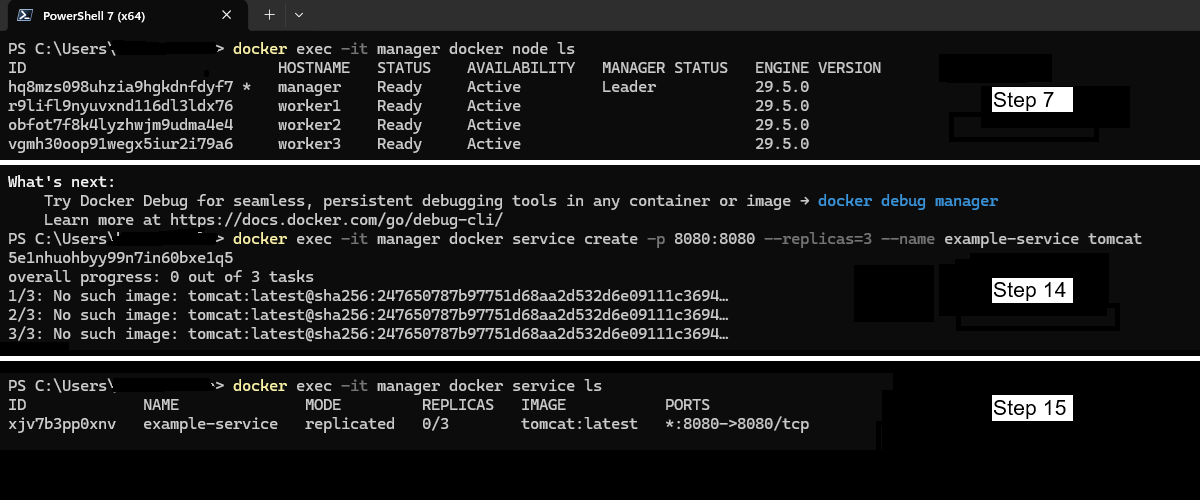
I hope I have this in the correct forum. I originally posted it in Docker but then realized it is probably should go in Playgrounds. I am running into a problem creating a service inside a manager node. I am on a Windows machine and I am using Powershell 7.6.1. My steps are different from the video because I am using DIND containers. The problem I am running into is in step 14 and 15. I have included all steps for details.
-
run a container that will be used as the manager
docker run -d --privileged --name manager --hostname manager docker:dind -
run three containers that will be used as the workers
docker run -d --privileged --name worker1 --hostname worker1 docker:dind
docker run -d --privileged --name worker2 --hostname worker2 docker:dind
docker run -d --privileged --name worker3 --hostname worker3 docker:dind -
assign the manager IP to a variable
$MANAGER_IP=$(docker inspect -f '{{range .NetworkSettings.Networks}}{{.IPAddress}}{{end}}' manager) -
initialize the swarm, use the ip you found above for the manager.
docker exec manager docker swarm init --advertise-addr $MANAGER_IP
-
get the join token for a worker
$SWARM_TOKEN=$(docker exec manager docker swarm join-token -q worker) -
join the workers to the swarm
docker exec worker1 docker swarm join --token $SWARM_TOKEN "$($MANAGER_IP):2377"
docker exec worker2 docker swarm join --token $SWARM_TOKEN "$($MANAGER_IP):2377"
docker exec worker3 docker swarm join --token $SWARM_TOKEN "$($MANAGER_IP):2377" -
verify the cluster. Manager is marked as leader and all containers are active. **Note: output shown in attachment.
docker exec -it manager docker node ls -
add the jre to the manager ensure you can use keytool. **Note: I am not sure I need this, but I have added it. This step is also for my local environment, so I am using http
docker exec -u 0 manager sed -i 's/https/http/' /etc/apk/repositories
docker exec -u 0 manager apk update
docker exec -u 0 manager apk add openjdk11-jre -
log into docker hub with my public access token
docker exec -it manager docker login -u <my-docker-hub-username> -
copy the localhost pfx certs to container. **Note: I exported the localhost cert from certlm.msc and used the following settings:
I selected:
- Yes, export the private key
- Include all certificates in the certification path if possible
- Enable certificate privacy
- Password:
docker cp "C:\Temp\Certs\cert-for-jsk-3des.pfx" manager:/temp/
-
copy the localhost pfx certs to container
docker cp "C:\Temp\Certs\." manager:/temp/ -
validate copied files exist. cd into temp directory and ls to see pfx file.
docker exec -it manager sh -
convert the pfx key to jks key
keytool -importkeystore -srckeystore cert-for-jsk-3des.pfx -srcstoretype pkcs12 -destkeystore keystore.jks -deststoretype jks -srcstorepass <password> -deststorepass <different-password> -
create a service with 3 replicas of tomcat. **Note: output shown in attachment.
docker exec -it manager docker service create -p 8080:8080 --replicas=3 --name example-service tomcat -
list the services running. **Note: output shown in attachment.
docker exec -it manager docker service ls