I do see this branch on the remote. Please see the uploaded screenshots.
Thank you!
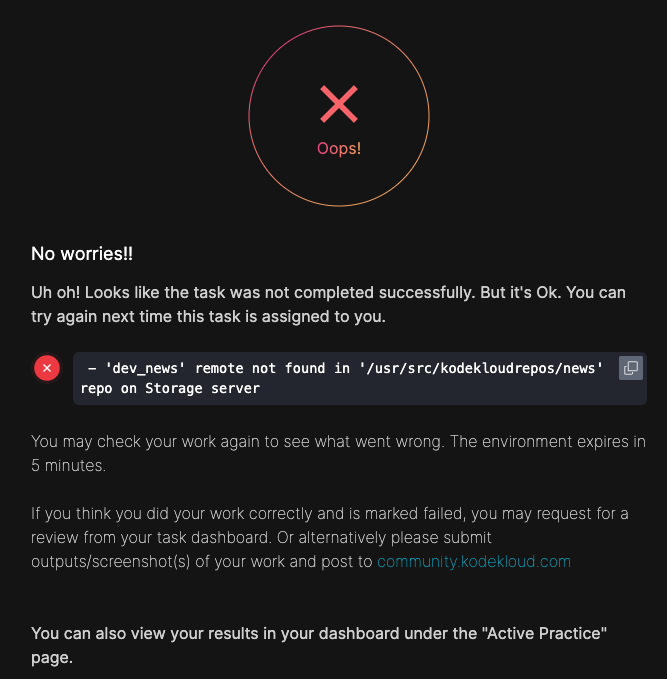
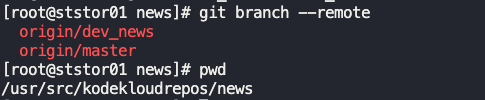
Any suggestions please?
What lab is this for? Full name of the lab + “Day of” will help.
Level 2 Git. Thank you!
Please: the name of the lab as well.
All that I know is, it’s part of engineer.kodekloud. I picked 100 days of Devops and 100 days of Cloud (AWS). It allowed me to pick two tasks, I picked Level 1 Git (I completed) and Level 2. Git. I am on the second one. Does that answer?
Under that it’s Git Merge Remotes.
That is the information I needed. Thanks.
Actually, there is NO LAB BY THAT NAME. There is
Git Manage Remotes
and
Git Merge Branches.
I find labs by their exact names. I’ll check the two labs, but please, be precise.
Sorry about that.
4 Git Manage Remotes
That’s the one.
I did the following, which worked:
[root@ststor01 blog]# git status
On branch master
Your branch is up to date with 'origin/master'.

nothing to commit, working tree clean
[root@ststor01 blog]# git remote add dev_blog /opt/xfusioncorp_blog.git
[root@ststor01 blog]# git remote -v
dev_blog        /opt/xfusioncorp_blog.git (fetch)
dev_blog        /opt/xfusioncorp_blog.git (push)
origin  /opt/blog.git (fetch)
origin  /opt/blog.git (push)
[root@ststor01 blog]# cp /tmp/index.html .
[root@ststor01 blog]# git add index.html
[root@ststor01 blog]# git commit -m 'add index'
[master e64820b] add index
 1 file changed, 10 insertions(+)
 create mode 100644 index.html
[root@ststor01 blog]# git push dev_blog master
Enumerating objects: 6, done.
Counting objects: 100% (6/6), done.
Delta compression using up to 16 threads
Compressing objects: 100% (4/4), done.
Writing objects: 100% (6/6), 579 bytes | 579.00 KiB/s, done.
Total 6 (delta 0), reused 0 (delta 0), pack-reused 0 (from 0)
To /opt/xfusioncorp_blog.git
 * [new branch]      master -> master
Thanks. But do you see my command and output? git branch --remote. It does show the stated remote branch which the error is complaining of.
This indicates you didn’t do the necessary – you’ve created a branch “dev_news” on the “origin” remote. The task asks you to create a new remote of dev_news that points to a different upstream repo. If you do the task correctly, you’d have gotten output that looked more like “dev_news/master”, since you’re pushing the modified master branch to the remote you needed to create with git remote add dev_news UPSTREAM.
Ok, thanks. So it looks like the end result didn’t matter but some specific sequence was required.
Interestingly, the error is about the specific remote “dev_news” not found. In my git branch --remote I show that the remote did exist. And yes, this was pushed after the new commit was added.
Thanks Rob. I realized I was looking at remote branches vs remote repositories.