Hello, My task was:
Your task is to grant executable permissions to the /tmp/xfusioncorp.sh script on App Server 2. Additionally, ensure that all users have the capability to execute it.
I retried this task 3 times and I have no idea what I could do better, sure, maybe doing this using 755 would work, but… my goal is clear; to give all users executable permissions, they dont need to read this or anything, so what am I doing wrong?
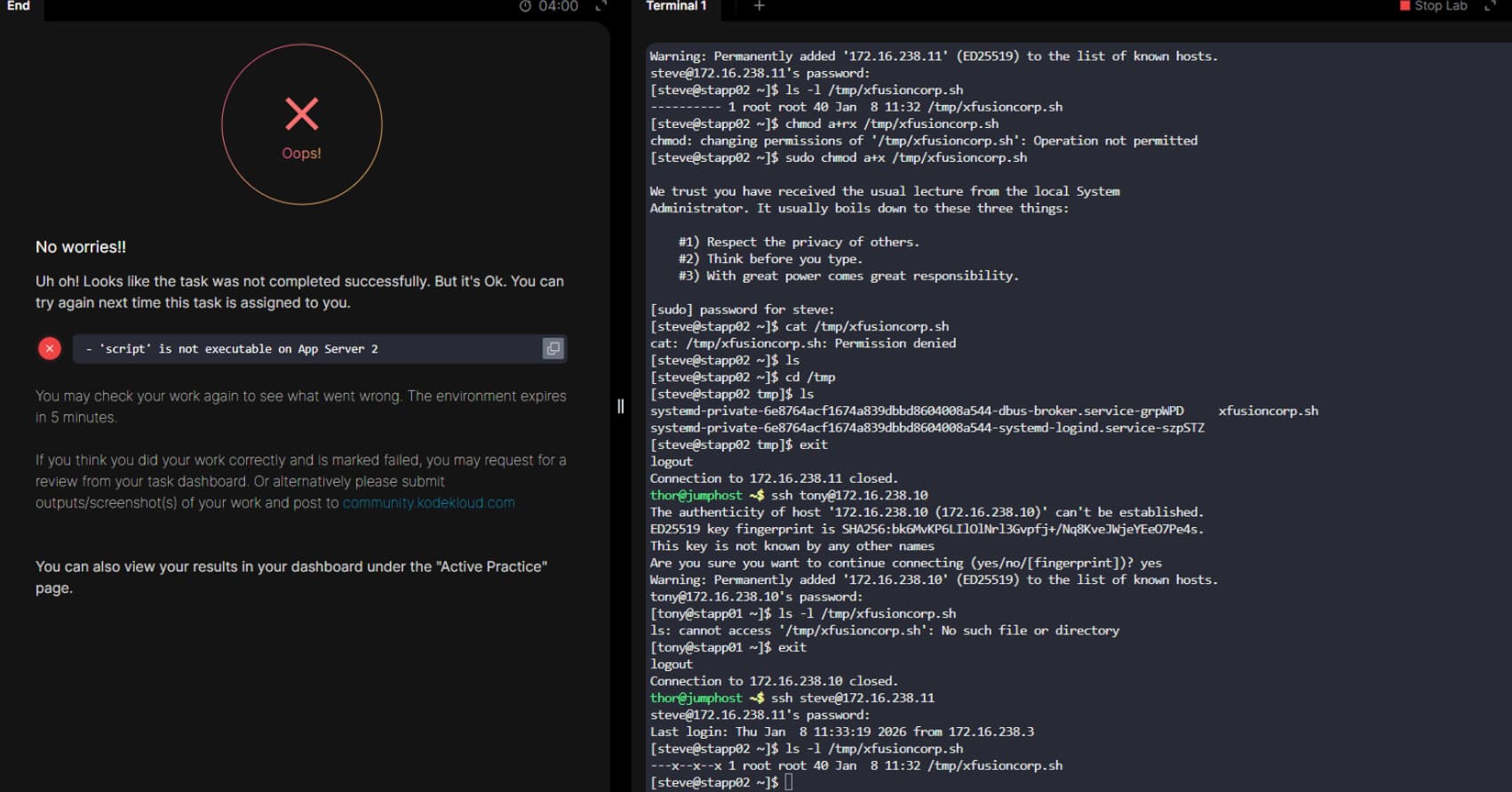
In order to execute a script, the script file needs to be:
- executable
- readable.
Your script is not readable, so it doesn’t work.
1 Like
use this:
sudo chmod a+rx /tmp/xfusioncorp.sh
(for both readable and executable)
1 Like
eh, ok, I understand this now, if this would be binary file I would only need -x, as it’s a script that need to be compiled and not just readed by kernel, I need to give it -rx, sorry and thanks!
Status Update – xfusioncorp.sh on App Server 3
The script /tmp/xfusioncorp.sh is now present on App Server 3 with the correct permissions:
-rwxr-xr-x 1 root root 40 /tmp/xfusioncorp.sh
- Owner: read, write, execute
- Group: read, execute
- Others: read, execute
This means all users can now execute the script.
The script has been verified, and it is ready for use. The application team can now run and test it safely.