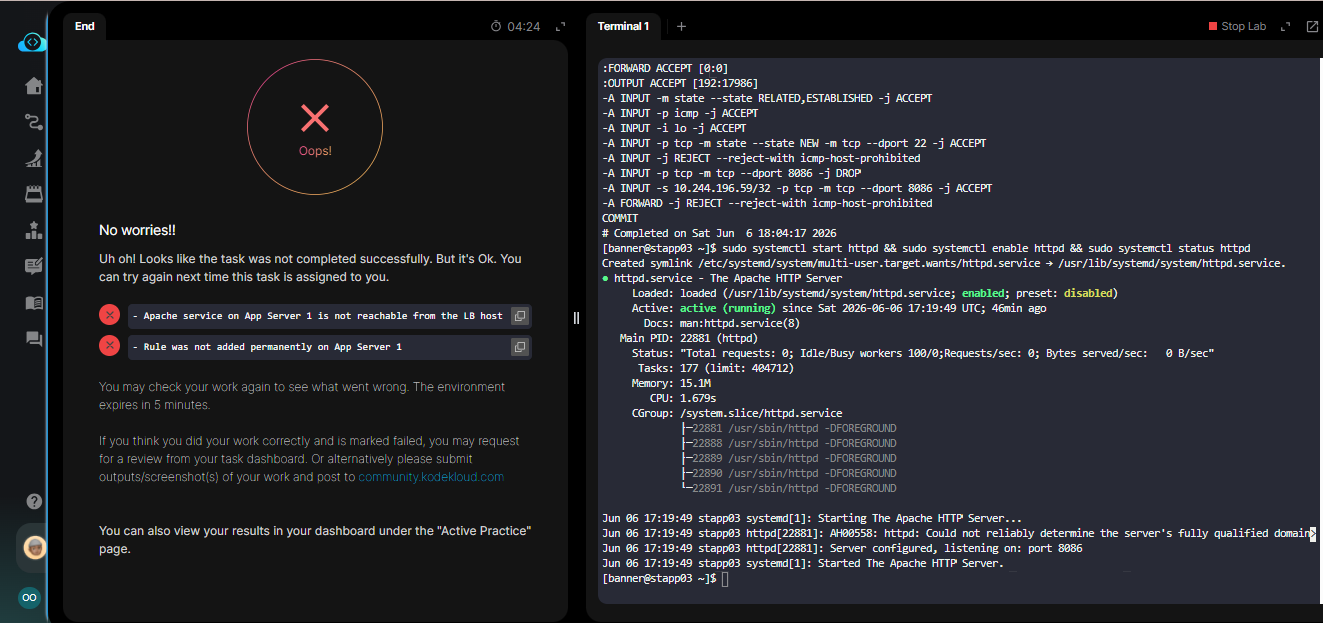
Somebody pls help me look at this error message. I have installed iptables on all apps, block the port given, only accessible to stlb01 and ensure to start Apacche on all servers.
Please compare your solution with this example . You’ll need in addition to install iptables-services to persist the the iptables settings.
MIQDAD
June 7, 2026, 6:18am
#3
hi please refer to this solution if fits helps .
**🌟 Task 13 - Configure Firewall to Restrict Apache Port 8088 Access**

**📌 Task Description**

Due to security concerns, the **xFusionCorp Industries** team has decided to add a security layer by configuring **iptables firewalls** on all app servers in **Stratos Datacenter**.

**Requirements:**
1. Install **iptables** and all dependencies on all app servers
2. Block incoming traffic on **port 8088** (Apache port) on all app servers except from the **LBR host** (172.16.238.14)
3. Ensure the firewall rules **persist after system reboot**

👉 **Your task:** Configure selective port access using iptables to allow only the load balancer to reach Apache on port 8088.

💡 **Note:** Perform these steps on **all app servers**: stapp01, stapp02, stapp03.

---

## 🔹 Step 1: Switch to root user

```bash
show original
Hello Olayele, you can check out my video on my YouTube channel. Good Luck!
1 Like