Question:
The DevOps team was looking for a solution where they want to restart Apache service on all app servers if the deployment goes fine on these servers in Stratos Datacenter. After having a discussion, they came up with a solution to use Jenkins chained builds so that they can use a downstream job for services which should only be triggered by the deployment job. So as per the requirements mentioned below configure the required Jenkins jobs.
Click on the
Jenkinsbutton on the top bar to access the Jenkins UI. Login using usernameadminandAdm!n321password.
Similarly you can access
Gitea UIon port3000(or click theGiteabutton) and username and password for Git issarahandSarah_pass123respectively. Under usersarahyou will find a repository namedweb.
Apache is already installed and configured on the app server. The doc root
/var/www/htmlon App Server 1 is a local git repository tracking the originwebrepository.
- Create a Jenkins job named
xfusion-app-deploymentand configure it to pull changes from themasterbranch of thewebrepository on App Server 1 under/var/www/htmldirectory.
- Create another Jenkins job named
manage-servicesand make it adownstream jobforxfusion-app-deployment. Things to take care about this job are:
a. This job should restart
httpdservice on the app server (App Server 1).
b. Trigger this job only if the
upstream jobi.exfusion-app-deploymentis stable.
The LB server is already configured. Click on the
Appbutton on the top bar to access the app. Please make sure the required content is loading on the main URL (e.g. http://stlb01:8091) i.e there should not be a sub-directory like http://stlb01:8091/web etc.
I have created the two jobs as mentioned in the question and tested them out too.
The ‘xfusion-app-deployment’ job gets triggered everytime there’s a new change in the master branch (configured via webhook).
And the ‘manage-services’ job gets triggered everytime the previous job is successful, which in turn restarts the httpd service in app server 01 and checks the status. Also, checked in the app, if the updated index.html is reflecting.
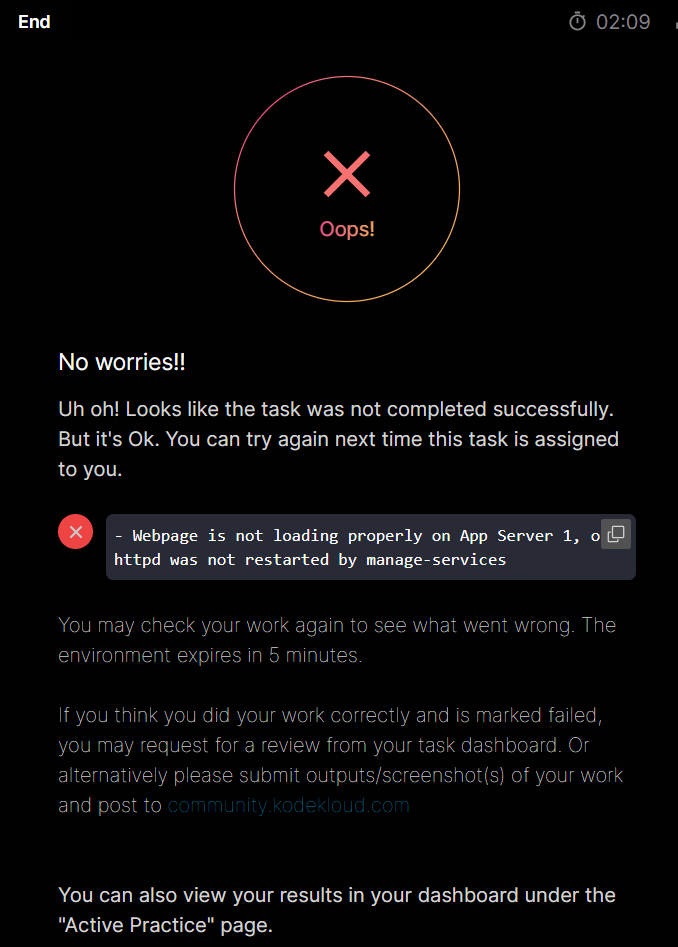
Have tested this out succesfully, yet, the challenge is still failing for me with the error as seen in the screenshot.
Am I missing out on something?
All the existing solutions seems quite old, (some has some solution with the storage server). I am assuming that’s an older question. But, yes, essentially, the solution given should work, right?
So, could you guide me as to what am I missing here?