Day 30 AWS : Enable Internet Access for Private EC2 using NAT Instance

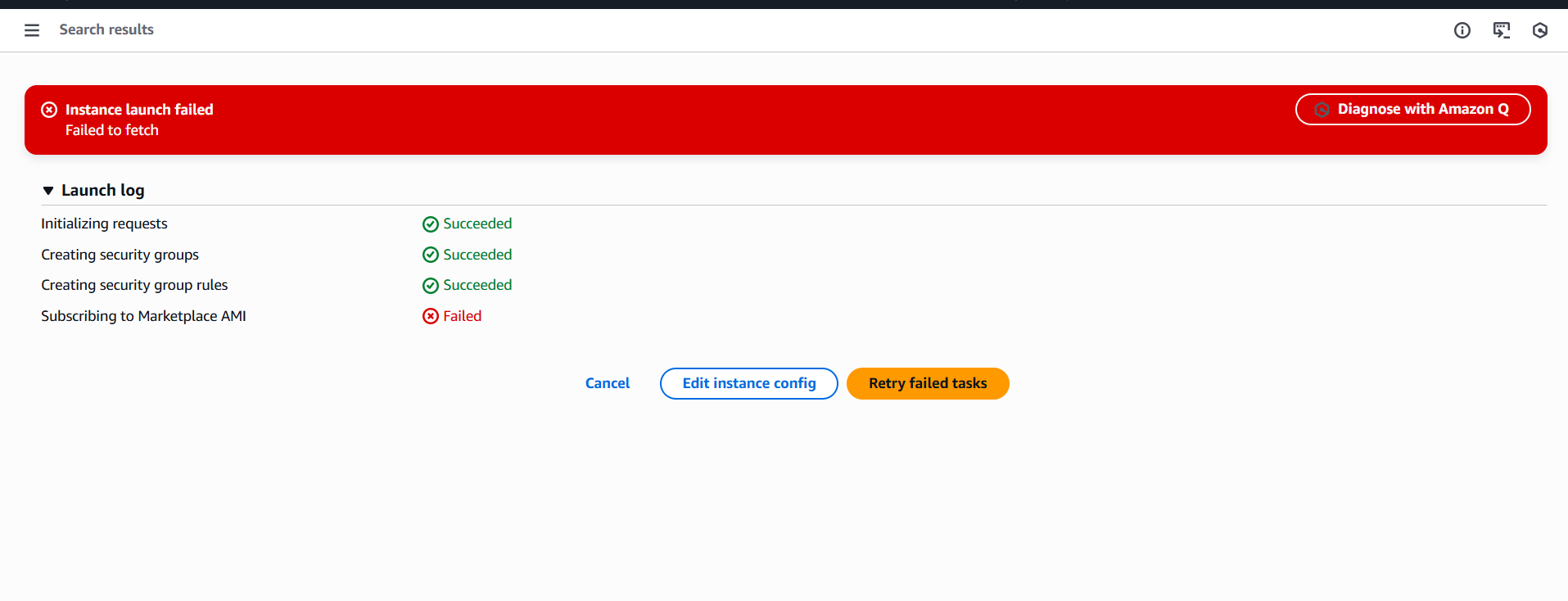
While launching an EC2 instance with Amazon Linux 2 AMI, I’m facing the issue -

Subscribing to Marketplace AMI - Failed

Can anyone help me out here, If I have used the correct AMI for the task or do I need to enable anything.
I have used the mentioned AMI - amzn2-ami-hvm-2.0.20251208.0-x86_64-gp2

you may use a general Amazon Linux AMI and configure iptables to work as an NAT instance.

hey guys, i configure all the things in the lab but i can not see the txt file on my s3 bucket?

Thank you, the issue is resolved.
I have used Amazon Linux AMI and configured iptables as per below AWS documentation page.

1 Like

configure ec2 instance as follows. default amazon Linux 2 has not configured for NAT instances.

Create a NAT AMI

A NAT AMI is configured to run NAT on an EC2 instance. You must create a NAT AMI and then launch your NAT instance using your NAT AMI.

If you plan to use an operating system other than Amazon Linux for your NAT AMI, refer to the documentation for this operating system to learn how to configure NAT. Be sure to save these settings so that they persist even after an instance reboot.

To create a NAT AMI for Amazon Linux
  1. Launch an EC2 instance running AL2023 or Amazon Linux 2. Be sure to specify the security group that you created for the NAT instance.
  2. Connect to your instance and run the following commands on the instance to enable iptables.
sudo yum install iptables-services -y
sudo systemctl enable iptables
sudo systemctl start iptables
  1. Do the following on the instance to enable IP forwarding such that it persists after reboot:
  2. Using a text editor, such as nano or vim, create the following configuration file: /etc/sysctl.d/custom-ip-forwarding.conf.
  3. Add the following line to the configuration file.
net.ipv4.ip_forward=1
  1. Save the configuration file and exit the text editor.
  2. Run the following command to apply the configuration file.
sudo sysctl -p /etc/sysctl.d/custom-ip-forwarding.conf
  1. Run the following command on the instance, and note the name of the primary network interface. You’ll need this information for the next step.
netstat -i

In the following example output, docker0 is a network interface created by docker, eth0 is the primary network interface, and lo is the loopback interface.

Iface      MTU    RX-OK RX-ERR RX-DRP RX-OVR    TX-OK TX-ERR TX-DRP TX-OVR Flg
docker0   1500        0      0      0 0             0      0      0      0 BMU
eth0      9001  7276052      0      0 0       5364991      0      0      0 BMRU
lo       65536   538857      0      0 0        538857      0      0      0 LRU

In the following example output, the primary network interface is enX0.

Iface      MTU    RX-OK RX-ERR RX-DRP RX-OVR    TX-OK TX-ERR TX-DRP TX-OVR Flg
enX0      9001     1076      0      0 0          1247      0      0      0 BMRU
lo       65536       24      0      0 0            24      0      0      0 LRU

In the following example output, the primary network interface is ens5.

Iface      MTU    RX-OK RX-ERR RX-DRP RX-OVR    TX-OK TX-ERR TX-DRP TX-OVR Flg
ens5      9001    14036      0      0 0          2116      0      0      0 BMRU
lo       65536       12      0      0 0            12      0      0      0 LRU
  1. Run the following commands on the instance to configure NAT. If the primary network interface is not eth0, replace eth0 with the primary network interface that you noted in the previous step.
sudo /sbin/iptables -t nat -A POSTROUTING -o eth0

-j MASQUERADE sudo /sbin/iptables -F FORWARD sudo service iptables save

  1. Create a NAT AMI from the EC2 instance. For more information, see [Create a Linux AMI from an instance]

thank you very much @Tharaka

Great job. But I think we do not need to create a whole ami. I used eth0 as primary network interface whereas the correct one is ens5. Thanks a lot