I have installed the php-fpm 8.2 and nginx port 8099 port and took the screenshot and shared below images. curl was working and giving the expected result.
![image.png]()
![image.png]()
But the below result was not right, it says correct port is not configured. I tried 3 times in all cases the question validation gave error.
![image.png]()
–
Regards,
Nagappan.
I did this using this post as a guide; it worked and passed the grader.
Sir i completed it and able to get the nginx http response. I dont have issue in completeting. But the answer was not accepted with port number is not matching. I have exposed the port 8099 as per the question. I have put the screenshot.
All 3 images combined and put as a single image.
Use the link as a guide, but you need to read the task carefully and change any parameters that are different in the task description from the guide. If it says use one port, use that port, not the one in the guide.
Sir the question was asked for 8099 and i have also exposed the same port. Still it says incorrect, thats why i posted this issue in this group.
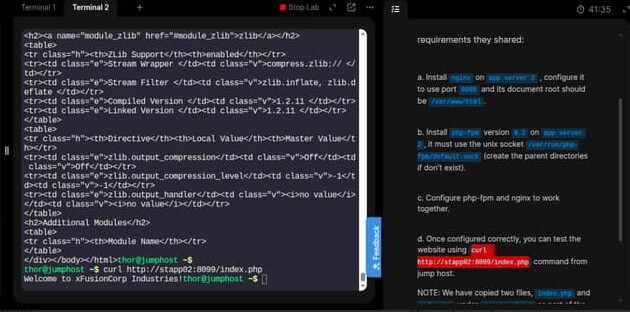
Hi @nagappan-subramanian
Unfortunately, your screenshot could not be maximized, so it is not possible to see what you have configured.
However, could you please refer to this solution? I am sure this will help you resolve this task.
I have put the enlarged image. It is exposing port 8099 only. question was also port 8099, still the question validation failing here.
(Please note : i tried 3 times then only raising this issue)
Screenshot says i have done it right. So please auto correct the task, so i can move to next task. I have been waiting for it for past 3 to 4 days.
TBH, not sure what you’re doing wrong, but again, using imShakil’s solution for D20, here’s what I get:
The solution required php-fpm 8.1 (installed using these instructions), and setting the port to 8096. But work it did.
Sir, i triple checked is there any mistake from my side three times, every time it says port exposed is wrong. last time i checked the port with curl command, showed the question port number and error message given by kodekloud and that’s the reason i am following up here.
Please document exactly how the task is stated (since it changes randomly) and how you solved it. Both Santosh and I have tried a variety of approaches to solve this task, and have succeeded consistently. So the task can be solved beyond a doubt.
The simplest explanation here is that you are missing some item required in the task. Annoying as it is, that explains what we’re seeing here the best I can tell.
the error saying is for wrong port, but the curl works with the correct port. Other than that it doesnt have any other error while checking the task. I think we create php cgipass directly in nginx.conf it is not validating the answer. But if we use default.d/conf it is accepting the answer.