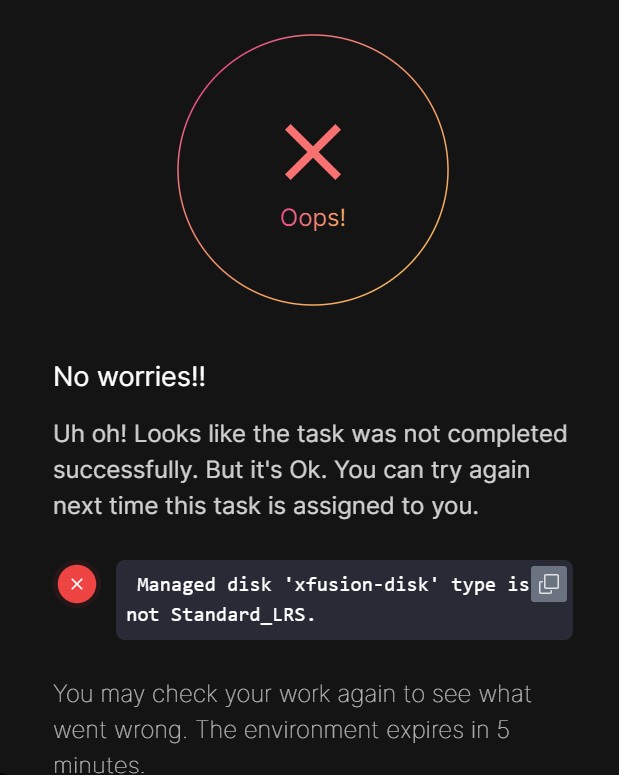
Hi people!
I’m struggling with this lab, I successfully created the disk according to the requirements, but the lab doesn’t accept the disk despite everything is correct. Please your help to move to the next lab.
Hi people!
I’m struggling with this lab, I successfully created the disk according to the requirements, but the lab doesn’t accept the disk despite everything is correct. Please your help to move to the next lab.
I chose HDD instead, which might be the relevant difference. With az disk list, I see this:
  {
    "creationData": {
      "createOption": "Empty"
    },
    "dataAccessAuthMode": "None",
    "diskIOPSReadWrite": 500,
    "diskMBpsReadWrite": 60,
    "diskSizeBytes": 2147483648,
    "diskSizeGB": 2,
    "diskState": "Unattached",
    "encryption": {
      "type": "EncryptionAtRestWithPlatformKey"
    },
    "id": "/subscriptions/f0c3bcdd-5ce2-4fa0-8cf3-41559747512b/resourceGroups/KML_RG_MAIN-ED355A20A8464D2E/providers/Microsoft.Compute/disks/datacenter-disk",
    "location": "westus",
    "name": "datacenter-disk",
    "networkAccessPolicy": "AllowAll",
    "provisioningState": "Succeeded",
    "publicNetworkAccess": "Enabled",
    "resourceGroup": "KML_RG_MAIN-ED355A20A8464D2E",
    "sku": {
      "name": "Standard_LRS",
      "tier": "Standard"
    },
    "tags": {},
    "timeCreated": "2026-01-12T00:20:41.7272145+00:00",
    "type": "Microsoft.Compute/disks",
    "uniqueId": "9f40aa61-7d6c-41c0-9772-2b483bf84647"
  }
This the grader accepted.