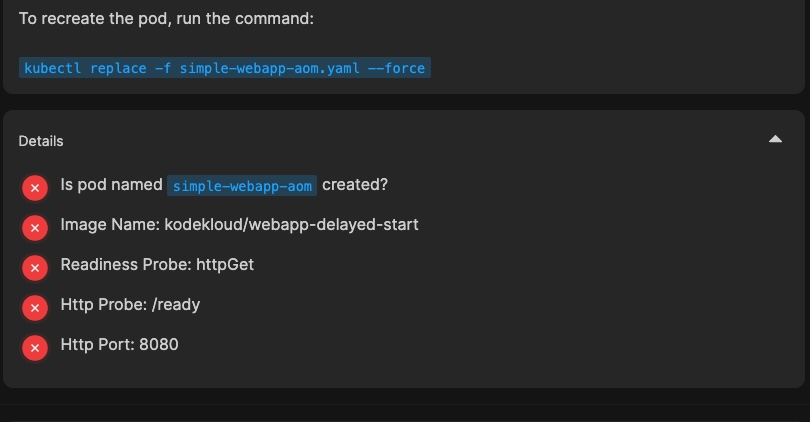
Ckad-mock-1 (q19)

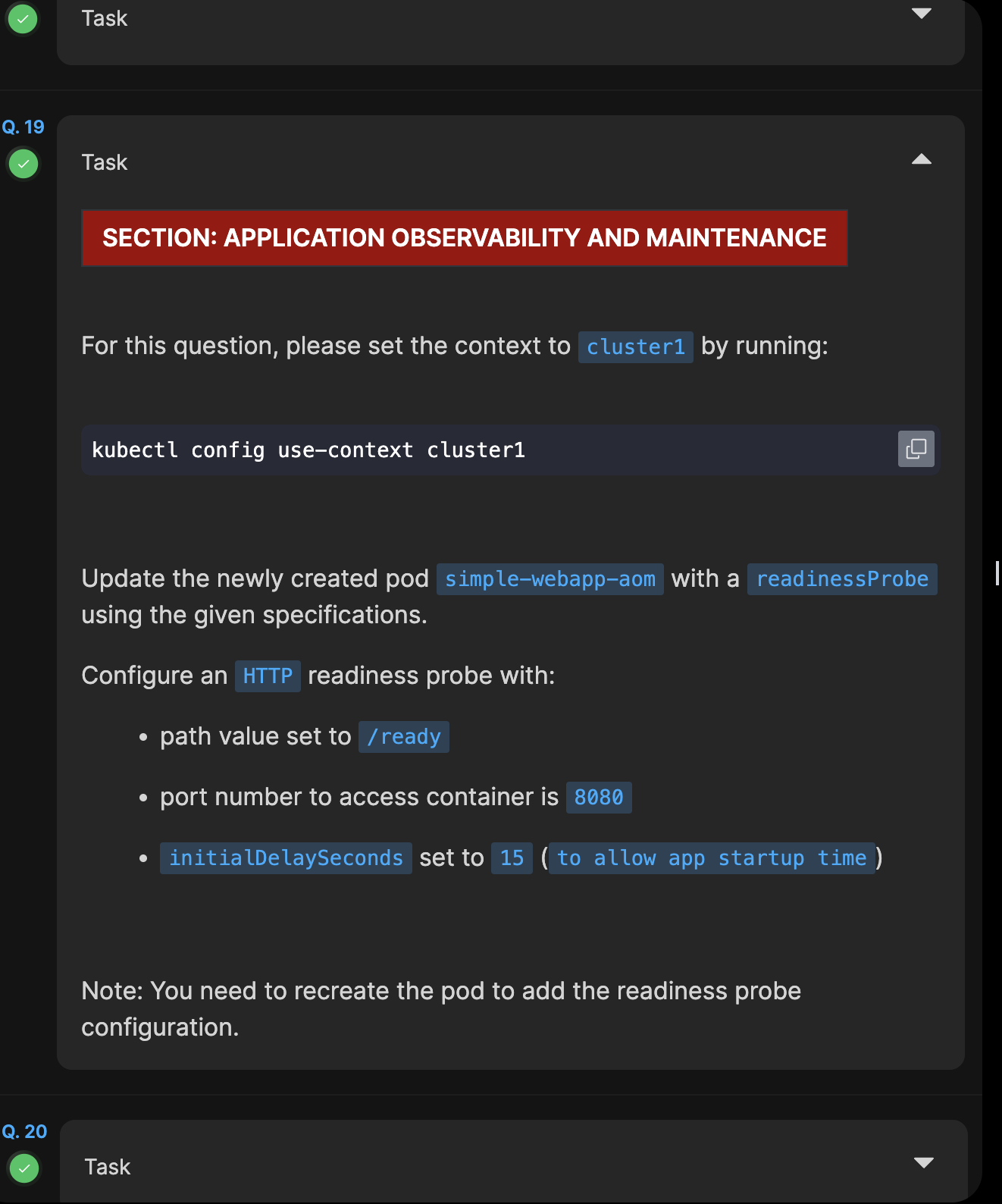
I don’t really understand the question. Can anyone help me to understand the question?

I created the readinessProbe like below:

readinessProbe:
initialDelaySeconds: 15
httpGet:
path: /ready
port: 8080

The result of this question is evaluated as Wrong. After I added “periodSeconds: 5” then it evaluated as Correct. But in the question there is no requirement to add periodSeconds.

I just tried Q19, and the grader accepted my answer, which does NOT use periodSeconds (which wouldn’t make much sense for a readinessProbe in any case:):

  containers:
  - image: kodekloud/webapp-delayed-start
    imagePullPolicy: Always
    name: simple-webapp
    ports:
    - containerPort: 8080
      protocol: TCP
    readinessProbe:
      httpGet:
        path: /ready
        port: 8080
      initialDelaySeconds: 15

    resources: {}

2 Likes

I actually had the same problem and didn’t specify periodSeconds and it was not approved

Did you remember to apply the YAML? I note that you got no matches with the grader, so that’s the most likely problem.

Just tried the same mock exam second time, the problem persists

As you see the cluster where it is deployed is cluster 1 just like in the task and I am using -o yaml directly so this is source of truth.

$ k get pod simple-webapp-aom -o yaml | grep -v '{"apiVersion":"v1"'
apiVersion: v1
kind: Pod
metadata:
  annotations:
    kubectl.kubernetes.io/last-applied-configuration: |
  creationTimestamp: "2026-04-12T16:30:42Z"
  generation: 1
  labels:
    name: simple-webapp-aom
  name: simple-webapp-aom
  namespace: default
  resourceVersion: "4777"
  uid: f751cc2a-9d49-4d06-8b7c-db2fecd0a806
spec:
  containers:
  - image: kodekloud/webapp-delayed-start
    imagePullPolicy: Always
    name: simple-webapp
    ports:
    - containerPort: 8080
      protocol: TCP
    readinessProbe:
      failureThreshold: 3
      httpGet:
        path: /ready
        port: 8080
        scheme: HTTP
      initialDelaySeconds: 15
      periodSeconds: 10
      successThreshold: 1
      timeoutSeconds: 1
    resources: {}
    terminationMessagePath: /dev/termination-log
    terminationMessagePolicy: File
    volumeMounts:
    - mountPath: /var/run/secrets/kubernetes.io/serviceaccount
      name: kube-api-access-hl9t5
      readOnly: true
  dnsPolicy: ClusterFirst
  enableServiceLinks: true
  nodeName: cluster1-controlplane

This is way more than you need. This works:

    readinessProbe:
      httpGet:
        path: /ready
        port: 8080
      initialDelaySeconds: 15

I’m not sure how you got all of the items wrong. Most likely you are creating the pod in the wrong context somehow in this case. When you try this again:

  1. Make sure you have run kubectl config use-context cluster1
  2. Save away the pod’s YAML. Don’t use the grep -v trick you’re using – I suspect that’s part of your problem due to the trailing | symbol you leave hanging.
  3. Delete the pod (I’d use k delete pod simple-webapp-aom --now)
  4. Add my more simple readinessProbe.
  5. Apply the modified YAML.
  1. As you see in the output above: nodeName: cluster1-controlplane so the context is correct.
  2. The grep -v this is only for brevity when posting here after I did the exam. The export I did using pure -o yaml.
  3. I used k replace -f simple-webapp-aom.yaml --force, same as in the explaiantion.
  4. I also used the most simple YAML, the same one you used, all other values are defaults added by k8s itself.
  1. As you see in the output above: nodeName: cluster1-controlplane so the context is correct.
  2. The grep -v this is only for brevity when posting here after I did the exam. The export I did using pure -o yaml.
  3. I used k replace -f simple-webapp-aom.yaml --force, same as in the explaiantion.
  4. I also used the most simple YAML, the same one you used, all other values are defaults added by k8s itself.

The -o yaml I prov

Neither clear what you did in this case, nor is it clear what the grader returned. Since I attempted the problem just 2 days ago, it’s clear that the grader will work at least under some circumstances. Could you please:

  • Try this again, but show me what the grader actually indicated this time.
  • Show me the YAML as you passed to kubectl. I’d recommend using k delete pod and then k apply -f this time, since there are some subtleties with using k replace -f that might make things less clear in this case.

Hi rob

When I just do this one task then it works (both with replace and delete+create)

But when I do Q19, Q20 and Q21 (both on cluster1 and Q21 on cluster3), both Q19 and Q20 fail the checks!

I don’t know if it’s about some time that passes in the meantime, or interference between the tasks.

OK, NOW I see what your problem was. And you are correct – there’s an issue with the grader. The problem is that the grader is not setting the current context when it checks Q19 and Q20, so when you do Q21 (which is on cluster3), the context is no longer set to cluster1. If you change the current cluster back to cluster1, they are graded correctly.

Bizarre, but true. I’ve reported this to the lab engineering team, which should be able to fix this bug now that you’ve uncovered it for us :slight_smile: Sorry for the hassle – this one was pretty subtle.
Amazing! Great that we finally found out where the problem is

Please give it another check; we think we have this one fixed.

I can confirm, now it works flawlessly!