I completed the “Set up Azure Application Gateway for load balancing” lab exactly per the task instructions across 3 separate lab environments, using the exact resource names specified each time (e.g. xfusion-*, datacenter-* naming variants).
Every time, the grader failed with:
Frontend IP configuration is missing for Application Gateway.
However, I independently verified the frontend IP configuration using:
az network application-gateway frontend-ip show --gateway-name <gateway-name> --resource-group <rg> --name <frontend-ip-name> -o json
This consistently returned the correct name, a fully populated publicIPAddress.id, and provisioningState: Succeeded - proving the resource exists and is correctly configured every time.
Likely root cause: This subscription’s Azure Policy only permits the Basic SKU for Application Gateway. However, the installed Azure CLI’s --sku parameter validator does not recognize Basic as a valid value (only Standard_Small, Standard_Medium, Standard_v2, WAF_Large, WAF_Medium, WAF_v2 are accepted). This makes it impossible to create the gateway via az network application-gateway create directly, forcing deployment via raw ARM template (az deployment group create) instead.
The gateway, backend pool, routing rule, and frontend IP config all deploy successfully and are verified correct via the Azure API, but the grader consistently reports the frontend IP as missing. This suggests either a grader bug that doesn’t detect resources created via ARM template deployment, or a mismatch between the subscription’s policy restrictions and what the grader expects.
Happy to share verification screenshots if useful. Has anyone else hit this on the Application Gateway lab?
Could you please share the name of the course and the lab?
Sure! The course is KodeKloud Engineer, and the lab is “Day 50: VM Setup and Configuration for Azure Application Gateway”, part of the 100 Days of Cloud (Azure) track, Day 50 (last task).
Try following this solution and see if it helps.
Thanks for pointing me to that, Santosh. I gave it a careful try, but ran into a hard blocker specifically around the frontend IP naming requirement.
For a Basic tier Application Gateway, the Portal wizard doesn’t offer any way to set a custom name for the frontend IP configuration, it’s auto-generated (e.g. appGwPublicFrontendIpIPv4) with no override field during creation.
I also tried renaming it after the fact, through three different routes:
- Portal → Frontend IP configurations → edit panel — the Name field is read-only there
-
az network application-gateway frontend-ip update --new-name — CLI doesn’t recognize that parameter
-
az resource update --set properties.frontendIPConfigurations[0].name=... — fails with ApplicationGatewayFrontendIpConfigurationNameCannotBeChangedForV2Sku
So it looks like Basic SKU gateways simply don’t allow a custom-named frontend IP config after creation, regardless of method.
The only approach that let me set the name correctly from the start was deploying via ARM template (az deployment group create), which I then verified independently with az network application-gateway frontend-ip show — confirming the correct name, a populated public IP binding, and provisioningState: Succeeded. Despite that, the grader still returns “Frontend IP configuration is missing”, this has now happened across 3 separate attempts with fully verified configurations.
Would really appreciate if this could get flagged for someone to check the grading script directly, happy to share full command output/screenshots if that’d help debug it.
You can configure Application Gateway on the Azure console.
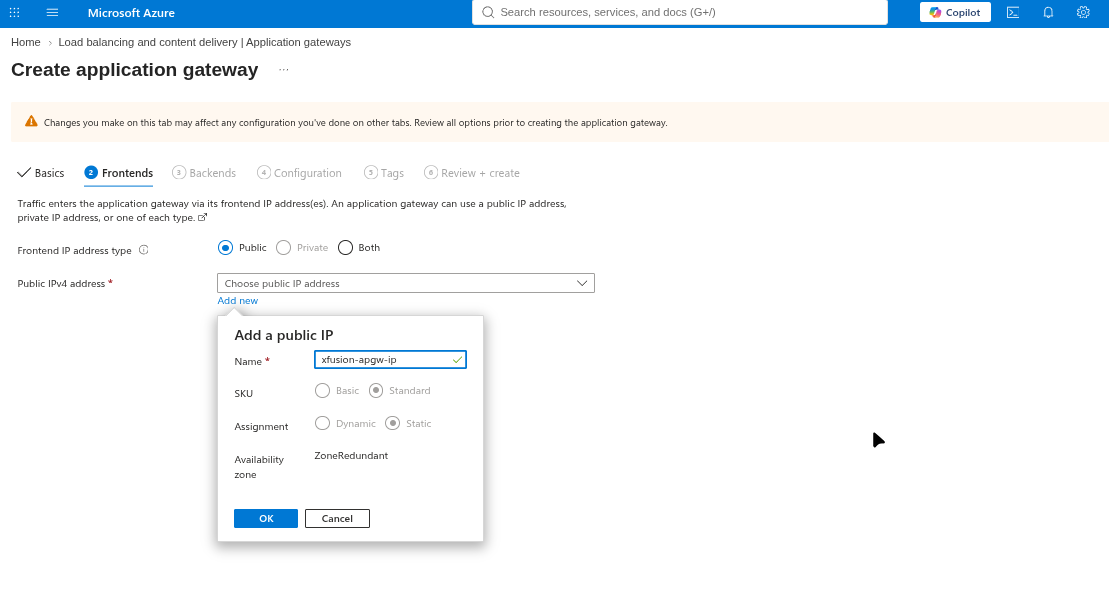
This allows the creation of a new named IP.
Thank you, Santosh, this actually worked! 
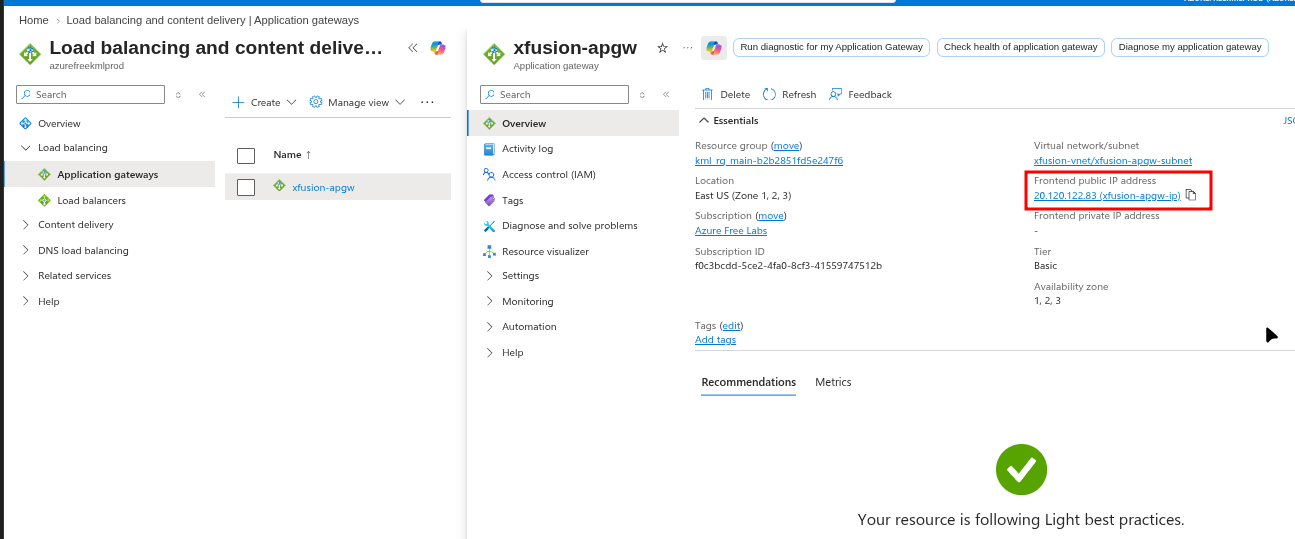
I tried it exactly as you suggested: named the public IP resource itself xfusion-apgw-ip during the Frontends step of the Portal wizard (Standard SKU, Static assignment), then completed the rest of the gateway (backend pool with both VM NICs, HTTP listener, basic routing rule) through the same wizard.
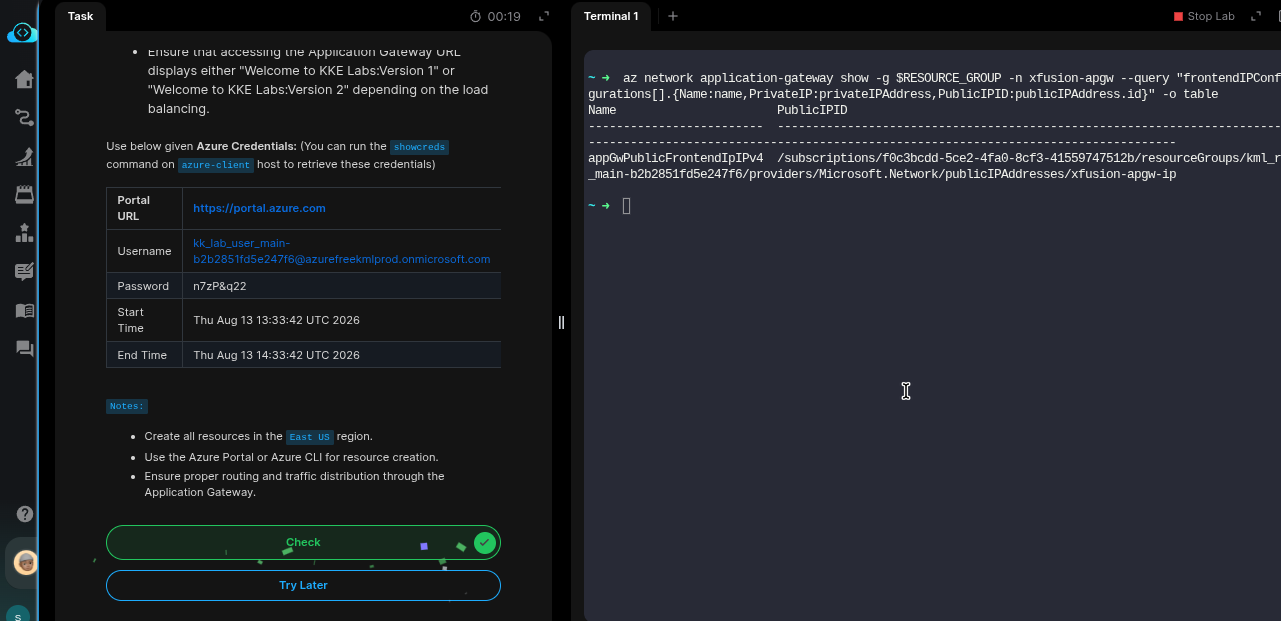
For anyone else who finds this thread, the internal frontend IP configuration object still auto-names itself something like appGwPublicFrontendIpIPv4 on Basic tier (confirmed via az network application-gateway frontend-ip list), and that genuinely cannot be renamed by any method - Portal, az network application-gateway frontend-ip update --new-name (unrecognized param), or az resource update --set (ApplicationGatewayFrontendIpConfigurationNameCannotBeChangedForV2Sku). But naming the public IP resource correctly from the start is what the grader actually needed - verified by az network application-gateway show ... --query "frontendIPConfigurations[].publicIPAddress.id" pointing to the correctly-named public IP.
Really appreciate you taking the time to dig into this and share a working fix. Saved me a lot of frustration after several failed attempts with the ARM template approach.