Hi,
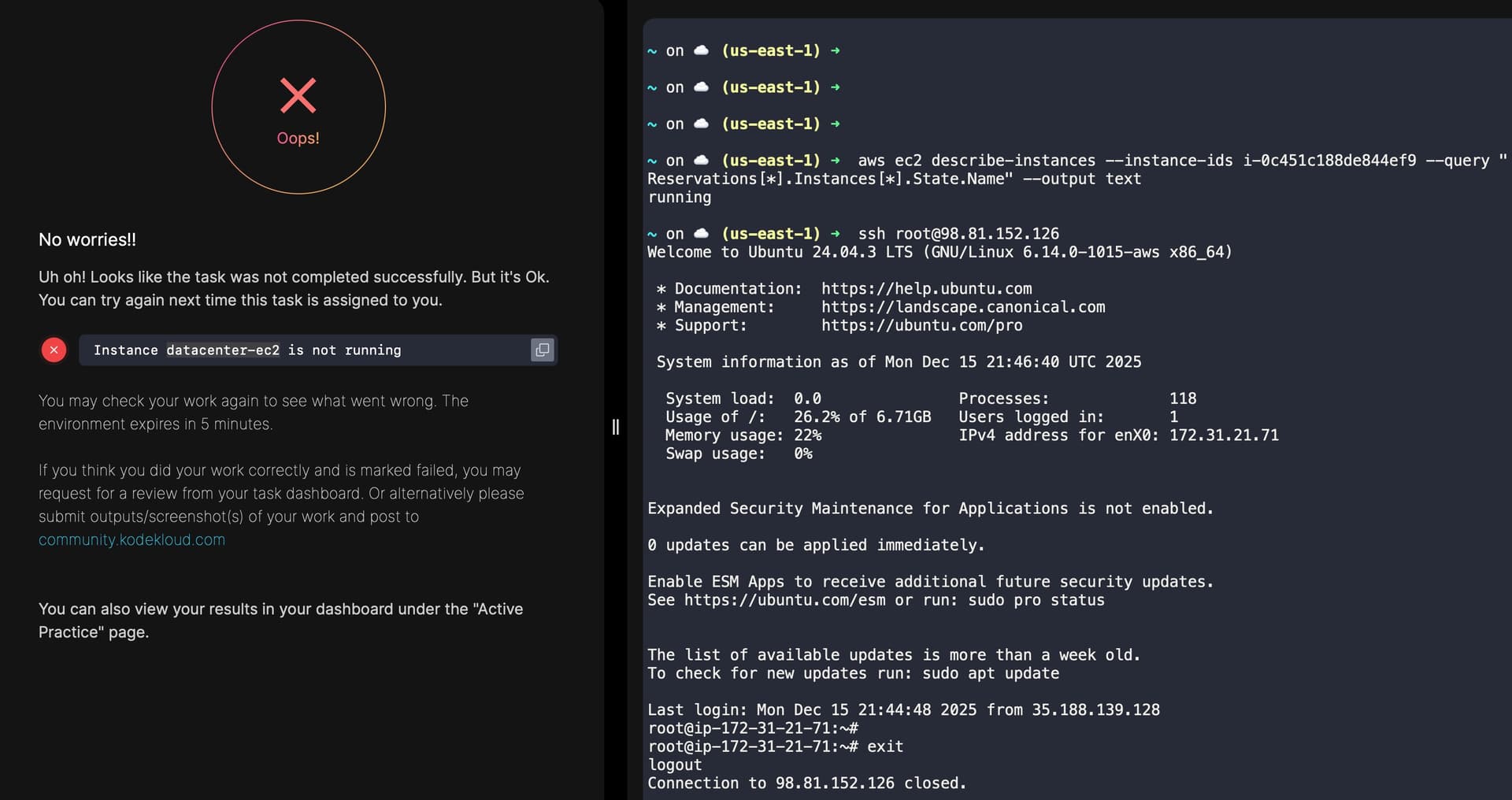
I think I ran into a bug in this lab. On my first attempt, it errored out saying the “datacenter-ec2 instance was not running”, but I verified that the instance was indeed up and running (screenshot attached). I also ran the ‘aws ec2 describe-instance’ command to check the status, which confirmed the instance was active and status check passed as well.
I was able to complete the task successfully on my second attempt, I did the same steps on my ‘first attempt’ so it seems like an intermittent issue. Just wanted to flag it as it was a bit unusual.
I expect the problem here is the error message more than anything else. I did the following, and the lab passed:
- Created a key pair for .ssh/id_rsa using ssh-keygen.
- Created a second key at ~/ec2-temp with ssh-keygen
- Started up the AWS console.
- Created an imported keypair based on the public key of (2)
- Created the ec2 instance with the requested name, t2-micro size, Ubuntu image, using the imported keypair from (4).
- ssh into the instance using the public IP for user ubuntu, using the ec2-temp private key.
- Now, on the ec2 instance, sudo -i, cd /root/.ssh, and recreated authorized_keys using the public id_rsa.pub key from (1).
- Exit the ec2 instance.
- Test and verify that you can log in as root@ (you can).
This procedure passed the grader. So I don’t think that there’s a bug in the lab.
1 Like
Hi Rob,
I agree that the issue could be related to the error message rather than the actual task logic. Since I don’t have much visibility into what the grader is checking internally, it’s difficult to pinpoint the exact cause, which makes it feel a bit like guesswork from the user’s side.
That said, as shown in the screenshot, I was able to successfully SSH into the instance as root, permission were correct so it’s unclear what the grader was detecting as missing at that point.
I was able to complete the task successfully on a subsequent attempt using the same steps.
1 Like
I believe the lab checks using “/root/.ssh/id_rsa” file only, so if you created the keys using any other name it will fail.
I failed several times, but somehow when creating the key I just simply didn’t give any name so it defaulted to id_rsa and it worked finally.
Tried the same with terraform:
Hi Manoj,
I have explicitly used the id_rsa key name, so I don’t think that’s the issue here. Even on the subsequent attempt that was successful, I passed the exact same key. Unfortunately, there’s no clear way to backtrack what changed between the failed and successful runs.
Thanks for taking the time to look into this @rob_kodekloud @pandumanoj971
1 Like
Oh then issue might be something else then, btw I was trying to do these tasks using terraform just to learn tf along the way.
Check the terraform file in Day 22 and try if you can in this way.