I had a successful build for my day 81 task but I kept getting “Build failed: FAILURE” when I submit. Attached is my console output from Jenkins.
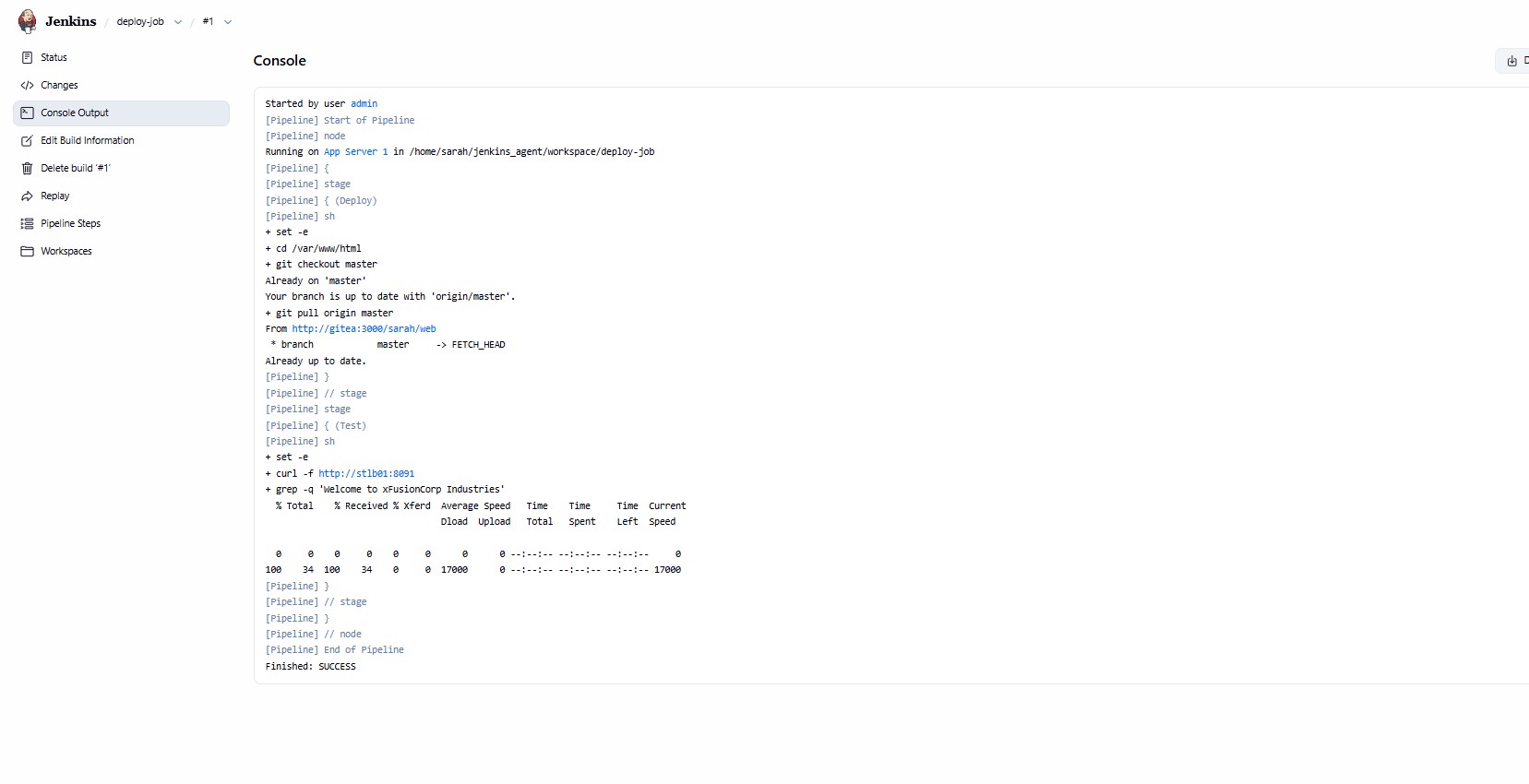
Console output does not guarantee you’re doing what the task requested. Could you please post (as a code block) the Jenkins pipeline so we can see what you actually did?
This is my Jenkins Pipeline
node('stapp01') {
    stage('Deploy') {
        sh '''
            set -e
            cd /var/www/html
            git checkout master
            git pull origin master
        '''
    }

    stage('Test') {
        sh '''
            set -e
            curl -f http://stlb01:8091 | grep -q "Welcome to xFusionCorp Industries"
        '''
    }
}
That looks plausible. Not sure why you’re not succeeding – I did this lab today with a pretty similar pipeline, and it worked.
The one thing I did different in the pipeline was to supply an agent clause, not a node clause:
pipeline {
    agent { label 'stapp01' }

    stages {
        stage('Deploy') {
            steps {
       sh '''
            cd /var/www/html
            git checkout master
            git pull origin master
        '''

            }
        }

        stage('Test') {
            steps {
                script {
                    sh """
                        curl  http://stlb01:8091
                   """
              }
    }
}
I assume:
- That your agent is set up to run as user sarah and has correct password credentials.
- That you had node otherwise set up correctly.
Yes, sarah has the correct password credentials. I’d take another attempt at the task using the agent clause.
Thank you for your time.
I’d let you know the about outcome.
Thank you once again for the response.
I’ve attempted the task severally again and I still can’t get past it.
Below is my console output before submitting:
Started by user admin
[Pipeline] Start of Pipeline
[Pipeline] node
Running on App Server 1 in /home/sarah/jenkins_agent/workspace/deploy-job
[Pipeline] {
[Pipeline] stage
[Pipeline] { (Deploy)
[Pipeline] sh
+ set -e
+ git config --global --add safe.directory /var/www/html
+ cd /var/www/html
+ git checkout master
Already on 'master'
Your branch is up to date with 'origin/master'.
+ git fetch origin
+ git reset --hard origin/master
HEAD is now at 633598e modified index file
[Pipeline] }
[Pipeline] // stage
[Pipeline] stage
[Pipeline] { (Test)
[Pipeline] sh
+ set -e
++ curl -sf http://stlb01:8091
+ RESPONSE='Welcome to xFusionCorp Industries'
+ echo 'Welcome to xFusionCorp Industries'
+ grep -q 'Welcome to xFusionCorp Industries'
[Pipeline] }
[Pipeline] // stage
[Pipeline] }
[Pipeline] // node
[Pipeline] End of Pipeline
Finished: SUCCESS
However after submitting, I remained on the jenkins job and saw the build that was made to check task returned this console output:
Started by user admin
[Pipeline] Start of Pipeline
[Pipeline] node
Running on App Server 1 in /home/sarah/jenkins_agent/workspace/deploy-job
[Pipeline] {
[Pipeline] stage
[Pipeline] { (Deploy)
[Pipeline] sh
+ set -e
+ git config --global --add safe.directory /var/www/html
+ cd /var/www/html
+ git checkout master
Already on 'master'
Your branch is up to date with 'origin/master'.
+ git fetch origin
+ git reset --hard origin/master
HEAD is now at 59cc799 update
[Pipeline] }
[Pipeline] // stage
[Pipeline] stage
[Pipeline] { (Test)
[Pipeline] sh
+ set -e
++ curl -sf http://stlb01:8091
+ RESPONSE=cz4ufhz8uh36
+ echo cz4ufhz8uh36
+ grep -q 'Welcome to xFusionCorp Industries'
[Pipeline] }
[Pipeline] // stage
[Pipeline] }
[Pipeline] // node
[Pipeline] End of Pipeline
ERROR: script returned exit code 1
Finished: FAILURE
It is observed that the LBR is returning cz4ufhz8uh36 a random token. This is NOT coming from Apache. The LBR is doing sticky sessions or health checks and sometimes returns a token instead of the actual page content.
I’ll be glad if I can get any help to fix this.
Thank you.
I’m not sure what you can do about the LBR behavior. For now, just remove the grep from the Testing phase.
Another possibility is to modify your curl invocation a bit, to add “?stuff=$RANDOM” to the URL to make sure that the LBR does not have a value to cache.
Thank you, Rob for your response. I have been able to get past the task.
I was however able to get past it when I saw someone raise similar issue and how he went about it. The validation system actually checks for a random pre-seeded string that is already present in the Gitea repository (e.g., c899chnjunrk , wv9x96vbtjsw , etc.), not the welcome message stated in the instructions.
I did the task without updating index file as stated in the instruction with the same pipeline script and I passed the task.
I’ll suggest you look at this from your end because of others that might encounter similar issue.
Thank you for your responses.
Regards.