Although if i ssh to “stdb01” with same user 'thor" it says permission denied.
Why do you want to “switch user to peter”?
HI @yogendra
You are trying to switch to user peter on jump host itself where it doesn’t exist. You need to SSH into DB server (stdb01).
1 Like
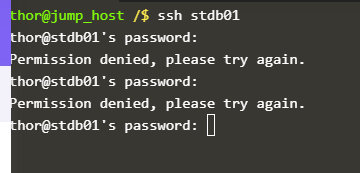
Hi Inderpreet, i already worked with that method. I did SSH to “stdb01”, but it asks password for which i tried with “mjolnir123” and “Sp!dy”. But, it gives me below error. Please guide.
Hi @yogendra
SSH into DB server from jump host using command ssh peter@stdb01 and use password Sp!dy , it should work.
Hi @Lalit and @Inderpreet
Please look this snip of logs received as per your command.
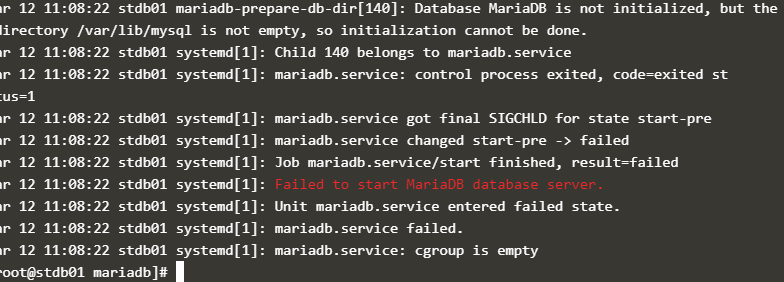
I see failed to start the service. nothing useful from other blogs. Please help.
check the permissions and ownership of /var/lib/mysql
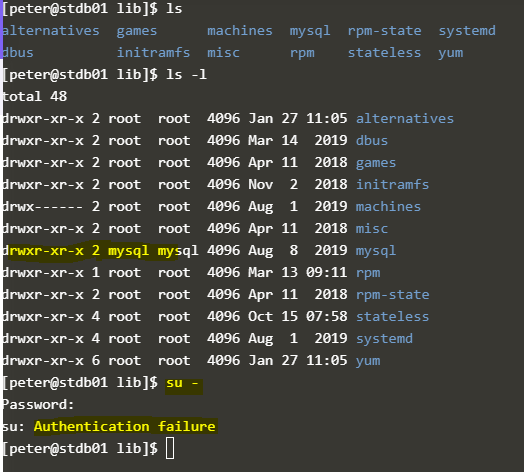
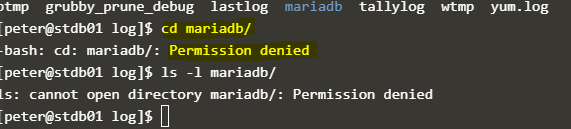
See the very first error in the screenshot, I think you should get some hint from there.
1 Like
Hi @Inderpreet is reinstallation of mariadb necessary in this scenario or do i just need to change the directory location for sql?
remove the content of inside mysql directory as per shown in error.
1 Like
thor@jump_host /$ ssh peter@stdb01
peter@stdb01 ~]$ sudo su -
root@stdb01 ~]# sudo systemctl start mariadb
Job for mariadb.service failed because the control process exited with error code. See “systemctl status mariadb.service” and “journalctl -xe” for details.
root@stdb01 ~]# mysql_install_db
root@stdb01 mysql]# sudo chown mysql:mysql mysql/
root@stdb01 lib]# sudo systemctl start mariadb
[root@stdb01 lib]# sudo systemctl status mariadb
2 Likes
Try #mysql_secure_installation and then try starting the service.
clear all in /var/lib/mysql
After that try again to run command
root@stdb01 ~]# mysql_install_db --user=mysql --basedir=/usr --datadir=/var/lib/mysql
[root@stdb01 ~]# sudo systemctl start mariadb
[root@stdb01 ~]# sudo systemctl status mariadb

You should see an error in the journalctl logs that says it could not change ownership of a directory. It might help to do journalctl -xe | grep maria. Once you find that directory you just need to change the ownership on it manually and you will be able to start the service.
When you change the permissions you need to use sudo, just like any other command that needs elevated permissions.
1 Like
No need to run any mysql commands or delete any files. You just need to fix the permissions.
1 Like
You just need to change permissions to the /var/log/mariadb/ folder. Assign Mysql as owner to that folder.