haproxy -c -f /path/to/haproxy.cfg this command help you check your config is ok or not , and tell you where is likely the problem to be.
Hope it helps !
4 Likes
Hi @aina_dipupo,
HAProxy may have started but that doesn’t confirm that it’s configured properly, or that all required dependencies are, for this specific task. For example, all of your app_backend hosts route to port 80 but I don’t recall those app servers ever being configured to run on port 80 on Kode Kloud.
You can easily validate these types of tasks by using curl against every service in the chain (sometimes apache + nginx + haproxy) to determine exactly where the problem is. For example, if you can’t successfully ‘curl 172.16.238.10:80’ you’ll know your haproxy configuration is invalid.
Generally speaking, I always work backwards for these types of tasks - I verify that apache is running, and fix it if it isn’t, before looking at the nginx and/or haproxy config.
Hope this helps,
Peter
1 Like

@peterwhite @Inderpreet @akshayyw @Salim
thanks guys for pointing out to typo hint. fixed my issue.
2 Likes
What solved your issue? Did you use this command for checking syntax errors in the file?
haproxy -c -f haproxy.cfg
1 Like
- haproxy -c -f /etc/haproxy/haproxy.cfg
- timeout checking 10s —> timeout check 10s
- systemctl start haproxy.service
1 Like
Hi Akshay,
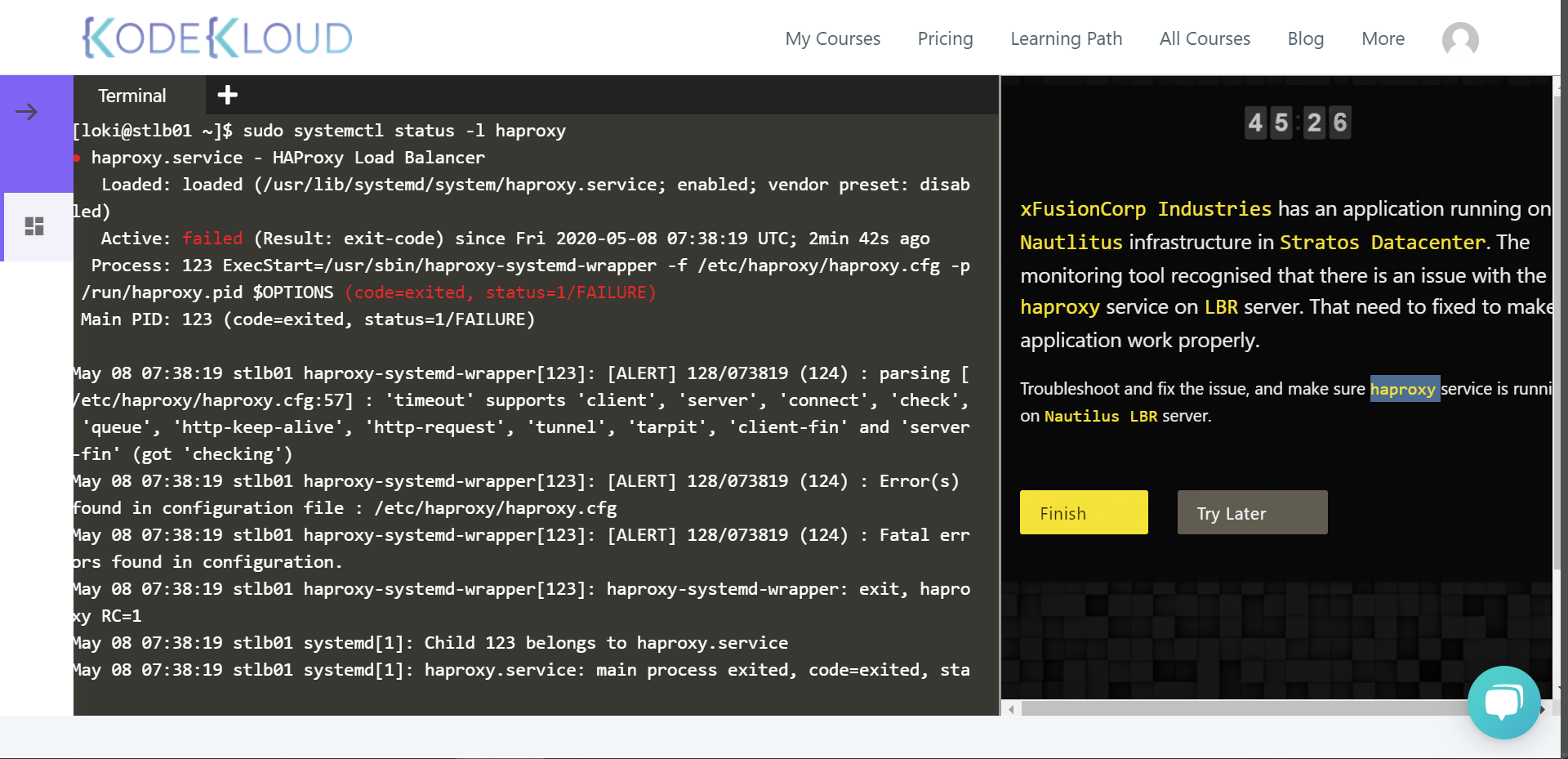
The status of the haproxy service was refering to timeout section of client, connect and server. there was the typo of client in the configuration section. I just corrected the same.
Again restarted the haproxy services. The services was up and running.
I didn’t try below steps given by you.
Thanks
Swaroop
1 Like
In haproxy.cfg file add below content after global and default section:
frontend http_front
bind *:80
stats uri /haproxy?stats
default_backend http_back
backend http_back
balance roundrobin
server stapp01 172.16.238.10:8080 check <<— Check the port of app server on which httpd is configrured and add that here, in my case it was 8080
server stapp02 172.16.238.11:8080 check
server stapp03 172.16.238.12:8080 check
Hi @Inderpreet, @peterwhite and other geeks…
Although i am able to get the desired output page, my task status says Failed.
Could any of you please guide me did i really do it wrong.
The below snip gave the output page as expected.

The task status says failed as per below snip.
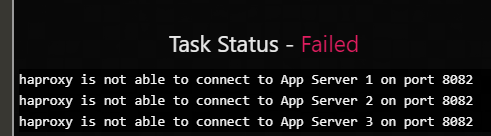
All App servers were listening for httpd on 8082 and i configured same for app servers in haproxy file and port 80 for lbr server.
Seeking your guidance.
Thanks,
Yogendra
Today i troubleshooted the issue its just a simple misspelled issue, clearly understand the error in cmd service haproxy status you will find the issue.
What is the clue?
Can you please tell!
What was the command to enter into haproxy …???
- haproxy -c -f /etc/haproxy/haproxy.cfg
- timeout checking 10s —> timeout check 10s
- systemctl start haproxy.service
No its not working …i have donee…
I juts finished this task, I think they just want you to make sure that HAPROXY is running, nothing more is needed at this stage, I finished the lab and I passed.
I can see that the error is not the same for all us. But is similar. I also finished this task successfully.
Main command to find the error:
haproxy -c -f /etc/haproxy/haproxy.cfg
Next, you resolve the error and check again the haproxy.cfg

Finally, start haproxy.
Exactly! The only task you have to perform in the “Haproxy LBR Troubleshooting” activity is to check for a typo in the config file /etc/haproxy/haproxy.cfg. The command “haproxy -c -f /etc/haproxy/haproxy.cfg” will show information about where to find the typo in the config file, then you go and correct it using your preferred text editor, in my case “vi”.
Note that the error will change anytime you choose to try the activity later, for example the error can be a typo in the timeout parameters in the config file, for instance “timeout checking” instead of “timeout check” or a keyword that has been commented like #backend app, in which case the output of “haproxy -c -f /etc/haproxy/haproxy.cfg” will say something like: backend app cannot be found. So you edit the config file by finding and uncommenting “#backend app” to “backend app”. Then check the validity of the config file again with “haproxy -c -f /etc/haproxy/haproxy.cfg”, restart the service and check the status of the service to see if its running(Active).
1 Like
I was too stuck, but reading your suggestions on checking the error message, and the logs from
haproxy -c -f haproxy.cfg
I was able to troubleshoot it.
Thank you people!
Actually I comment out “backend app” and it worked… I think the key is to use “haproxy -c -f /etc/haproxy/haproxy.cfg” to identify the root cause and fix the bug accordingly…
Hi All,
I was able to finish this task by following the following steps. Please have a look and let me know if this helps.
Steps Followed
Step1
Step2
Checked the status
[loki@stlb01 ~]$ systemctl status haproxy
● haproxy.service - HAProxy Load Balancer
Loaded: loaded (/usr/lib/systemd/system/haproxy.service; disabled; vendor preset: disabled) Active: inactive (dead)
[loki@stlb01 ~]$
Step 3 Validate the Config file
[loki@stlb01 ~]$ haproxy -c -f /etc/haproxy/haproxy.cfg
[ALERT] 302/025622 (96) : parsing [/etc/haproxy/haproxy.cfg:57] : ‘timeout’ supports ‘client’, ‘server’, ‘connect’, ‘check’, ‘queue’, ‘http-keep-alive’, ‘http-request’, ‘tunnel’, ‘tarpit’, ‘client-fin’ and ‘server-fin’ (got ‘checking’)
[ALERT] 302/025622 (96) : Error(s) found in configuration file : /etc/haproxy/haproxy.cfg
[ALERT] 302/025622 (96) : Fatal errors found in configuration.
[loki@stlb01 ~]$
Step4
Edit the config file.
timeout server 1m
timeout http-keep-alive 10s
timeout checking 10s >>>>>Modified to
timeout check 10s
Step5
[loki@stlb01 ~]$ haproxy -c -f /etc/haproxy/haproxy.cfg
Configuration file is valid
[loki@stlb01 ~]$
Step6
Start the service
sudo systemctl start haproxy
Step7
Check the status of the service
systemctl status haproxy