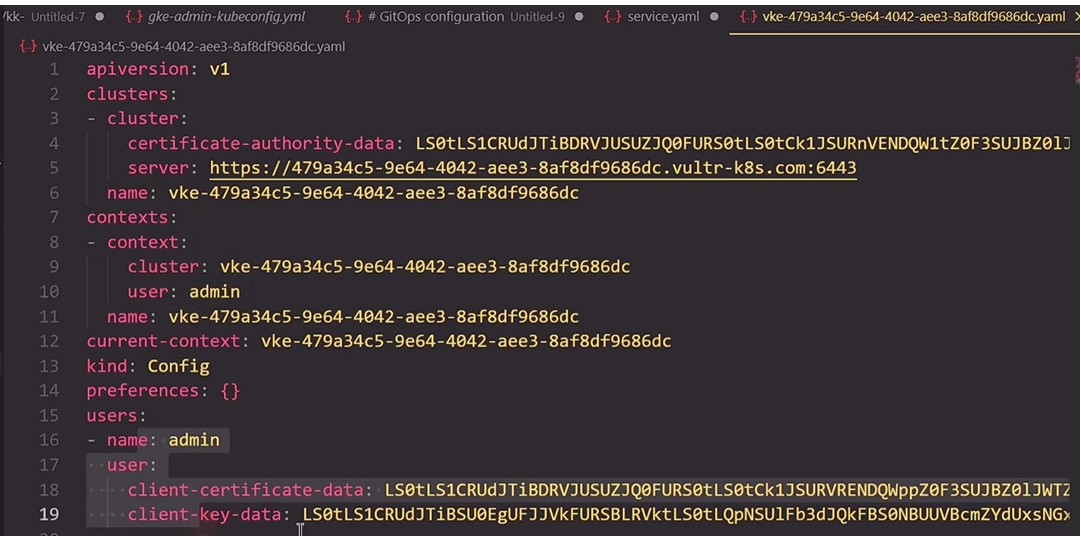
Hi. I am going through the course “ GitLab CI/CD: Architecting, Deploying, and Optimizing Pipelines” and I am also doing all the steps in parallel in my gitlab as well.
At the module “Job - Configuring Kubeconfig file” there is this kubeconfig file show in the video.
I am not able to continue to continue with the gitlab jobs as I do not have this exact kubeconfig file from the course.
Dear Kodekloud could you provide this file to me so I can add it and run the job myself in my gitlab too?Without this the job fails.
The kubeconfig should be available in the Lab env as ~/.kube/config.
You can refer to the notes here for more info on how to use it in CI.
I am not talking about the Lab env. (Btw I tried that by using the file from the lab and is not working as it is different).
I am talking about the kubeconfig file from the video, from the demo presentation. That one is different.
You don’t need that exact file. If you’re deploying this on your own systems, you need a kubeconfig file that points to a K8s cluster that is accessible to your gitlab install. Not knowing what hardware configuration you have, we can’t say what that file contains. But the key point is that the the kubeconfig file needs to have a K8s endpoint for kube-apiserver that can be accessed from gitlab.
So how are your servers set up?
Is the same way as in the course. From the beginning of the gitlab course I did all the steps as shown in the video ( Not from the lab). Basically at the beginning of the course I cloned the repository of the trainer in my gitlab. But now I miss the kubeconfig file. So I need the kubeconfig file from the video in order to deploy the K8s clusfer as shown in the video.
If I understand what you mean, then you’re using a free Gitlab account for this. If so, then there are two ways you can get access to a K8s cluster:
- You can use a cluster that’s available on the public internet (say, an EKS cluster from AWS)
- You can create a local cluster inside of your CI/CD script using something like kind to create the cluster.
For the kubeconfig file, you’d use a kubeconfig that points to that cluster.
Can you show how to create a local cluster inside of the CI/CD script and then use the kubeconfig that points to that cluster.
Here’s an extension of one of the related courses’ scripts that implements a local kind cluster. The “kind” job is what to look at:
name: Solar System Workflow

on:
  workflow_dispatch:
  push:
    branches:
      - main
      - 'feature/*'
env:
    MONGO_URI: mongodb+srv://supercluster.d83jj.mongodb.net/superData
    MONGO_USERNAME: superuser
    MONGO_PASSWORD: ${{ secrets.MONGO_PASSWORD }}

permissions:
    contents: read
    packages: write

jobs:
    unit-testing:
        name: Unit Testing
        runs-on: ubuntu-latest
        steps:
        - name: Checkout Repository
          uses: actions/checkout@v4

        - name: Setup NodeJS Version
          uses: actions/setup-node@v4
          with:
            node-version: 20

        - name: Install Dependencies
          run: npm install

        - name: Unit Testing
          run: npm test

        - name: Archive Test Result
          uses: actions/upload-artifact@v4
          with:
            name: Mocha-Test-Result
            path: test-results.xml
        - name: Cache NPM dependencies
          uses: actions/cache@v4
          with:
            path: ~/.npm
            key: "${{ runner.os }}-node-modules-${{ hashFiles('package-lock.json') }}"

    docker:
      name: Dockerize
      runs-on: ubuntu-latest

      needs:
        - unit-testing
      steps:
        - name: Install sources
          uses: actions/checkout@v4

        - name: Login to GitHub Container Registry
          uses: docker/login-action@v3
          with:
            registry: ghcr.io
            username: ${{ github.repository_owner }}
            password: ${{ secrets.GITHUB_TOKEN }}

        - name: Login to DockerHub
          uses: docker/login-action@v3
          with:
            username: ${{ secrets.DOCKERHUB_USER }}
            password: ${{ secrets.DOCKERHUB_PASSWORD }}


        -
          name: Set up QEMU
          uses: docker/setup-qemu-action@v3
        -
          name: Build for Test
          uses: docker/build-push-action@v6
          with:
            context: .
            push: false
            tags: |
              ${{ github.repository_owner }}/solar-system:${{ github.sha }}
              solar-system:${{ github.sha }}
              solar-system:latest


        - name: image test
          run: |
            docker images
            docker run --name solar-system-app -d \
              -p 3000:3000 \
              -e MONGO_URI=$MONGO_URI \
              -e MONGO_USERNAME=$MONGO_USERNAME \
              -e MONGO_PASSWORD=$MONGO_PASSWORD \
              solar-system:${{ github.sha }}

            echo "see if image returns expected live endpoint"
            wget -q -O - 127.0.0.1:3000/live | grep live

        - name: Dockerhub repo push
          uses: docker/build-push-action@v6
          with:
            context: .
            push: true
            tags: |
              ${{ github.repository_owner }}/solar-system:${{ github.sha }}
              ${{ github.repository_owner }}/solar-system:latest

        - name: GHCR repo push
          continue-on-error: true
          uses: docker/build-push-action@v6
          with:
            context: .
            push: true
            tags: |
              ${{ github.repository_owner }}/solar-system:${{ github.sha }}
              ghcr.io/${{ github.repository_owner }}/solar-system:${{ github.sha }}

    kind:
        name: Install kind and pull to K8s
        runs-on: ubuntu-latest
        needs:
        - docker
        steps:
        - name: install cluster
          uses: helm/kind-action@v1
        - name: Pull image
          run: |
            # wait for DNS and run image
            sleep 60
            kubectl -n kube-system get pod
            set +e
            kubectl run solar --image ghcr.io/${{ github.repository_owner }}/solar-system:${{ github.sha }} \
               --env MONGO_URI=${{ env.MONGO_URI}} \
               --env MONGO_USERNAME=${{ env.MONGO_USERNAME}} \
               --env MONGO_PASSWORD=${{ env.MONGO_PASSWORD}}
            set -e
            echo "kubectl returned $?"
            sleep 10
            kubectl logs solar
Thank you Rob.
Now this “kind” section will need to be copy/paste into the pipeline editor of the solar-system – feature branch?
And where?
And for MONGO_USERNAME and MONGO_PASSWORD which one to use?
For reminder I am following the steps in the videos from the course: GitLab CI/CD: Architecting, Deploying, and Optimizing Pipelines
https://learn.kodekloud.com/user/courses/gitlab-ci-cd-architecting-deploying-and-optimizing-pipelines/module/75db752f-09a3-4df6-a1ac-3a1fa506eb65/lesson/74d568de-7193-4beb-947d-f209b3dbf3a7
Now I am at module nr.5: CONTINOUS DEPLOYMENT WITH GITLAB
This is the current pipeline of **solar-system – feature branch:
workflow:
  name: Solar System NodeJS Piepline
  rules:
    - if: $CI_COMMIT_BRANCH == 'main' ||  $CI_COMMIT_BRANCH =~ /^feature/
      when: always
    - if: $CI_MERGE_REQUEST_SOURCE_BRANCH_NAME =~ /^feature/ && $CI_PIPELINE_SOURCE == "merge_request_event"
      when: always

stages:
  - test
  - containerization
  - dev-deploy

variables:
    DOCKER_USERNAME: tibor76
    IMAGE_VERSION: $CI_PIPELINE_ID
#    MONGO_URI: 'mongodb+srv://supercluster.d83jj.mongodb.net/superData'
#    MONGO_USERNAME: superuser
#    MONGO_PASSWORD: $M_DB_PASSWORD


k8s_dev_deploy:
  stage: dev-deploy
  image:
    name: alpine:3.7
  dependencies: []
  before_script:
     - wget https://storage.googleapis.com/kubernetes-release/release/$(wget -q -O - https://storage.googleapis.com/kubernetes-release/release/stable.txt)/bin/linux/amd64/kubectl
     - chmod +x ./kubectl
     - mv ./kubectl /usr/bin/kubectl
  script:
    - export KUBECONFIG=$DEV_KUBE_CONFIG
    - kubectl version -o yaml
    - kubectl config get-contexts
    - kubectl get nodes
    - export INGRESS_IP=$(kubectl -n ingress-nginx get services ingress-nginx-controller -o jsonpath="{.status.loadBalancer.ingress[0].ip}")
    - echo $INGRESS_IP
    - for i in kubernetes/*.yaml; do envsubst < $i ; done
It’s worth looking at the docs for the helm/kind action. It does the following:
- It installs kind into your script’s context.
- It installs kubectl
- It installs a kubeconfig file that points to the created kind cluster
So you need to call the kind action before you use kubectl in your script, but once you’ve called the action it will “just work”. It does take a bit for the kind cluster to settle, which is why I call sleep in my script. I’ve also found that the when calling kubectl, occasionally you need to cover for errors that get thrown (not sure what they are, but I know they occur; they appear to be timeout related for invocations that otherwise work), which is why I do the error handling with set +e; ... set -e blocks. This is just from experience with these sorts of scripts that I do this. More than that, look at the examples in the helm/kind docs so you know the available options.
Once you do a job that installs the cluster, you can reuse the cluster in your script by making it a dependency for other jobs.
I am kind of lost now. You mean like that? Is it OK?
I never used helm and I am new to gitlab.
workflow:
  name: Solar System NodeJS Piepline
  rules:
    - if: $CI_COMMIT_BRANCH == 'main' ||  $CI_COMMIT_BRANCH =~ /^feature/
      when: always
    - if: $CI_MERGE_REQUEST_SOURCE_BRANCH_NAME =~ /^feature/ && $CI_PIPELINE_SOURCE == "merge_request_event"
      when: always

stages:
  - test
  - containerization
  - dev-deploy

variables:
    DOCKER_USERNAME: tibor76
    IMAGE_VERSION: $CI_PIPELINE_ID
#    MONGO_URI: 'mongodb+srv://supercluster.d83jj.mongodb.net/superData'
#    MONGO_USERNAME: superuser
#    MONGO_PASSWORD: $M_DB_PASSWORD


kind:
        name: Install kind and pull to K8s
        runs-on: ubuntu-latest
        needs:
        - docker
        steps:
        - name: install cluster
          uses: helm/kind-action@v1
        - name: Pull image
          run: |
            # wait for DNS and run image
            sleep 60
            kubectl -n kube-system get pod
            set +e
            kubectl run solar --image ghcr.io/${{ github.repository_owner }}/solar-system:${{ github.sha }} \
               --env MONGO_URI=${{ env.MONGO_URI}} \
               --env MONGO_USERNAME=${{ env.MONGO_USERNAME}} \
               --env MONGO_PASSWORD=${{ env.MONGO_PASSWORD}}
            set -e
            echo "kubectl returned $?"
            sleep 10
            kubectl logs solar


k8s_dev_deploy:
  stage: dev-deploy
  needs: kind
  image:
    name: alpine:3.7
  dependencies: []
  before_script:
     - wget https://storage.googleapis.com/kubernetes-release/release/$(wget -q -O - https://storage.googleapis.com/kubernetes-release/release/stable.txt)/bin/linux/amd64/kubectl
     - chmod +x ./kubectl
     - mv ./kubectl /usr/bin/kubectl
  script:
    - export KUBECONFIG=$DEV_KUBE_CONFIG
    - kubectl version -o yaml
    - kubectl config get-contexts
    - kubectl get nodes
    - export INGRESS_IP=$(kubectl -n ingress-nginx get services ingress-nginx-controller -o jsonpath="{.status.loadBalancer.ingress[0].ip}")
    - echo $INGRESS_IP
    - for i in kubernetes/*.yaml; do envsubst < $i ; done
What the about this part in kind section? Is it needed?
needs:
- docker